How to Automate Video Testimonials for Revenue Growth?

Key Highlights
-
Manual video testimonial collection does not scale due to chasing customers, inconsistent follow-ups, and scattered video assets.
-
Automating video testimonials removes friction, improves response rates, and standardizes customer advocacy.
-
There are two core automation models: event-triggered requests and always-on testimonial collection links.
-
Automated testimonial videos increase trust, improve conversion rates, and support sales and marketing at scale.
-
Dedicated testimonial tools outperform CRM-only setups by offering video-first recording and centralized management.
-
While HubSpot manages workflows well, only ProofFlow provides native HubSpot integration for video testimonials, treating customer proof as first-class CRM data rather than requiring a separate standalone tool.
Collecting video testimonials manually doesn’t scale. Chasing customers, sending reminders, managing files, and embedding videos across channels quickly becomes a bottleneck, especially for HubSpot agencies managing multiple client portals.
That’s why more businesses are choosing to automate video testimonials. Automation removes friction, increases response rates, and transforms customer feedback into a repeatable growth asset.
This is especially critical for HubSpot-driven B2B marketing teams and agencies managing multiple client portals, where testimonials must align directly with revenue workflows, lifecycle stages, and CRM data.
This guide explains testimonial video automation, the tools that make it possible, and how platforms integrate with CRMs such as HubSpot to streamline the entire workflow.
What Does It Mean to Automate Video Testimonials?
Automating video testimonials means using structured systems to collect, manage, and reuse customer video feedback without manual effort. Instead of chasing customers individually, automation ensures testimonials are requested, recorded, and organized consistently at the right points in the customer journey.
Here’s what testimonial automation typically manages:
-
Triggers testimonial requests automatically after key milestones, purchases, renewals, or successful customer interactions
-
Enables customers to record high-quality video testimonials easily without downloads, logins, or technical friction
-
Stores and organizes testimonial videos centrally for easy access across teams and campaigns
-
Repurposes approved testimonial videos across websites, ads, emails, and sales enablement assets
Overall, testimonial automation turns customer advocacy into a repeatable, scalable growth channel.
Why Manual Testimonial Collection Doesn’t Work at Scale?
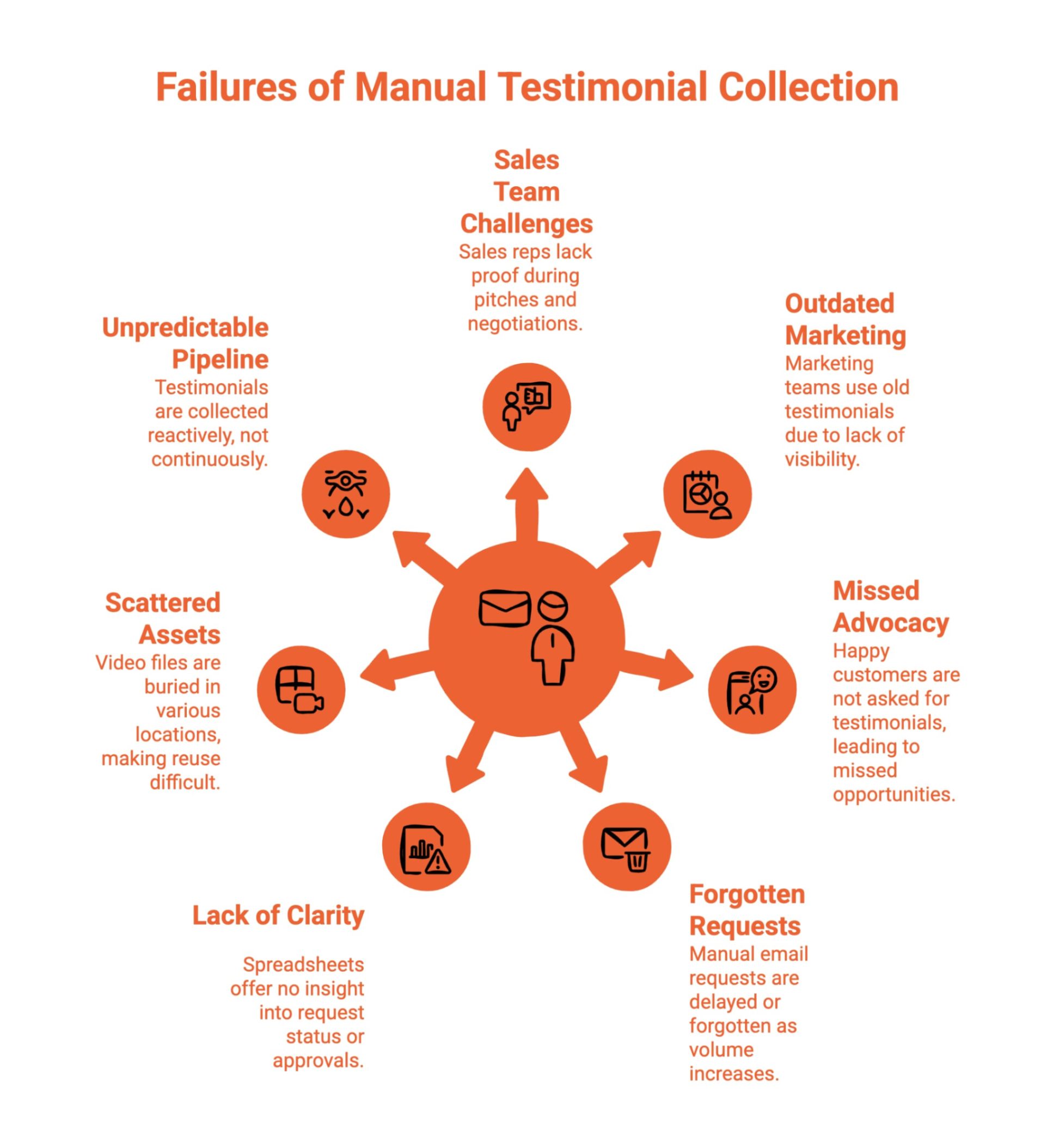
Manual testimonial collection breaks down the moment a business starts growing. What begins as a few one-off requests quickly turns into operational chaos, missed opportunities, scattered assets, and teams scrambling for proof when it matters most.
Instead of building a reliable system, manual processes create random testimonials that appear occasionally, with no predictability, ownership, or alignment to revenue goals.
Here’s where manual testimonial collection consistently fails:
-
Sales teams don’t have proof when they need it, forcing reps to pitch without real customer stories during demos, negotiations, or objection-heavy deal stages
-
Marketing teams reuse outdated testimonials because there’s no visibility into which customers are happy now versus months or years ago
-
Happy customers are never asked, leading to missed advocacy simply because no one remembered to follow up at the right moment
-
Manual email requests get forgotten or delayed, especially as customer volume increases and teams juggle competing priorities
-
Spreadsheets provide zero operational clarity, offering no insight into request status, approvals, usage rights, or performance
-
Video files live everywhere, buried in inboxes, drives, chat threads, or separate testimonial platforms, disconnected from CRM records and revenue context.
-
There’s no predictable pipeline of proof, only occasional testimonials collected reactively instead of continuously
The result is a constant mismatch between demand and supply. Sales asks for testimonials. Marketing searches old folders. Customer success knows who’s happy, but nothing connects.
This is the difference between random testimonials and a predictable pipeline of proof. Manual collection produces the former. Automation is required to achieve the latter.
Without automation, testimonial collection remains reactive, fragmented, and unreliable, exactly the opposite of what B2B marketing teams already using HubSpot need.
What Is an Automated Way to Create Customer Testimonial Videos?
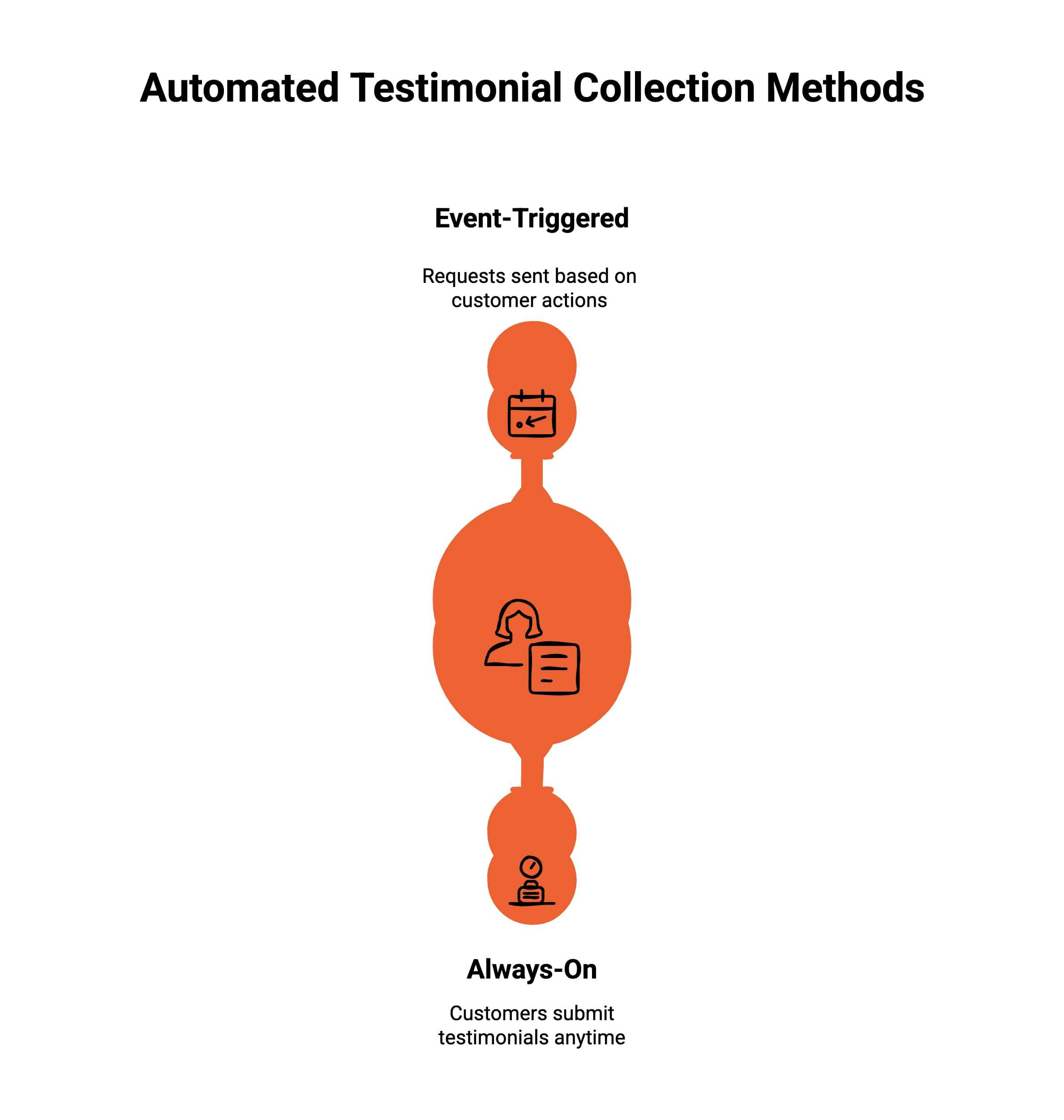
An automated way to create customer testimonial videos removes manual effort for both customers and internal teams. Instead of chasing reviews, handling files, or managing scattered tools, automation turns testimonial collection into a repeatable, scalable workflow.
At a high level, there are two types of automated testimonial collection, and most modern platforms support one or both.
Type 1: Event-Triggered Automated Testimonial Collection
This is the most common and scalable approach. Testimonial requests are automatically triggered based on specific customer actions or milestones, ensuring requests are sent at the right moment without manual effort.
In this model:
-
Requests are triggered after key events like onboarding completion, purchases, renewals, or positive support interactions
-
Customers receive a video testimonial request automatically via email, link, or embedded flow
-
Timing is consistent, which improves response rates and testimonial quality
-
Teams can send requests in bulk without manual follow-ups
This type of automation works especially well for SaaS, e-commerce, and subscription-based businesses where customer milestones are clearly defined.
Type 2: Always-On, Customer-Initiated Testimonial Collection
The second approach focuses on making testimonial submission available at any time, without waiting for a trigger. Customers can submit testimonials whenever they feel motivated to share feedback.
In this model:
-
Businesses create a dedicated testimonial landing page or shareable link
-
Customers can record video testimonials on demand without being prompted
-
Links are shared across emails, websites, invoices, dashboards, or community spaces
-
Testimonial collection becomes passive but continuous
This approach works well for communities, agencies, creators, and businesses that rely on referrals or organic advocacy.
How Modern Automated Testimonial Flows Work Together?
The most effective setups combine both types into a single system. Event-triggered requests capture testimonials at peak satisfaction moments, while always-on links collect organic feedback continuously.
A modern automated testimonial flow typically includes:
-
Trigger-based requests that automatically ask for testimonials after key milestones
-
One-click video recording tools that work across devices with no friction
-
Instant uploads that organize videos inside a centralized testimonial platform
-
Reusable assets like dedicated landing pages and walls of love that influence buyers
With automation, testimonial collection becomes embedded into daily operations. Instead of treating testimonials as one-off tasks, businesses turn customer advocacy into a consistent growth asset that builds trust at scale.
How Do Automated Testimonial Videos Improve Results?
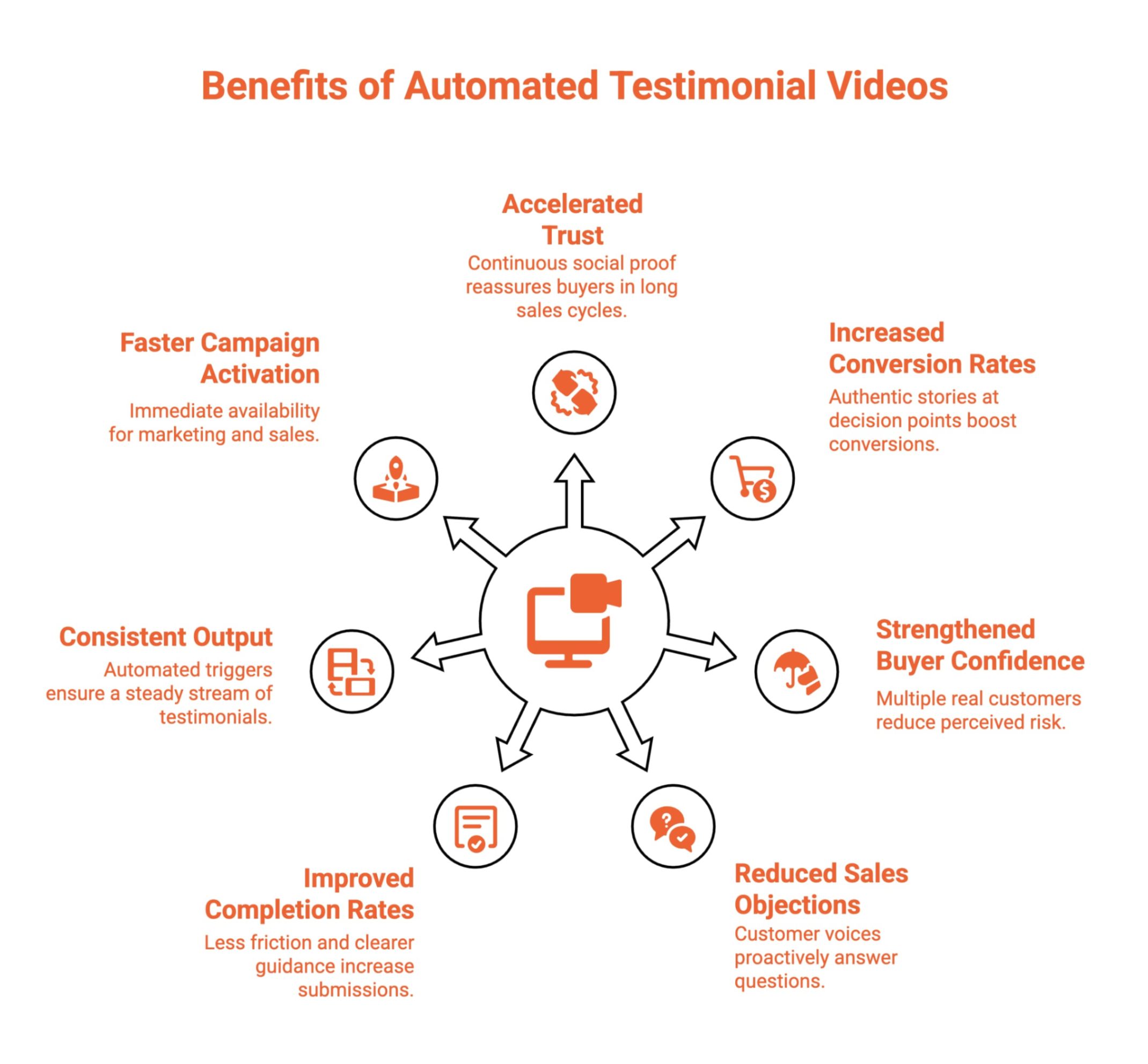
This shift from manual collection to automated testimonial videos directly accelerates trust, improves conversion rates, and reduces friction across the buyer journey. By increasing testimonial volume and consistency, automation changes how prospects evaluate credibility, especially in longer, high-consideration B2B sales cycles.
Instead of relying on a handful of static reviews, automated systems create a steady stream of authentic customer proof that compounds over time.
Here’s how automated testimonial videos drive measurable results:
-
Accelerate trust in longer B2B sales cycles by providing continuous social proof that reassures buyers throughout extended evaluation periods
-
Increase conversion rates by placing authentic customer stories at key decision points like landing pages, demos, and checkout flows
-
Strengthen buyer confidence through testimonial volume, as seeing multiple real customers reduces perceived risk and uncertainty
-
Reduce common sales objections by proactively answering questions about value, outcomes, and real-world use cases through customer voices
-
Improve completion rates because customers face less friction and clearer guidance during testimonial submission
-
Deliver consistent testimonial output through automated triggers instead of sporadic, manual outreach
-
Enable faster campaign activation by making testimonials immediately available for marketing, sales, and enablement teams
Overall, automated testimonial videos shift customer proof from a one-off asset into a compounding trust engine, one that continuously supports revenue growth by influencing buyers at every stage of the journey.
How Does Testimonial Video Automation Work?
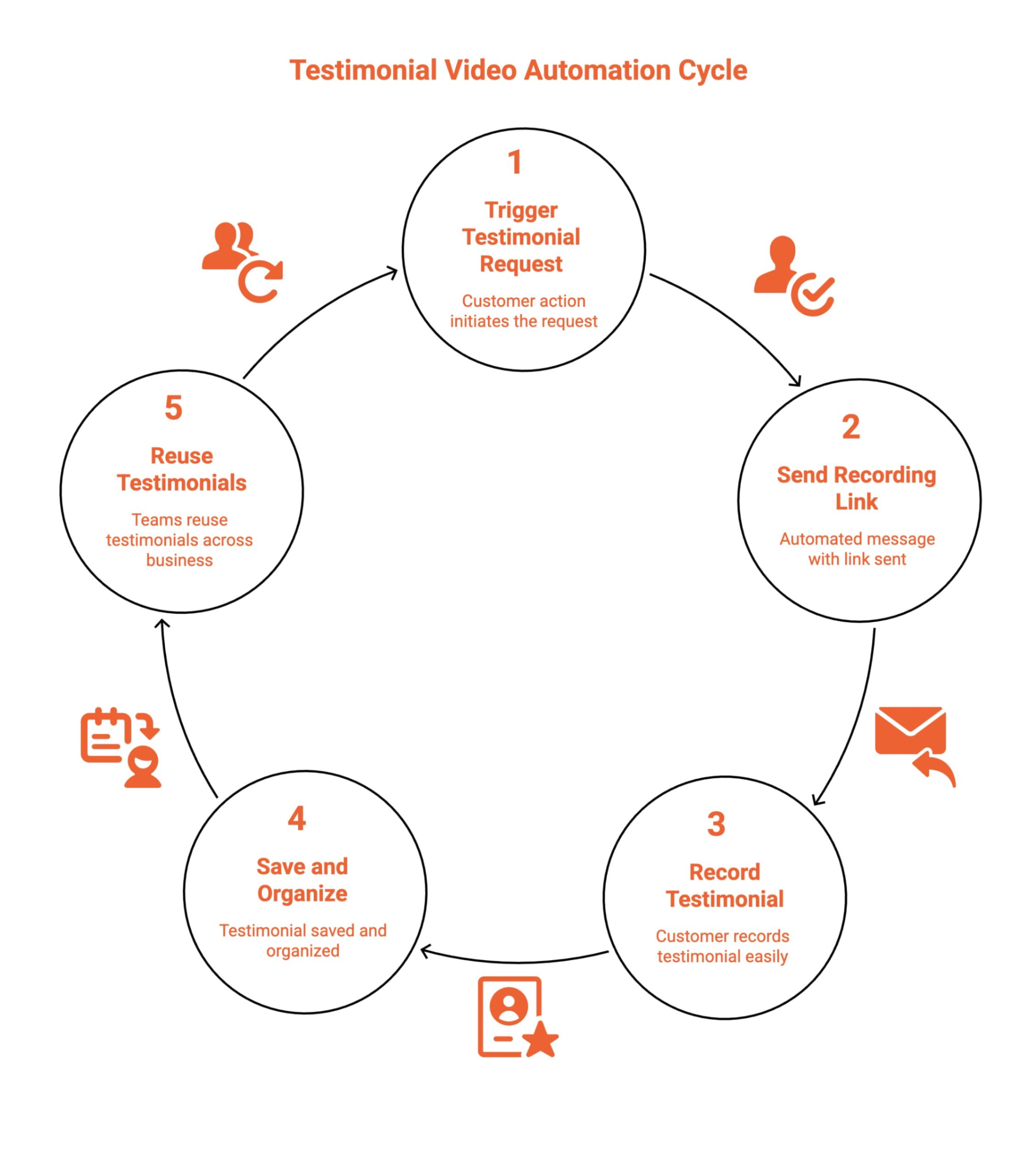
Testimonial video automation follows a structured flow that captures customer feedback at the right moment. Each step removes friction, improves response rates, and ensures testimonials are collected while customer sentiment is high and organized for reuse across teams.
Step 1: A Customer Action Triggers the Testimonial Request
A defined customer action, such as a purchase, renewal, or milestone, automatically triggers the testimonial request. This timing matters because customers are most willing to share feedback immediately after a positive experience, resulting in higher participation and more authentic testimonial videos.
Step 2: An Automated Message Sends the Recording Link
Once triggered, an automated message is sent instantly with a secure video recording link. This removes manual follow-ups and ensures every customer receives a consistent request at the right time, improving reliability across the testimonial collection process.
Step 3: The Customer Records the Testimonial Instantly
Customers open the link and record their testimonial directly from their device. No downloads, logins, or technical steps are required, making the experience simple and comfortable. This encourages natural, confident responses and higher completion rates.
Step 4: The Testimonial Is Saved and Organized Automatically
After recording, the testimonial video is automatically uploaded and stored in a centralized system. Videos are categorized and easy to locate, giving teams visibility without spreadsheets, emails, or scattered storage tools.
Step 5: Teams Reuse Testimonials Across the Business
Organized testimonials are instantly available for marketing, sales, and product teams. Videos can be reused across campaigns, landing pages, and sales workflows to continuously reinforce trust and credibility.
Overall, testimonial video automation turns customer feedback into a scalable system that consistently fuels growth.
What Does a Video Testimonial Automation Flow Look Like for Modern Teams?
A modern video testimonial automation flow is designed for scale and simplicity. It removes friction for customers and B2B marketing teams already using HubSpot, ensuring testimonials are collected consistently, stored centrally, and ready for reuse without relying on manual processes or generic platforms.
For teams serious about scale, automation should:
-
Work seamlessly across devices so customers can record testimonials anytime, anywhere.
-
Require no downloads or logins to reduce friction and increase completion rates.
-
Integrate smoothly with existing marketing, sales, and CRM tools.
-
Centralize all testimonial assets for easy access and reuse
This is where dedicated automated customer testimonial video creation tools outperform generic CRMs or video platforms.
What Are the Benefits of Automated Video Testimonials for E-Commerce?
For e-commerce brands, automated video testimonials create a consistent stream of social proof at scale. By capturing customer stories at the right moment, brands build trust faster, support buying decisions, and reduce reliance on manual review collection processes.
Key benefits of automated video testimonials for e-commerce include:
-
Collecting customer testimonials immediately after delivery or repeat purchases
-
Increasing trust and credibility on product and category pages
-
Improving conversion rates through authentic customer stories
-
Reducing dependence on written reviews alone
-
Reusing testimonial videos across ads and email campaigns
Overall, automation ensures fresh, credible social proof without adding manual work for teams.
How Do You Choose the Right Automated Customer Testimonial Video Creation Tool?
Choosing the right automated customer testimonial video creation tool means focusing on scalability, integration, and long-term impact. A great shoutout to the right platform is that it should go beyond text testimonials and video messages, acting as an effective tool that fits naturally into your workflows and supports growth across teams.
When evaluating a testimonial collection tool, look for the following key features:
-
One-click recording with strong ease of use, ensuring customers can submit video testimonials quickly without technical friction.
-
Automation-friendly workflows that trigger requests at the right moments using reliable testimonial collection software tools.
-
Strong CRM-native architecture, especially with HubSpot, where testimonials are stored as CRM records alongside contact and company data instead of living in isolated dashboards.
-
Centralized video management that allows teams to organize, search, and reuse testimonials efficiently.
-
Simple sharing across different channels, so testimonials can support marketing campaigns, sales conversations, and trust-building for potential buyers.
Many testimonial tools collect videos effectively but store them in separate systems. This creates scattered testimonials across inboxes, drives, and third-party dashboards. When proof is disconnected from the CRM context, it becomes harder to activate at the right revenue moment. CRM-native testimonial automation eliminates this fragmentation.
How Can You Automate Video Testimonial Collection in HubSpot With ProofFlow?
ProofFlow is the only HubSpot-native video testimonial platform, integrating directly with HubSpot workflows to store testimonials as first-class CRM data. Unlike standalone tools, ProofFlow treats customer proof as CRM records alongside your contacts, deals, and lifecycle stages.
Instead of forcing manual workarounds, ProofFlow adds a purpose-built layer that handles customer recording, storage, and reuse while HubSpot continues managing CRM and lifecycle workflows.
This CRM-first approach solves a common problem: testimonials scattered across tools, inboxes, and documents. Instead of managing testimonials in yet another separate platform, ProofFlow centralizes customer proof inside the CRM where your team already works. For HubSpot agencies managing multiple client portals, ProofFlow’s multi-portal support makes testimonial management scalable across your entire client base.
Unlike standalone testimonial tools that store videos in isolated dashboards, ProofFlow stores testimonials as CRM records directly inside HubSpot.
Each testimonial is connected to:
-
The original contact record.
-
Company data.
-
Deal information.
-
Lifecycle stage.
-
Revenue attribution.
This means testimonials are not siloed assets sitting on another platform. They become structured CRM data that sales, marketing, and customer success teams can use inside the same system they already operate in.
Most standalone tools create data silos. Testimonials live in one dashboard. Customer data lives in another. Teams must manually connect context.
ProofFlow removes that fragmentation by making testimonials part of your CRM architecture, not an external add-on.
Together, ProofFlow and HubSpot create a clean, scalable video testimonial automation flow without adding manual complexity.
Final Thoughts
Customer trust is built through consistent, authentic customer proof, not one-off requests or manual follow-ups. When video testimonials are automated, teams remove friction, increase participation, and create a repeatable system for capturing real customer stories at scale. When testimonials live inside your CRM as structured data instead of isolated video files, they become operational revenue assets rather than marketing content.
The next step is operationalizing testimonials inside your existing CRM workflows. Review where customer success moments occur, map them to automated triggers, and ensure testimonials are collected, stored, and reused across sales and marketing. When treated as a system, video testimonials become a durable growth asset, not just content.
Frequently Asked Questions
How secure are automated video testimonial platforms for customer data?
Most automated video testimonial platforms use encryption, secure cloud hosting, and role-based access controls to protect customer data. Reputable tools also follow privacy standards, support consent-based recording, and safeguard videos and personal information.
Are there tools that let me request video testimonials automatically via email or link?
Yes. Many video testimonial tools allow automated requests via email or shareable links. These can be triggered after purchases or milestones, enabling customers to record testimonials easily without accounts or technical setup.
What is the easiest way to automate collecting video testimonials from customers?
The easiest way is using a dedicated video testimonial automation tool. These platforms automate requests, reminders, and one-click recording while storing videos centrally, removing manual follow-ups and simplifying the entire collection process.
What is the alternative to StoryPrompt?
Alternatives to StoryPrompt include ProofFlow, Vocal Video, and Boast. These tools offer automated testimonial requests, frictionless recording, centralized video management, and better alignment with CRM and marketing workflows.
Why are video testimonials important?
Video testimonials build trust by showing real customers and genuine emotions. They feel more authentic than text reviews, reduce buyer hesitation, increase credibility, and help prospects connect with real-world customer experiences.
What is a key benefit of using video content in digital marketing?
A key benefit of video content is higher engagement. Videos capture attention quickly, communicate value clearly, increase time on page, and often outperform static content across ads, landing pages, and social media platforms.
Which video testimonial software offers the fastest setup for automated testimonial collection?
Platforms like ProofFlow, Vocal Video, and Boast offer quick onboarding and easy automated setup. They include ready-made templates, simple email/link triggers, and minimal configuration so you can start collecting testimonials fast.
Ready to automate your testimonial collection?
Get full access to ProofFlow at no cost during our free beta. The complete testimonial automation platform for HubSpot.
Get Started Free