7 Benefits of Using ProofFlow for HubSpot Teams
Key Highlights
-
ProofFlow is a HubSpot-native testimonial automation platform that manages social proof
-
Testimonial requests are triggered automatically by HubSpot CRM events like closed deals, NPS scores, and lifecycle stage changes
-
Both video and text testimonials are collected through a frictionless, browser-based experience, no downloads required
-
All submitted testimonials flow into a centralized approval dashboard, replacing scattered email threads and Slack messages
-
Approved testimonials are stored as native HubSpot objects, searchable by industry, persona, deal size, and funnel stage
-
Embeddable widgets, logo walls, and public showcase pages make it easy to activate proof across marketing and sales channels
-
ProofFlow supports marketing teams, RevOps, sales, customer success teams, and agencies managing multiple HubSpot portals
-
The platform is currently free during beta, with grandfather pricing locked in for early users
Introduction
Your happiest customers have stories worth telling, but most teams have no reliable system for capturing them. The social proof testimonials increase conversion rate study by Spiegel Research Center found that displaying reviews can lift conversion rates by up to 270%. Yet for the majority of teams, collecting social proof testimonials is still driven by one-off emails, manual follow-ups, and gut instinct about who to ask and when. Requests go out late, follow-ups get forgotten, and when a testimonial does arrive, it disappears into a Slack thread or Google Doc and is never used again.
This is not a motivation problem. It is a systems problem, and it compounds as you scale. Marketing needs fresh customer quotes for campaigns, but has no structured way to request them. Sales wants relevant testimonials mapped to specific use cases, but has nowhere to search. RevOps has no visibility into where proof stalls in the process. What should be a growth asset turns into an operational bottleneck that gets deprioritized every time a higher-urgency task lands in the queue.
Whether you are a marketer trying to scale testimonial content on your homepage, a RevOps lead bringing structure to a fragmented process, or an agency managing multiple HubSpot portals, this guide shows you exactly what becomes possible when testimonial management runs as a system rather than a series of one-off tasks.
Why Does Testimonial Management Break Without a System?
Your CRM knows exactly who your happiest customers are. It tracks deal stages, NPS scores, renewal dates, and lifecycle milestones. What it cannot do on its own is turn that data into a steady stream of customer testimonials; that requires a system most teams simply do not have.
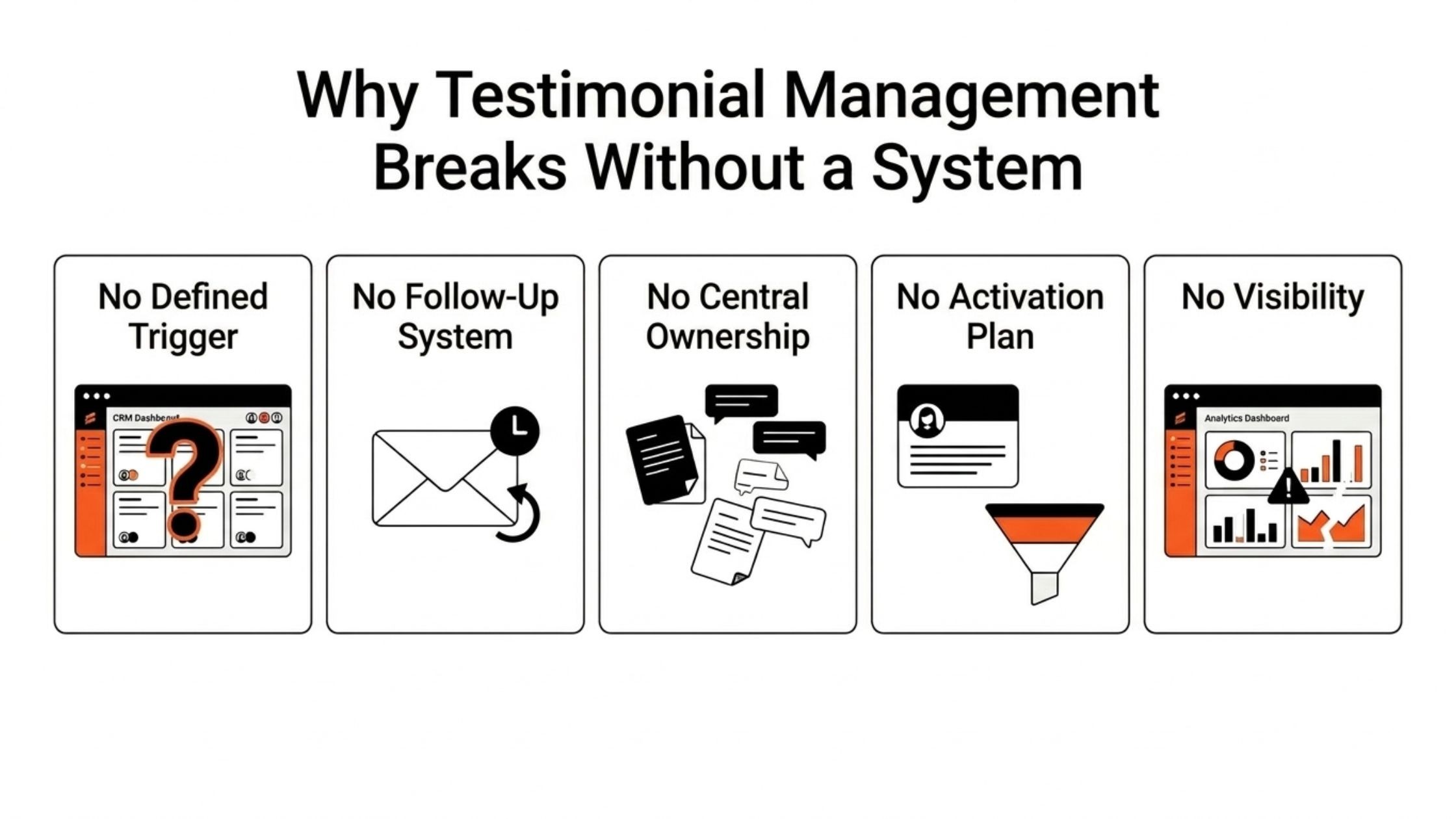
Here are the most common failure points HubSpot teams run into:
-
No defined trigger: teams guess when to ask instead of using CRM data
-
No follow-up system: a single email goes unanswered with no automated reminder
-
No central ownership: testimonials live across inboxes, shared drives, and chat threads
-
No activation plan: proof is collected but never connected to campaigns or deal stages
-
No visibility: RevOps and leadership have no way to track what is being collected or used
How Does Disconnected Tooling Make It Worse?
Adding a third-party testimonial tool without native HubSpot integration creates more problems than it solves. Data has to be manually exported and imported. Contact records in HubSpot never get updated with testimonial status. Teams end up maintaining two separate systems instead of one.
ProofFlow eliminates this problem entirely by living inside HubSpot rather than alongside it.
What Is ProofFlow and Why Does It Matter for HubSpot Teams?
ProofFlow is a HubSpot-native testimonial automation platform that helps marketing, sales, RevOps, and customer success teams collect, manage, and publish customer testimonials, the most trusted form of social proof, directly inside HubSpot.
Most HubSpot teams fall into one of three testimonial traps:
-
The manual trap: relying on one-off emails and hoping customers respond
-
The disconnected tool trap: using a third-party platform that never syncs back to the CRM
-
The activation trap: collecting testimonials with authentic emotion but never actually using them in campaigns or sales conversations.
ProofFlow solves all three by embedding the entire testimonial lifecycle of request, collection, review, storage, and publication directly into the HubSpot environment where your team already works.
The result is a repeatable, automated system that turns customer stories into a structured growth asset rather than an afterthought.
What Are the Main Benefits of Using ProofFlow for Managing Proofs?
Managing social proof effectively inside HubSpot requires more than just a form and a follow-up email. It requires a system that automates the right actions at the right moments, keeps testimonial proof organized and searchable, and makes it easy for every team to access and use it where it matters most.
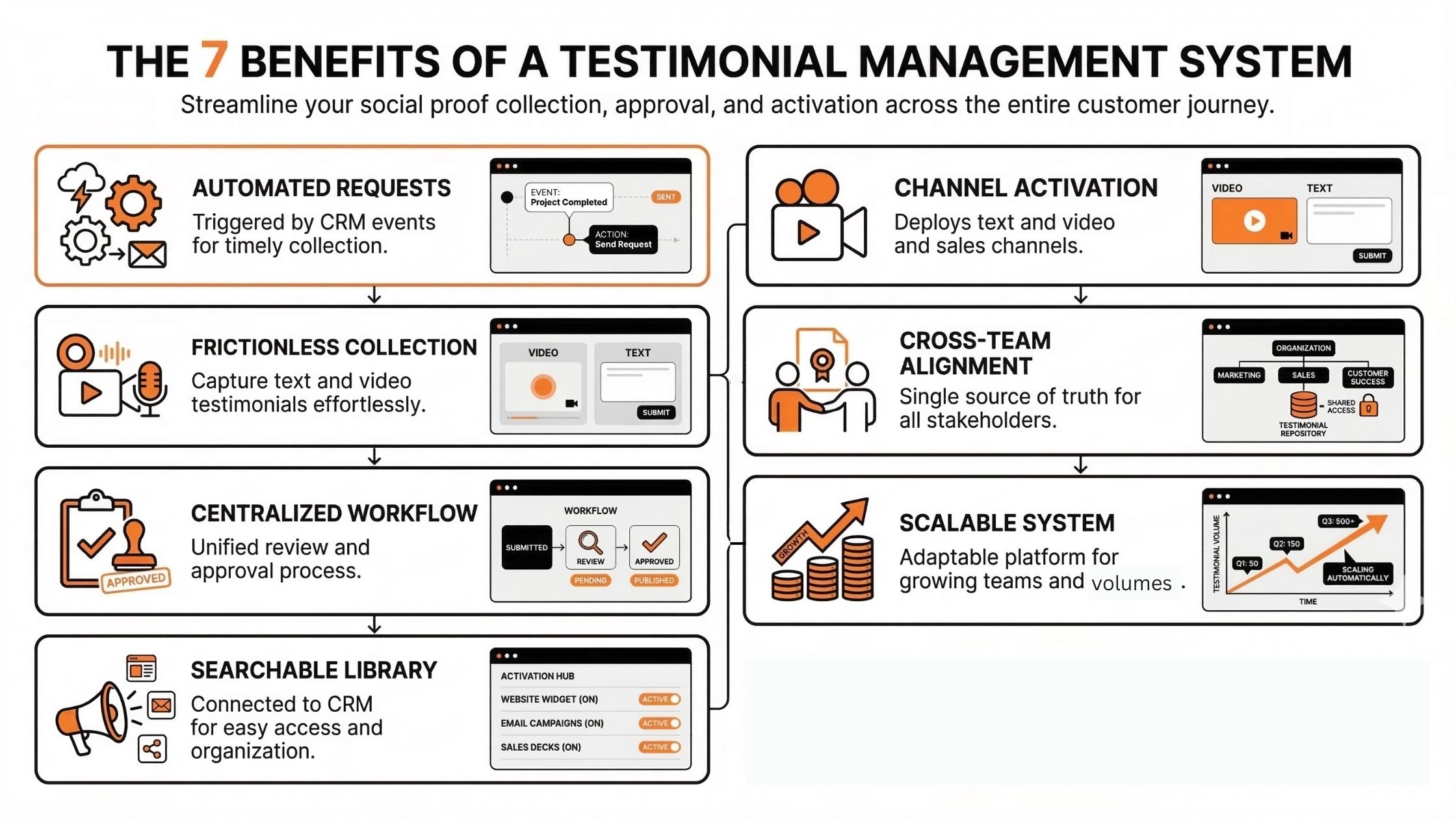
Below are the seven core benefits ProofFlow delivers for HubSpot teams managing social proof at scale.
Benefit 1: Automated Testimonial Requests at Exactly the Right Moment
One of the most common reasons testimonial collection fails is timing. Teams either ask too early, before the customer has experienced real value, or too late, when the relationship has gone cold. ProofFlow solves this by letting your HubSpot CRM data decide when to ask.
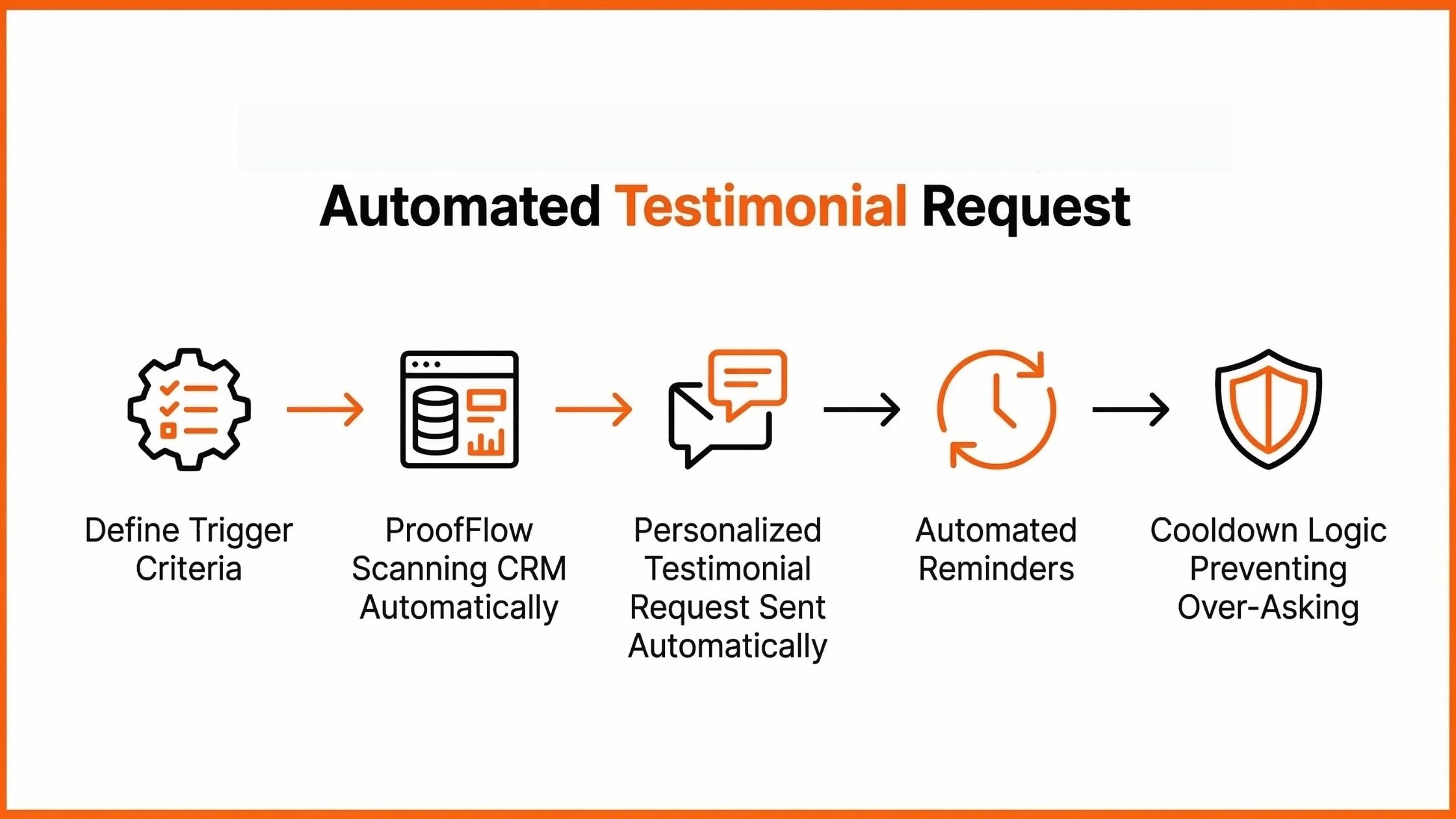
Here is how trigger-based testimonial requests work inside ProofFlow:
Step 1: Define Your Trigger Criteria
Set conditions based on existing HubSpot data, such as:
-
NPS score greater than 8
-
Deal closed more than 60 days ago
-
Lifecycle stage changed to Customer
-
Renewal completed
-
Onboarding milestone reached
Step 2: ProofFlow scans your CRM automatically
The platform continuously checks your HubSpot contacts against the criteria you set, identifying happy customers who are ready to share their story.
Step 3: Personalized requests go out automatically
Each request is personalized using HubSpot contact and deal data, the customer’s name, company, deal value, or any custom property, so every outreach feels relevant rather than generic.
Step 4: Reminders run on autopilot
If a customer does not respond, ProofFlow sends automated follow-up reminders based on predefined timing rules, without anyone on your team having to monitor or intervene.
Step 5: Smart cooldown logic prevents over-asking
ProofFlow tracks who has already been contacted and enforces a 90-day cooldown period, so no customer is ever asked twice in a short window. This protects relationships while keeping the pipeline of new testimonials flowing.
| Manual Approach | ProofFlow Approach |
|---|---|
| Guess who to ask and when | CRM-triggered requests based on real data |
| One email, hope for a reply | Automated follow-up sequence |
| Ask the same customers repeatedly | 90-day smart cooldown |
| Dependent on team availability | Runs continuously in the background |
Benefit 2: Frictionless Collection for Both Text and Video Testimonials
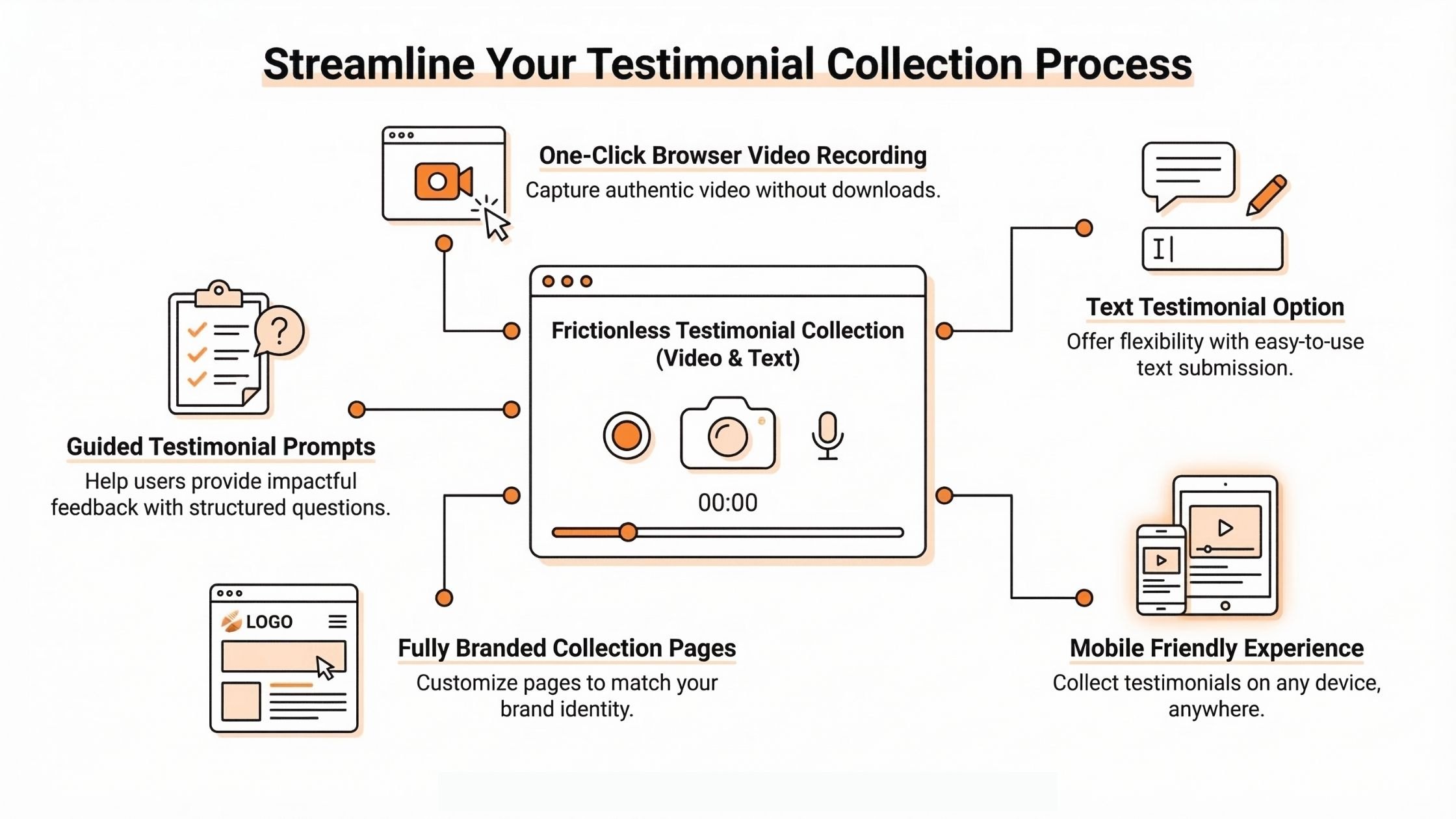
Getting a customer to agree to share video testimonials for social proof is only half the battle; the submission experience itself determines whether they follow through. If customers have to download video testimonial software, create an account, or navigate a complicated interface, response rates drop significantly.
ProofFlow removes every layer of friction from the submission experience:
-
One-click browser-based video recording: customers record directly in their browser with no app downloads, no plugins, and no account creation required
-
Text testimonial option: For customers who prefer writing over recording, a simple text form is available in the same branded experience
-
Fully branded collection pages: Each request lands on a personalized page with your company logo, brand colors, and the customer’s name pre-filled
-
Mobile-friendly design: The entire submission experience works seamlessly on any device, so customers can respond on the go
-
Guided prompts: Customers are given clear, specific questions generated based on their industry, use case, and customer journey, reducing blank-page anxiety and improving the quality of responses
The result is a submission experience that feels effortless for the customer and produces higher-quality, more specific testimonials for your team.
Benefit 3: Centralized Review and Approval Without the Email Chaos
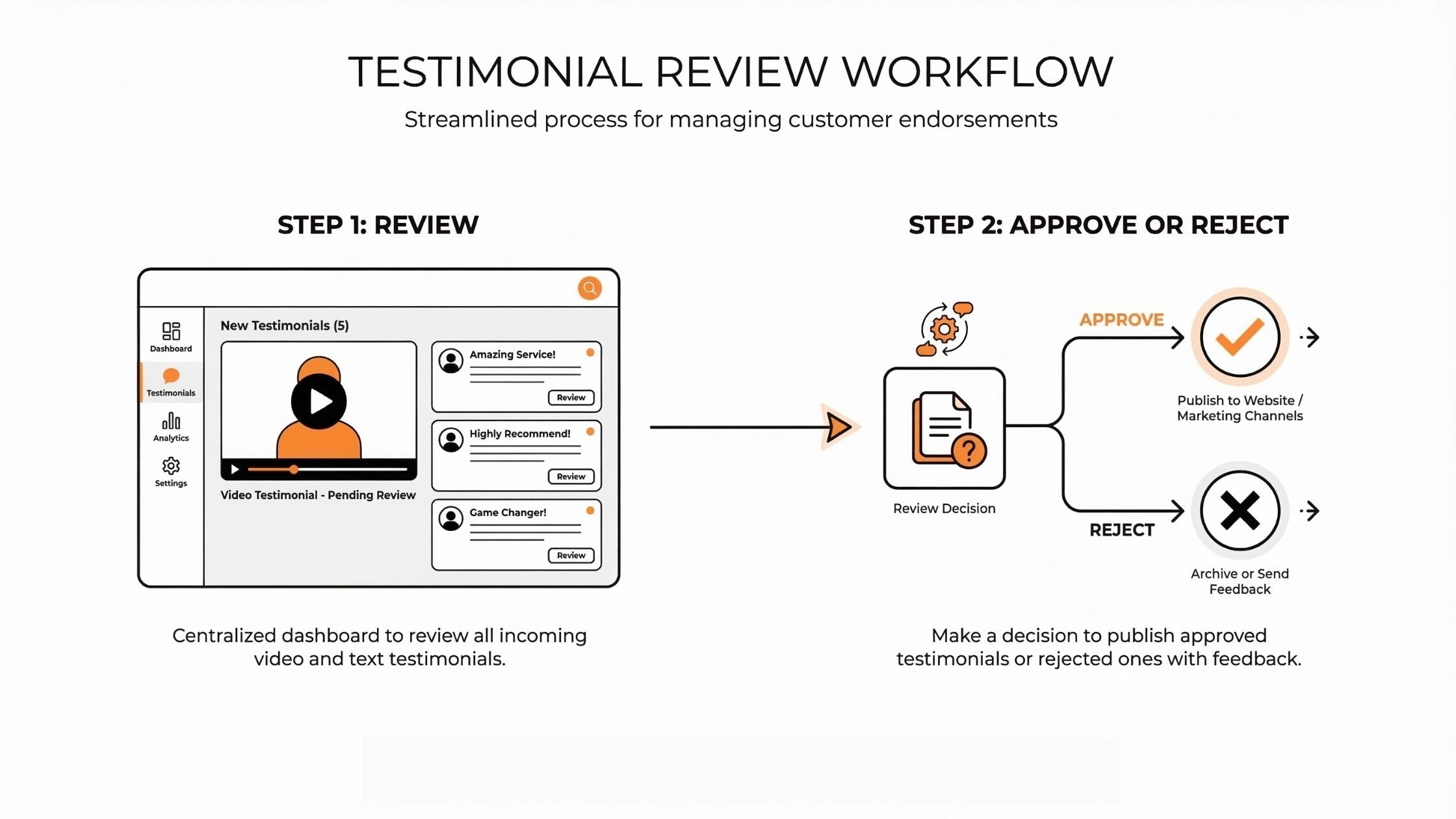
Once testimonials start coming in, the next challenge is reviewing and approving them without creating a new layer of operational chaos. In most manual systems, submitted testimonials trigger a chain of emails, Slack messages, and shared Google Docs, with unclear ownership and no single place to track the authenticity of what has been approved.
ProofFlow replaces that entirely with a centralized approval dashboard inside HubSpot.
Here is what the review process looks like:
Step 1: Review
All submitted testimonials appear in a single dashboard. Team members can watch video submissions, read text testimonials, and assess quality before taking any action.
Step 2: Approve or Reject
Each submission is approved or rejected with a single action. Approved testimonials move automatically into the testimonial library. Rejected ones are flagged for follow-up.
Tag for reuse: Every approved testimonial is tagged with relevant attributes, including:
-
Industry
-
Persona
-
Use case
-
Funnel stage
-
Product line
-
Region
Auto-approval option: For teams that want to move faster, ProofFlow supports optional auto-approval rules so that testimonials that meet predefined quality criteria are published without manual review.
| Old Approval Process | ProofFlow Approval Process |
|---|---|
| Email threads with unclear ownership | Single centralized dashboard |
| No edit capability before approval | Inline editing before publishing |
| Testimonials lost in shared drives | Tagged and stored automatically |
| No audit trail | Full status tracking per submission |
Benefit 4: A Searchable Testimonial Library Connected Directly to Your CRM
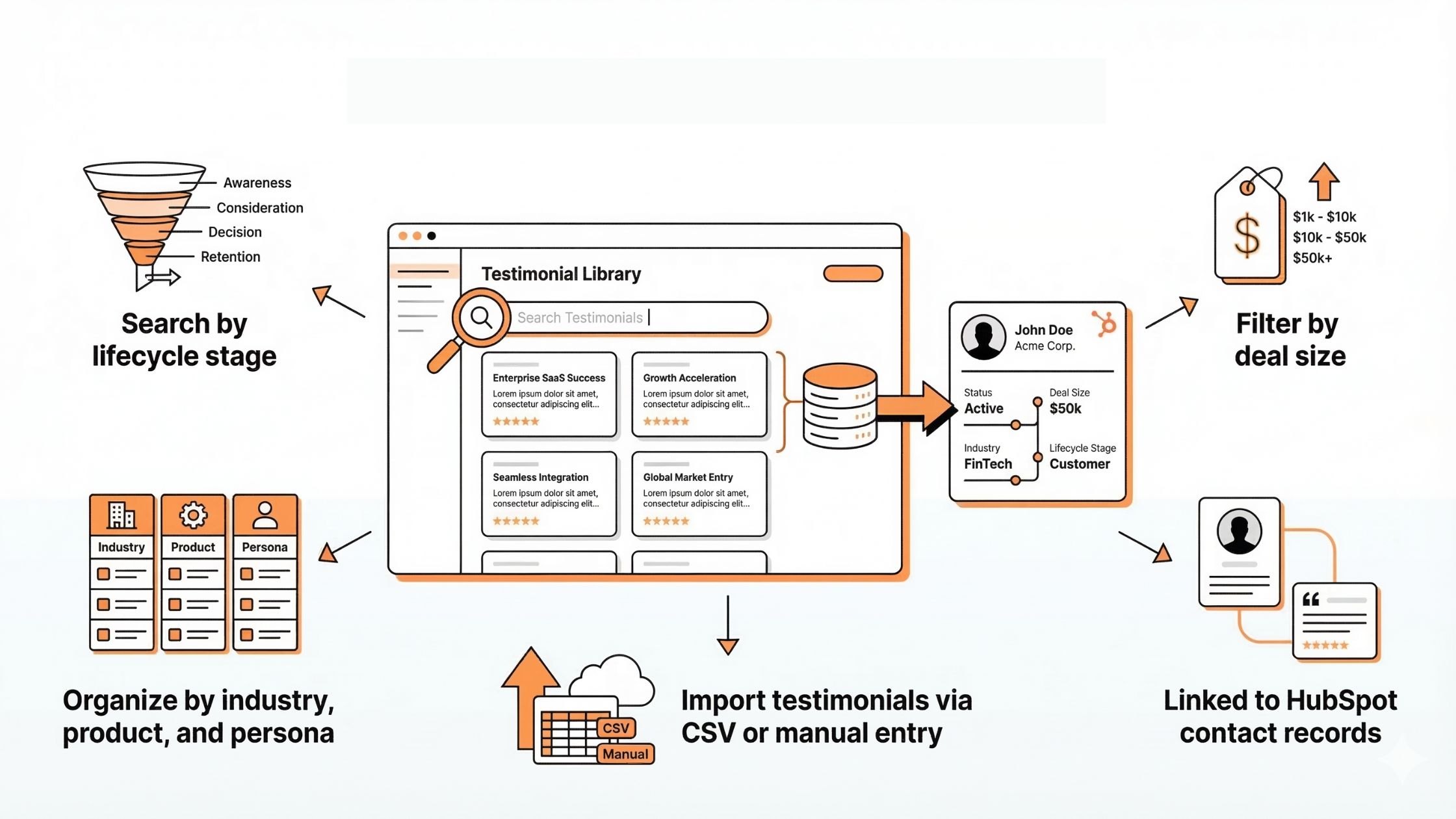
Collecting testimonials is only valuable if your team can actually find and use them when it matters. A testimonial about enterprise onboarding is useless if your sales rep cannot locate it during a deal with an enterprise prospect. Easy access to a case study from a fintech customer does not help if your marketing team cannot filter the library by industry.
ProofFlow stores every approved testimonial as a native HubSpot object, tied directly to the contact and deal records it came from.
This means your testimonial library is:
-
Searchable by lifecycle stage: Find proof from customers at specific points in the journey
-
Filterable by deal size: Surface testimonials from customers with relevant contract values, making this a powerful tool for targeted outreach.
-
Organized by industry, product, and persona: Match the right proof to the right audience instantly
-
Linked to HubSpot contact records: Click through from any testimonial to the full contact history
-
Importable: Existing testimonials can be bulk imported via CSV (up to 1,000 at a time) or added manually with automatic HubSpot contact matching by email
The library replaces folders, spreadsheets, slide decks, and disconnected platforms permanently. Because it lives inside HubSpot, no one needs a separate login or needs to remember which tool the testimonials are stored in.
Benefit 5: Activation Across Every Marketing and Sales Channel
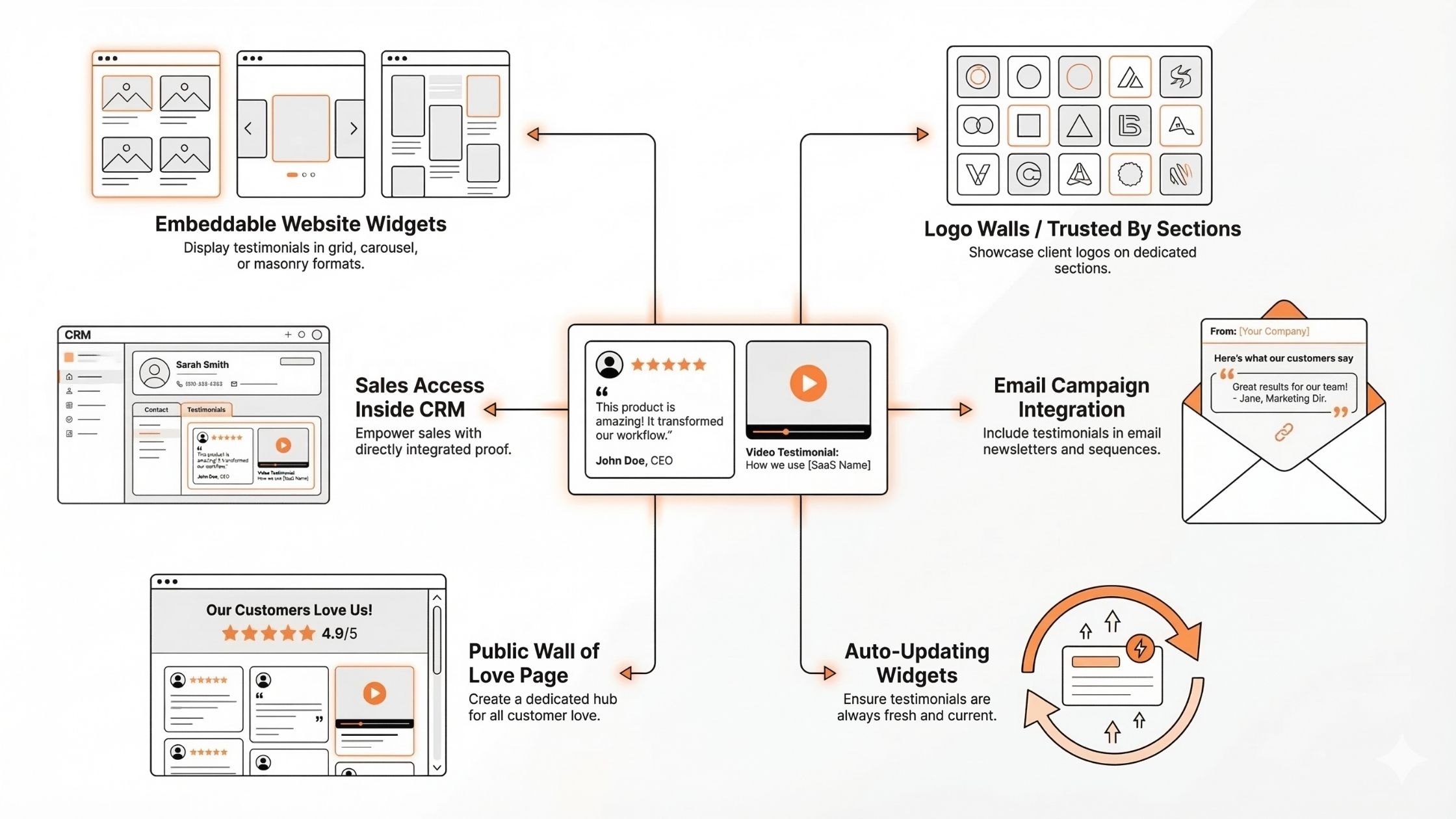
Collecting and approving testimonials is only the beginning. The real value comes from getting those testimonials in front of the right buyers at the right moment, ensuring maximum relevance on landing pages, in email campaigns, during sales conversations, and across your website.
ProofFlow is built for activation, not just collection. Here is how approved testimonials get deployed:
-
Embeddable widgets for any page: Copy-paste code snippets display testimonials on any website or landing page in multiple layout formats:
-
Grid layout (1 to 4 columns)
-
Carousel with autoplay
-
Masonry wall of love
-
-
Logo walls and “trusted by” sections: ProofFlow automatically fetches company logos from HubSpot company records and generates logo wall sections for your website, no manual design work required.
-
Sales access to relevant proof: Sales reps can search the testimonial library directly in HubSpot and pull customer quotes or video stories at key deal stages, without requesting assets from marketing.
-
HubSpot email campaigns: Approved testimonials can be embedded directly into HubSpot email campaigns to add social proof to nurture sequences, proposals, and follow-up emails.
-
Public showcase pages: ProofFlow generates a public Wall of Love page at a custom URL, complete with live stats showing the total number of testimonials collected, the average customer rating, and the video count.
-
Auto-updating widgets: When new testimonials are approved, widgets update automatically, eliminating the “stale testimonials” problem where the same three quotes appear on your landing page for years.
Benefit 6: Cross-Team Alignment on a Single Source of Truth
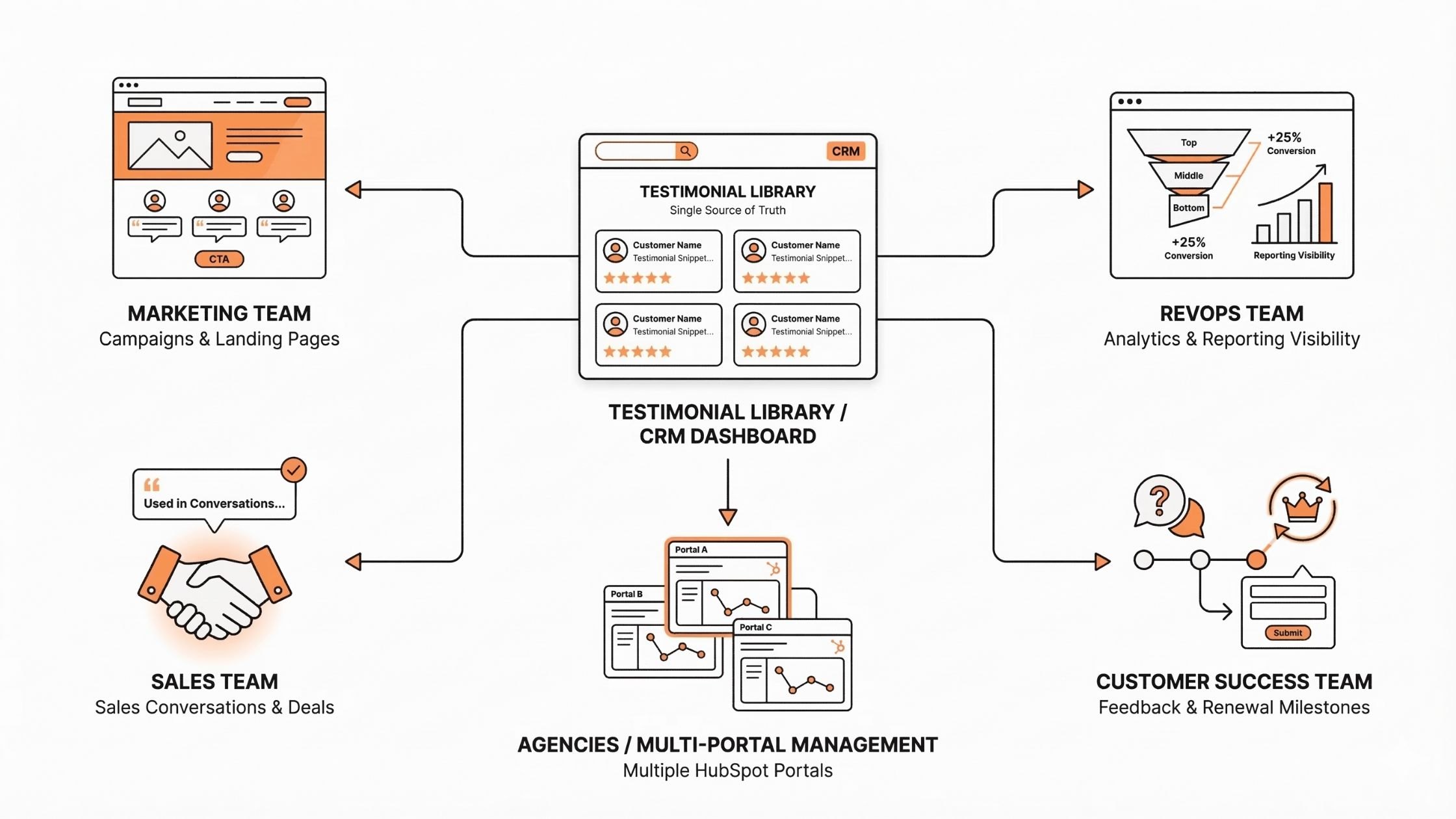
One of the most underestimated costs of manual testimonial management is the misalignment it creates between revenue teams. Marketing is collecting testimonials in one place. Sales is using outdated quotes saved in personal folders. Customer success is capturing feedback in a separate tool. RevOps has no visibility into any of it.
ProofFlow gives every team access to the same testimonial library, organized, approved, and connected to HubSpot data, so everyone is working from a single source of truth.
Here is how each team benefits:
-
Marketing teams: Automate testimonial collection and activate approved proof across landing pages, emails, and campaigns. Fresh testimonials stay available inside HubSpot, reducing reliance on outdated quotes and improving campaign performance.
-
RevOps teams: Gain visibility into how testimonials move across lifecycle stages. Centralized proof removes manual coordination and supports cleaner reporting, funnel tracking, and cross-team alignment.
-
Sales teams: Access approved testimonials mapped to specific segments or use cases. Reps can share relevant proof at key decision points without requesting assets from marketing, reducing friction in the deal process.
-
Customer success teams: Trigger testimonial requests after renewals, onboarding milestones, or successful outcomes. Feedback is captured without disrupting relationships or adding administrative overhead.
-
Agencies managing multiple HubSpot portals: ProofFlow supports multi-portal deployments, enabling agencies to standardize testimonial workflows across client accounts, centrally monitor performance, and scale social proof operations without adding headcount.
Benefit 7: Scales Without Adding Headcount or Complexity
Manual testimonial collection has a ceiling. As the number of customers grows, the number of requests that need to go out increases, and at some point, the team cannot keep up without either hiring more people or letting the process break down.
ProofFlow removes that ceiling entirely.
Because every step of the testimonial lifecycle is automated, from identifying the right customers to sending requests, following up, routing for approval, and publishing, the system scales with your customer base without requiring additional effort from your team.
| Area | Manual Collection | ProofFlow |
|---|---|---|
| Follow-ups | One-off emails, easy to forget | Automated sequences triggered by HubSpot workflows |
| Approvals | Email threads, unclear ownership | Centralized dashboard with defined workflow |
| Storage | Folders, spreadsheets, PDFs | Structured library connected to HubSpot data |
| Activation | Rarely reused beyond the first campaign | Designed for reuse across all channels without reapproval |
| Scalability | Breaks down as volume grows | Built for repeatability inside existing workflows |
The compounding effect is significant. Teams that implement ProofFlow early build a growing, organized testimonial library over time. Each month adds new approved proof, tagged, searchable, and ready for immediate activation, without any increase in manual effort.
For agencies managing multiple HubSpot portals, this means standardized testimonial systems across every client account, with consistent quality and zero duplication of effort.
Is ProofFlow the Right Testimonial Solution for Your HubSpot Stack?
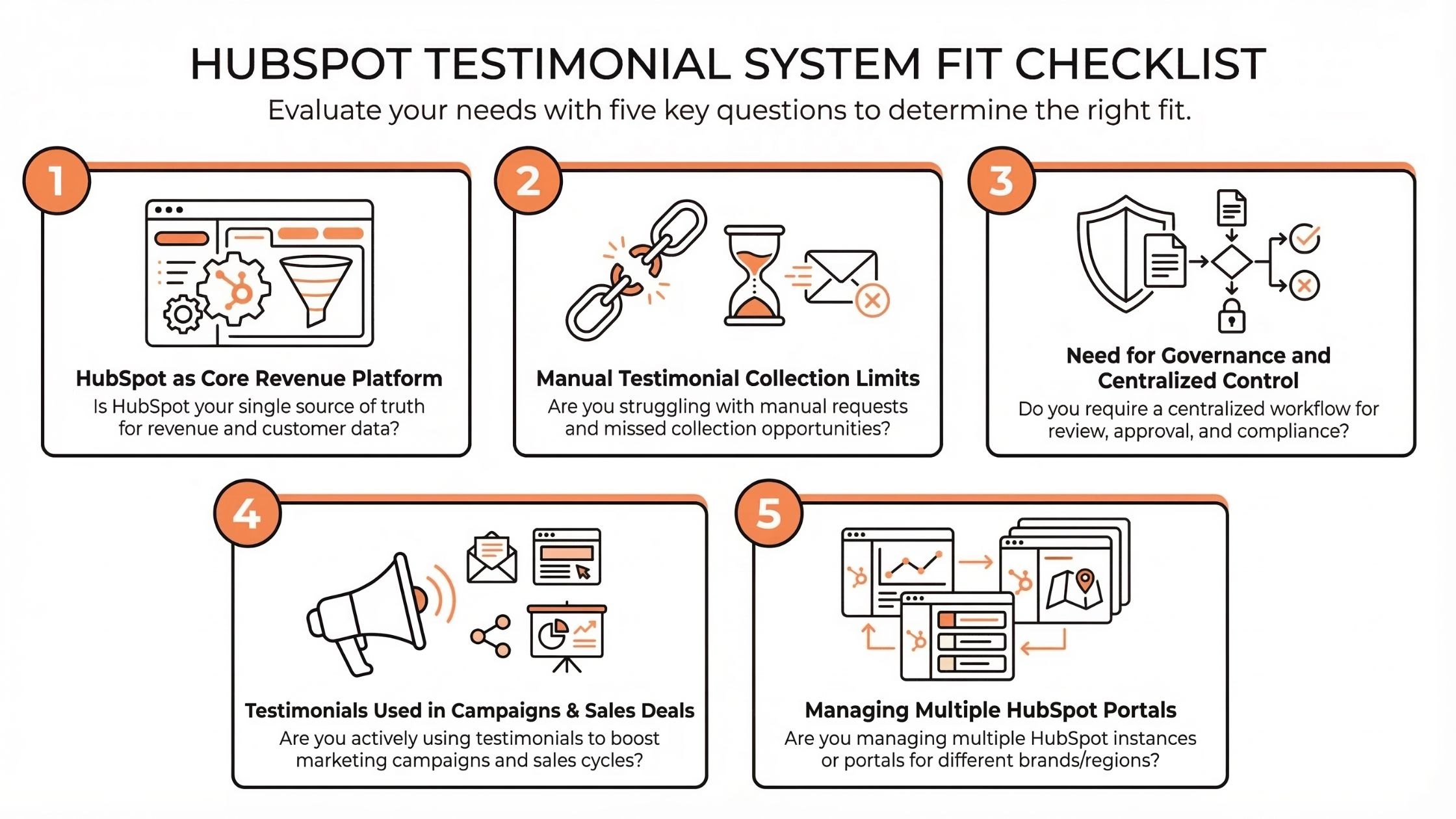
ProofFlow is not the right fit for every team. But for HubSpot-centric organizations where social proof matters to growth, it is worth evaluating against five specific questions.
1. Is HubSpot Your Core Revenue Platform?
If HubSpot already powers your marketing, sales, and customer lifecycle, ProofFlow fits naturally into your stack. It uses HubSpot data and triggers, so testimonials become part of your existing workflows rather than a disconnected process.
2. Are You Hitting a Ceiling On Manual Testimonial Collection?
If your team is consistently missing follow-ups, losing track of submitted testimonials, or simply not collecting enough proof to support campaigns, ProofFlow is designed to solve exactly that.
3. Do You Need Governance and Centralized Control?
If testimonials are currently scattered across emails, documents, and spreadsheets with no clear ownership, ProofFlow provides structure and clarity, a single source of truth with defined approval flows tied back to HubSpot records for different purposes.
4. Do You Want Testimonials Actively Showing Up In Campaigns And Deals?
ProofFlow works best for teams that want testimonials to show up consistently in landing pages, emails, and sales conversations, not just sit in a folder somewhere.
5. Are You Managing Multiple HubSpot Portals?
For agencies, ProofFlow supports multi-portal deployments with centralized reporting and standardized workflows across client accounts.
Beta access: ProofFlow is currently free during beta, with grandfather pricing locked in for early users. No credit card required. Setup takes under 2 minutes.
How to Get Started with ProofFlow in Under 2 Minutes?
Getting ProofFlow running inside your HubSpot account requires no technical skills, no API keys, and no complex configuration.
Here is the complete setup process:
Step 1: Connect Via One-Click HubSpot OAuth
Click “Get Started Free,” then authenticate with your HubSpot account via OAuth. ProofFlow connects securely without requiring any manual API configuration.
Step 2: Set Your Trigger Criteria
Define the conditions that identify your happiest customers, NPS score, deal stage, lifecycle stage, or any custom HubSpot property. ProofFlow will scan your CRM automatically from this point forward.
Step 3: Customize Your Branded Collection Page
Upload your logo, set your brand colors, and write your testimonial prompts. This is the page your customers will land on when they receive a request.
Step 4: Launch Your First Automated Testimonial Request
Activate your first workflow. ProofFlow will identify qualifying contacts, send personalized requests, and automatically begin managing follow-ups.
Step 5: Review, Approve, and Publish
Log in to your ProofFlow dashboard to review incoming submissions, approve or edit testimonials, tag them for reuse, and publish them to your website widgets or sales assets.
What to expect in the first 30 days:
-
First testimonial requests sent within hours of setup
-
Automated follow-ups are running without manual intervention
-
First approved testimonials ready to embed within 1 to 2 weeks
-
A growing, searchable library of customer proof connected to your HubSpot CRM
Ready to turn your happiest customers into your most powerful growth asset? Get Started Free with ProofFlow
Conclusion
Managing social proof strategy should not depend on who remembers to send the email. The teams winning on trust are the ones that have turned testimonial collection into a system, automated, organized, and connected to the CRM data they already have. ProofFlow makes that possible inside HubSpot without adding tools, headcount, or complexity. Every benefit covered in this guide compounds over time: more proof collected, better organization, and consistent activation move deals forward. The best time to build that social proof strategy system is before you need it.
Frequently Asked Questions
How does ProofFlow connect to HubSpot?
ProofFlow connects via one-click HubSpot OAuth. No API keys, no manual configuration, and no technical skills required. The integration is certified by HubSpot and is fully GDPR compliant.
Does ProofFlow support video testimonials?
Yes. ProofFlow supports both browser-based video recording and text testimonial collection. Customers record directly in their browser with no app downloads required. Video submissions are stored centrally and can be embedded in widgets or shared in sales conversations.
What happens if a customer does not respond to a testimonial request?
ProofFlow automatically sends follow-up reminders based on predefined timelines, typically Day 3, Day 7, and Day 14. Once a testimonial is submitted, the exit criteria stop further reminders. A 90-day cooldown period prevents customers from being re-contacted too soon.
Can I import testimonials I have already collected?
Yes. ProofFlow supports bulk CSV import of up to 1,000 existing testimonials, as well as manual entry. Imported testimonials are automatically matched to HubSpot contact records by email address.
Is ProofFlow suitable for agencies managing multiple HubSpot portals?
Yes. ProofFlow supports multi-portal deployments, allowing agencies to deploy standardized testimonial workflows across client accounts, monitor performance centrally, and scale social proof operations without adding operational complexity.
How are testimonials kept organized and searchable?
Every approved testimonial is stored as a native HubSpot object and tagged with attributes including lifecycle stage, deal size, industry, product line, persona, campaign source, and influencers. The library is fully searchable inside HubSpot, no separate login or external tool required.
Is there a cost?
ProofFlow is completely free during the beta period. Early users receive grandfather pricing when paid tiers launch, ensuring long-term value for those who join early.
When are AI features coming?
AI features are planned for Q2 2026. Early beta users get first access and direct input on which features are built first. The planned AI capabilities include automated quote extraction, LinkedIn post drafting from testimonials, and smart testimonial targeting.
Does ProofFlow have security and data privacy features for managing customer testimonials?
Yes. ProofFlow connects via HubSpot OAuth 2.0, meaning your customer data never leaves HubSpot’s secure environment. The platform is fully GDPR compliant with EU-hosted infrastructure, built-in consent management, and complete data export and deletion controls.
Ready to automate your testimonial collection?
Get full access to ProofFlow at no cost during our free beta. The complete testimonial automation platform for HubSpot.
Get Started Free