How to Collect Video Testimonials That Drive Conversions?
Key Highlights
-
Video testimonials outperform written reviews by capturing real emotion, tone, and authenticity that buyers trust.
-
72% of customers say positive testimonials increase trust, making video one of the strongest conversion drivers.
-
The biggest challenges in collecting video testimonials are friction, poor timing, and CRM limitations.
-
High-converting video testimonials are short, unscripted, and focused on clear customer outcomes.
-
One-click recording and light prompts significantly improve completion rates.
-
Dedicated testimonial platforms outperform manual and CRM-only workflows.
-
ProofFlow enables frictionless video testimonial collection, storage, and reuse at scale.
-
ProofFlow supports HubSpot agencies and multi-portal teams by keeping testimonial workflows consistent across multiple HubSpot portals and clients.
Video testimonials are one of the most effective forms of social proof. Unlike written reviews, they capture tone, emotion, and authenticity, making them far more persuasive for modern buyers.
Yet many HubSpot agencies managing multiple client portals struggle to collect video testimonials consistently, especially when using disconnected tools or manual follow-ups, without a HubSpot-native system like ProofFlow that turns testimonials into structured data inside HubSpot.
This guide breaks down the best ways to collect video customer testimonials, common mistakes to avoid, and how tools simplify the entire process.
Why Do Video Testimonials Matter More Than Ever in 2026?
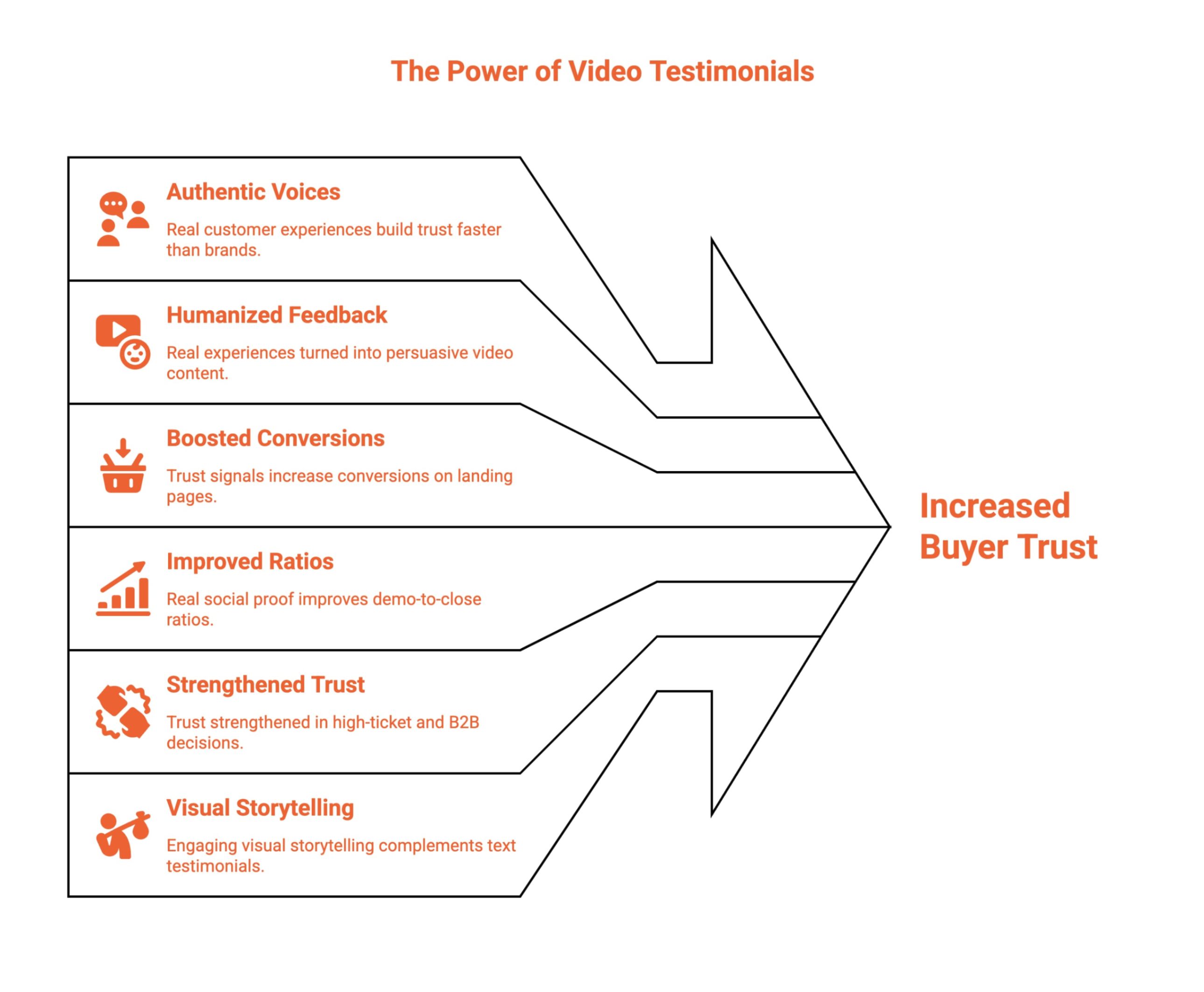
Buyers today trust people more than brands. Authentic voices from happy customers build credibility faster than polished messaging. 72% of customers say positive testimonials and reviews increase their trust in a company, showing just how impactful social proof can be.
The best part of testimonial videos is how they humanize customer feedback, turning real experiences into persuasive video content that influences decisions across the funnel.
Well-placed video testimonials help you:
-
Boost conversions on landing pages by pairing trust signals with offers.
-
Improve demo-to-close ratios using real social proof.
-
Strengthen trust in high-ticket and B2B buying decisions.
-
Support sales, email, and social media campaigns with credible proof.
-
Complement text testimonials with engaging visual storytelling.
Following best practices ensures testimonial videos consistently influence buyers and drive results.
How Do You Collect Customer Video Testimonials?
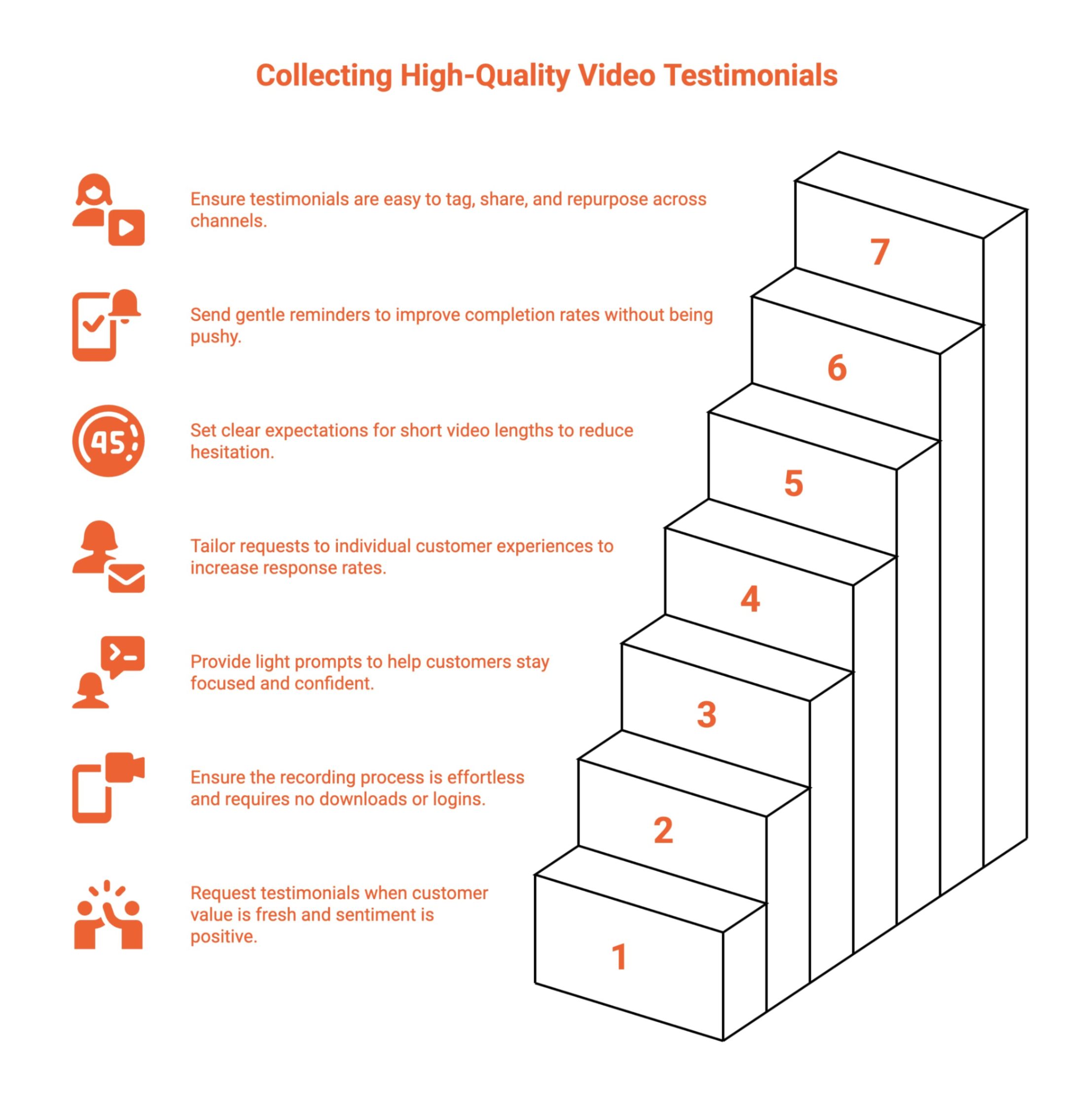
Collecting customer video testimonials works best when the process is structured, repeatable, and easy for customers. It’s not just about asking for feedback; it’s about removing friction at every step and ensuring testimonials are actually used after they’re collected.
People retain around 80% of visual information, compared with just 20% from text, which is why video testimonials consistently outperform written reviews. Most teams fail not because customers are unwilling, but because the process is clunky and hard to scale.
Below is a simple, step-by-step approach that works.
Step 1: Identify the Right Moment to Ask
Timing is the foundation of successful testimonial collection. Customers are most willing to record a testimonial when the value is clear, and satisfaction is high.
Ideal moments include:
-
After onboarding is successfully completed, customers clearly understand product value.
-
After achieving a measurable milestone or visible outcome from your product or service.
-
Following a positive customer support interaction that resolved an issue quickly.
-
After renewals, upgrades, repeat purchases, or continued long-term product usage.
Asking at the right moment increases testimonial quality and completion rates.
Step 2: Send a Clear, Friendly Testimonial Request
The request should feel personal, low-pressure, and respectful of the customer’s time and comfort.
Effective requests:
-
Use simple, conversational language that feels human rather than overly promotional or scripted.
-
Reference a specific success, outcome, or interaction the customer recently experienced.
-
Clearly communicate that the video can be short, informal, and unscripted.
Clarity reduces hesitation and increases response likelihood.
Step 3: Make Video Recording Effortless
Recording must be frictionless. Any extra step significantly reduces participation and completion rates.
High-performing testimonial workflows:
-
Use one-click recording links that open instantly without technical setup.
-
Work smoothly across both mobile devices and desktop browsers.
-
Require no app downloads, account creation, or additional tools.
Ease of recording is the biggest driver of completion.
Step 4: Guide Customers With Light Prompts
Most customers want guidance, not scripts. Prompts help them stay focused while sounding natural.
Helpful prompts include:
-
What challenge or problem were you facing before using this product or service?
-
Why did you choose this solution over other available alternatives?
-
What result, improvement, or outcome have you experienced since using it?
This structure creates clear, reusable testimonials without sounding rehearsed.
Step 5: Automate Follow-Ups and Reminders
Even satisfied customers forget. Manual follow-ups are inconsistent and time-consuming.
The most effective teams:
-
Send one or two automated reminder messages after the initial request.
-
Keep reminders friendly, brief, and pressure-free to avoid annoyance.
-
Always include the same one-click recording link for convenience.
Automation improves consistency without adding manual workload.
Step 6: Centralize and Organize Testimonials
Collecting videos is only valuable when testimonials are easy to find, manage, and reuse.
Best practices include:
-
Storing all video testimonials in a single centralized platform.
-
Tagging testimonials by use case, persona, industry, or product feature.
-
Tracking approval status, usage rights, and publishing readiness.
Organization prevents testimonials from getting lost.
Step 7: Reuse Testimonials Across the Funnel
Testimonials deliver value only when actively used across marketing and sales channels.
Common reuse points:
-
Landing pages, product pages, and conversion-focused website sections.
-
Sales presentations, demos, follow-up emails, and objection handling.
-
Paid ads, email campaigns, and social proof placements.
Strategic reuse turns testimonials into long-term growth assets.
What Are the Common Challenges When Collecting Video Testimonials?
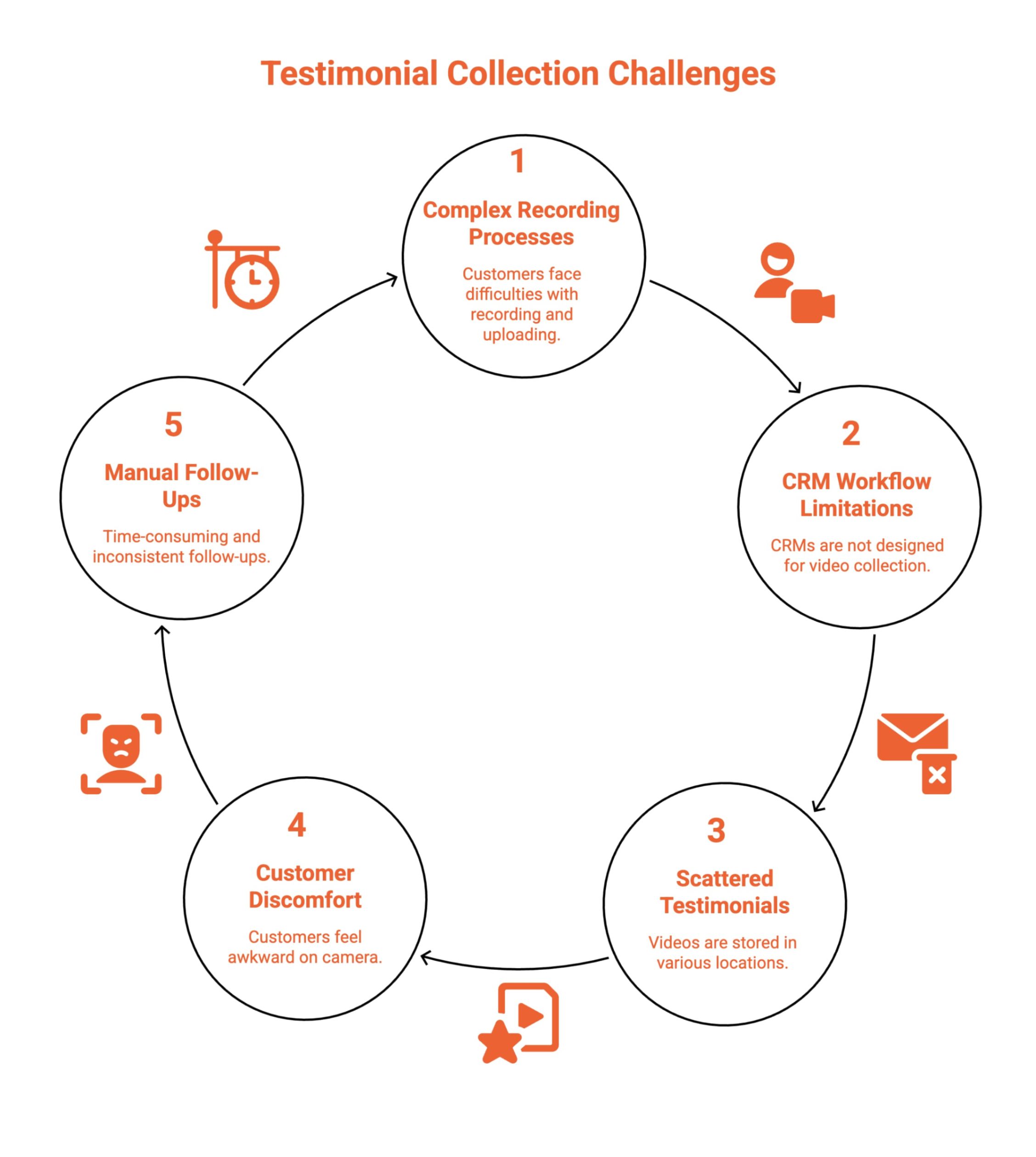
Before exploring solutions, it’s important to understand where most testimonial collection efforts break down. These challenges create friction for customers and internal teams, lowering completion rates and making video testimonials difficult to manage or reuse at scale.
1. Customers Don’t Want Complex Recording Processes
When customers are asked to record videos, upload files, rename them, or use unfamiliar tools, friction increases immediately. These extra steps lead to hesitation and drop-offs, even from satisfied customers.
How teams overcome this: Use one-click recording links that work directly in the browser with no logins, downloads, or setup required.
2. CRM Workflows Aren’t Built for Video Collection
CRMs like HubSpot are designed for managing data, not customer-facing video experiences. Manual email requests, external links, and disconnected tools reduce visibility and consistency.
How teams overcome this: Adopt a dedicated testimonial platform that integrates alongside CRM workflows instead of forcing video collection into unsupported systems.
3. Testimonials End Up Scattered Across Tools
Without a centralized system, testimonial videos live in inboxes, cloud drives, chat tools, or personal folders. This makes testimonials hard to find, approve, and reuse.
How teams overcome this: Centralize all testimonials in one platform where videos can be tagged, searched, approved, and reused across teams.
4. Customers Feel Uncomfortable or Unsure What to Say
Many customers are willing to help but feel awkward on camera or unsure how to structure their feedback. This uncertainty often leads to delayed or abandoned responses.
How teams overcome this: Provide light prompts and short guidance that help customers speak naturally without scripts or pressure.
5. Testimonial Collection Relies on Manual Follow-Ups
Manual chasing through emails or messages is time-consuming and inconsistent. As a result, testimonial requests are often forgotten or deprioritized.
How teams overcome this: Automate testimonial requests and reminders so follow-ups happen consistently at the right moments without adding manual work.
Together, these challenges explain why manual and CRM-only approaches struggle to scale video testimonial collection, and why structured, automated systems consistently deliver better results.
What Are the 7 Best Ways to Collect Video Customer Testimonials?
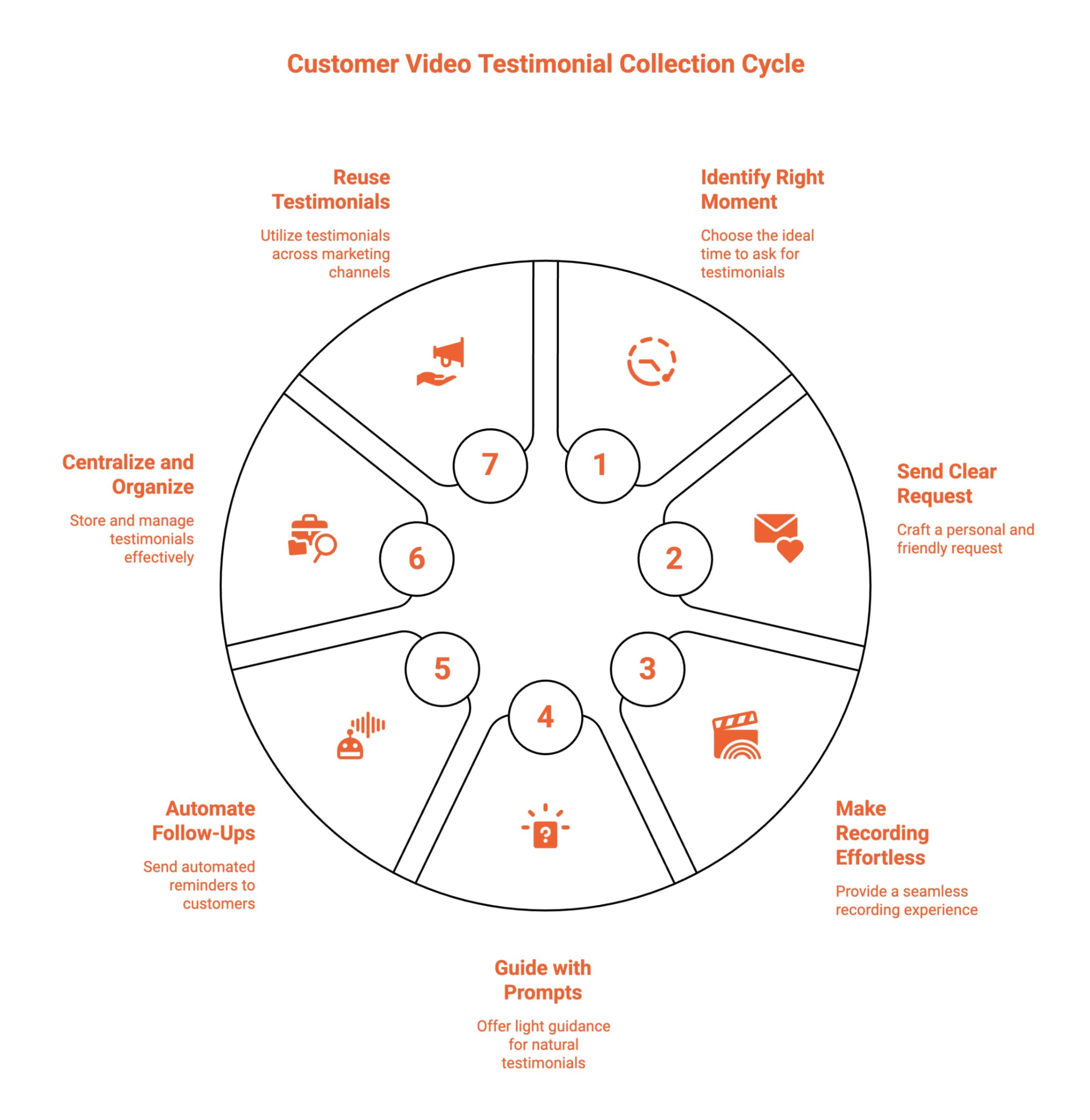
To consistently collect high-quality video testimonials, teams need more than good intentions. The process must be intentional, low-friction, and aligned with customer behavior. The following best practices focus on timing, simplicity, and guidance to maximize response rates and testimonial quality.
1. Ask at the Right Moment
The most effective testimonial requests happen when customer value is fresh. Asking too early or too late reduces clarity and enthusiasm. Align requests with moments where customers have clear wins and positive sentiment.
High-impact moments include:
-
After a successful onboarding experience
-
Following a post-implementation milestone
-
After a positive customer support interaction
-
After a renewal, upgrade, or expansion
In practice, timing matters far more than incentives.
2. Keep the Recording Experience Simple
Completion rates depend heavily on how easy it is to record. Every extra step creates friction and drop-off. The best testimonial collection experiences feel effortless for customers.
High-performing tools typically:
-
Require no app downloads or logins
-
Work smoothly on both desktop and mobile devices
-
Enable one-click video recording
-
Handle uploads automatically in the background
Simplicity directly translates to higher participation.
3. Guide Customers With Light Prompts
Customers don’t need scripts, but gentle prompts help them stay focused and confident. Clear guidance leads to more structured, conversion-ready testimonials without sounding rehearsed.
Effective prompts often include:
-
What problem were you facing before?
-
Why did you choose this product or service?
-
What result or outcome did you achieve?
This approach consistently produces clear, persuasive, and reusable video testimonials.
4. Personalize the Testimonial Request
Generic requests feel easy to ignore. Personalized testimonial asks show customers that their experience matters and increase response rates.
Effective personalization includes:
-
Mentioning the specific feature or outcome the customer benefited from
-
Referencing a recent win or interaction
-
Using a friendly, conversational tone instead of a marketing-heavy message
Personal context makes customers more willing to participate.
5. Limit Video Length Expectations
Long testimonial requests intimidate customers. Setting clear expectations around short video length reduces hesitation and increases completion.
Best practices include:
-
Asking for 30-60 second videos
-
Reassuring customers that there is no need for perfection
-
Emphasizing that authenticity matters more than polish
Short videos are easier to record and easier to reuse across channels.
6. Use Gentle, Automated Reminders
Many customers intend to record a testimonial but forget. Light, automated reminders dramatically improve completion without feeling pushy.
Effective reminders:
-
Are sent one to two times after the initial request
-
Keep the message friendly and pressure-free
-
Include the same one-click recording link
Automation ensures consistency without manual follow-up.
7. Make Testimonials Easy to Reuse and Share
Customers are more willing to participate when they know their testimonial will be used thoughtfully. Internally, easy reuse ensures testimonials actually drive value.
Strong systems allow teams to:
-
Tag testimonials by use case, industry, or persona
-
Share videos easily with sales and marketing teams
-
Repurpose testimonials across landing pages, emails, demos, and ads
Collection only matters if testimonials are activated across the funnel.
What Are Some Examples of Video Testimonials That Drive Conversions?
Seeing how strong video testimonials work in practice helps teams understand what “good” actually looks like. The most effective examples share a common thread: authenticity, clarity, and relevance to buyer pain points.
1. Shopify Customer Stories
Shopify’s video testimonials focus on real merchants explaining how they solved tangible business problems like scaling sales or managing inventory. The videos are short, unscripted, and results-focused, which makes them highly persuasive for new store owners evaluating the platform.
Why it works: Clear before-and-after storytelling tied directly to business outcomes.
2. Slack Customer Testimonial Videos
Slack features customers speaking naturally about collaboration challenges and productivity improvements. These testimonials often show the customer in their real work environment, reinforcing credibility and relatability.
Why it works: Real people, real workflows, and zero marketing fluff.
3. HubSpot Customer Success Videos
HubSpot’s testimonials emphasize metrics, pipeline growth, lead volume, and time saved, while still keeping the customer voice authentic. These videos are frequently used across landing pages, demos, and sales conversations.
Why it works: Combines emotional trust with measurable results.
4. Zoom Customer Testimonials
Zoom’s testimonial videos highlight reliability, ease of use, and scale. Customers explain how Zoom supported critical moments like remote work transitions or customer communication during growth phases.
Why it works: High relevance to urgent, real-world use cases.
5. Canva User Testimonials
Canva’s video testimonials feature creators, marketers, and small business owners sharing how they quickly produce professional designs without design expertise.
Why it works: The testimonials mirror the exact audience Canva targets, making it easy for prospects to see themselves succeeding.
How Can You Collect Video Testimonials Online Without Friction?
If you still ask customers to record a video and email it back, you are losing responses. Modern teams use a testimonial platform that removes effort for real people, captures authentic video testimonials at the best time, and turns feedback into assets that drive trust with potential customers.
Unlike siloed standalone tools that sit outside your CRM, a CRM connected approach lets you trigger requests from real lifecycle milestones, keep testimonials tied to contacts, and make proof usable in revenue workflows.
Modern B2B marketing teams already using HubSpot collect video testimonials online using dedicated tools that handle:
-
Automated requests that prompt customers to send video testimonial responses at the right moment
-
Branded recording via a dedicated landing page that reflects your target audience and brand
-
Secure uploads that protect customer feedback and video quality
-
Centralized storage to build a wall of love for product pages, online reviews, and campaigns
Used correctly, this approach goes a long way toward improving organic traffic, supporting Google reviews, influencing new customers, and delivering great results across the best places in your funnel.
If you’re a business owner looking for one of the most powerful tools to do this right, ProofFlow is currently in public beta — start collecting video testimonials without friction.
Why Is Collecting Video Testimonials in HubSpot a Hassle?
HubSpot is excellent for managing contacts, deals, and automation workflows, but it was never designed as a customer-facing video testimonial collection system. As a result, teams attempting to collect video testimonials inside HubSpot often face operational friction, low response rates, and fragmented testimonial management.
Common issues B2B marketing teams already using HubSpot face include:
-
No native video recording experience for customers, forcing teams to rely on external tools or manual recording instructions.
-
Manual testimonial follow-ups increase workload and reduce consistency across customer touchpoints.
-
No testimonial-specific workflows to track requests, completions, approvals, or reuse effectively.
-
Video testimonial files are stored outside HubSpot in drives, inboxes, or chat tools.
-
Limited visibility for sales teams to find, access, and reuse testimonial videos during active deals.
To solve this, many customer success managers who live in the CRM turn to standalone testimonial platforms like Vocal Video, Boast, or VideoAsk. While these tools simplify video recording, they typically operate outside the CRM.
Standalone testimonial tools often create a new silo, where videos live outside HubSpot, approvals happen in a separate system, and sales teams still struggle to find the right proof during active deals.
Testimonials live in a separate system, disconnected from lifecycle stages, deal data, and revenue milestones.
That separation creates a new problem: social proof becomes a marketing asset rather than a revenue-aligned growth tool. Sales teams may not know which testimonial matches which deal stage. Marketing teams must manually export and redistribute videos.
And agencies managing multiple client portals often juggle separate testimonial dashboards.
The result is either heavy manual work inside HubSpot or disconnected tools that don’t align with your revenue engine. Modern teams need testimonial collection that works with HubSpot, not around it.
Why Is ProofFlow The Best Video Testimonial Collection Tool?
HubSpot wasn’t designed as a customer-facing video collection system. ProofFlow complements HubSpot by adding native testimonial automation that works seamlessly with your existing CRM workflows.
While siloed standalone tools collect videos in isolation, ProofFlow keeps testimonial collection connected to HubSpot context, so proof stays searchable, attributable, and reusable by sales and marketing.
What makes ProofFlow different:
-
One-click video testimonial collection: Customers record directly from a simple branded page without logins, downloads, or technical setup requirements.
-
CRM-native alignment: Testimonial requests can be triggered based on lifecycle stages, deal progress, or customer milestones instead of manual outreach.
-
Testimonials as CRM records: Unlike standalone tools, ProofFlow stores testimonials as first-class CRM data alongside contacts and deals, eliminating the scattered data problem.
-
Centralized testimonial library: All video testimonials are stored, tagged, searchable, and managed from one structured system.
-
Built for HubSpot agencies and multi-portal teams: Agencies managing multiple client portals can standardize testimonial collection across accounts, while enterprise teams operating across regions, brands, or business units can manage testimonial collection across multiple HubSpot portals with unified visibility and control — without duplicating workflows or mixing client assets.
-
Sales-ready proof: Testimonials are easy to access and reuse across demos, follow-ups, objection handling, and live deal conversations.
This turns testimonial collection from a manual chore into a structured, scalable, CRM-aligned growth system designed for HubSpot teams, agencies, and multi-portal organizations.
How To Collect Video Testimonials Using ProofFlow?
Teams using ProofFlow follow a simple, scalable workflow that removes chasing, file chaos, and CRM workarounds. The entire process is designed to feel effortless for customers while giving marketing and sales teams immediate access to usable, high-quality testimonial videos.
The process typically looks like this:
-
Send a ProofFlow testimonial request link automatically after a key customer milestone or success moment.
-
The customer records a short, high-quality testimonial video directly from their device in minutes.
-
ProofFlow automatically stores, tags, and organizes the testimonial inside a centralized library.
-
Marketing and sales teams reuse testimonials across landing pages, emails, demos, and campaigns.
No chasing. No scattered files. No CRM hacks, start collecting scalable video testimonials today with ProofFlow.
Frequently Asked Questions
Can you suggest simple tools for collecting video testimonials online?
Simple tools for collecting video testimonials include ProofFlow, Vocal Video, and Boast. These platforms offer one-click recording links, automated requests, and easy sharing without requiring customers to sign up or install additional software.
Are there any free platforms for collecting video testimonials?
Yes, some platforms offer free plans or trials for collecting video testimonials. These usually include basic recording and limited storage, making them suitable for small teams testing video testimonials before upgrading to paid automation features.
What tips can help increase the chances of customers sending video testimonials?
Keep the process simple and quick. Ask at the right moment, use clear prompts, reassure customers that there is no script, and send gentle reminders. One-click recording links significantly improve response rates.
How do I embed collected video testimonials on my website?
Most video testimonial tools provide embed codes or widgets. You can place these on landing pages, product pages, or homepages using simple HTML embeds, CMS blocks, or integrations with platforms like Webflow, WordPress, or Shopify.
Why are video reviews important for e-commerce businesses?
Video reviews build trust by showing real customers using products. They reduce purchase anxiety, improve conversion rates, and add authentic social proof on product and category pages, helping shoppers feel confident before buying.
Is ProofFlow suitable for agencies managing multiple HubSpot portals?
Yes. ProofFlow is designed for agencies and multi-portal teams, making it easy to keep testimonial collection and reuse organised per portal or client.
Ready to automate your testimonial collection?
Get full access to ProofFlow at no cost during our free beta. The complete testimonial automation platform for HubSpot.
Get Started Free