Why is CRM and Testimonial Collection Important in 2026?
Key Highlights
-
CRM-driven testimonials turn scattered feedback into structured, reusable trust assets across marketing and sales.
-
Using your CRM as the backbone enables automated, well-timed testimonial requests based on real customer lifecycle events.
-
CRM data allows testimonial requests to be personalized, improving response quality and authenticity.
-
Dedicated testimonial software supports both text and high-impact video testimonials while keeping collection and approvals centralized.
-
Properly organized CRM testimonials can be reused across websites, landing pages, email campaigns, ads, and sales conversations.
-
Sales teams benefit from context-matched testimonials that support objections, industries, and deal stages in real time.
-
Tools like HubSpot and ProofFlow enable scalable, end-to-end testimonial workflows.
Customer testimonials are one of the most trusted decision-making factors in modern buying journeys. But for most teams, testimonials are still collected manually, stored inconsistently, and rarely activated across marketing or sales.
That’s where CRM and testimonial collection come together.
By using your CRM as the backbone of testimonial collection, you can automate requests, manage testimonials centrally, and deploy them strategically across the funnel, without chasing customers or relying on one-off outreach.
In this guide, you’ll learn how CRM testimonials work, how to automate testimonial collection using your CRM, what features to look for in testimonial collection software, and how tools like HubSpot + ProofFlow enable scalable, high-quality testimonial workflows.
What Are CRM Testimonials?
CRM testimonials are customer testimonials collected, managed, and activated using CRM data and workflows. Spoiler alert: when testimonials are tied to real customer context, they become a great tool for building social proof across the entire sales process, especially for small businesses.
1. Trigger Testimonial Requests Using Lifecycle Events
CRM testimonials allow requests to trigger after milestones like a free trial completion, onboarding success, or a positive review moment. This is a great way to collect authentic feedback at the right time and turn customer experiences into consistent social proof.
2. Personalize Testimonial Requests Using CRM Data
Using CRM fields like the customer’s name, company, or different products used makes testimonial requests feel human. Personalized asks improve response quality and unlock different ways to collect authentic video testimonials instead of generic online reviews.
3. Associate Testimonials With Accounts and Channels
CRM testimonials are linked to contacts and accounts, making them easy to reuse across email marketing, social media posts, landing pages, or a wall of love. This keeps social proof organized and usable across campaigns and funnel stages.
4. Activate Testimonials Across Marketing and Sales
Stored testimonials can power email marketing, social media, search engines, and sales conversations. Whether using testimonial software with a free plan or scaling paid tools, CRM testimonials highlight the benefits of customer testimonials in one repeatable system.
In short, CRM testimonials turn scattered online reviews into structured, reusable trust assets that support growth, visibility, and credibility across every stage of the business.
Why Do CRM and Testimonial Collection Belong Together?
Most businesses already have the right information to collect great testimonials; they just are not using it fully. Your CRM shows when customers are happy, what they use, and where they see value. Connecting testimonials to this data makes the process smarter, easier, and far more effective.
1. Customer Lifecycle Stage and Milestones
CRMs track onboarding progress, renewals, expansions, and revenue milestones in real time. These signals make it easy to trigger testimonial requests at moments of proven value, improving response rates and ensuring feedback reflects real outcomes rather than early impressions.
2. Industry, persona, and use case context
CRM records store industry, company size, persona, and use case data. Tagging testimonials with this context allows teams to reuse the right proof for the right audience, keeping testimonials relevant across campaigns, funnel stages, and sales conversations.
3. Engagement and satisfaction signals
Customer engagement history, support interactions, and satisfaction scores live inside the CRM. These insights help identify promoters who are most likely to share positive testimonials, ensuring collection efforts focus on happy customers while protecting relationships and long-term trust.
In short, when testimonials are connected to your CRM, they stop being scattered feedback and become structured, reusable trust assets that support growth at every stage.
How Can I Use a CRM to Collect, Organize, and Activate Customer Testimonials?
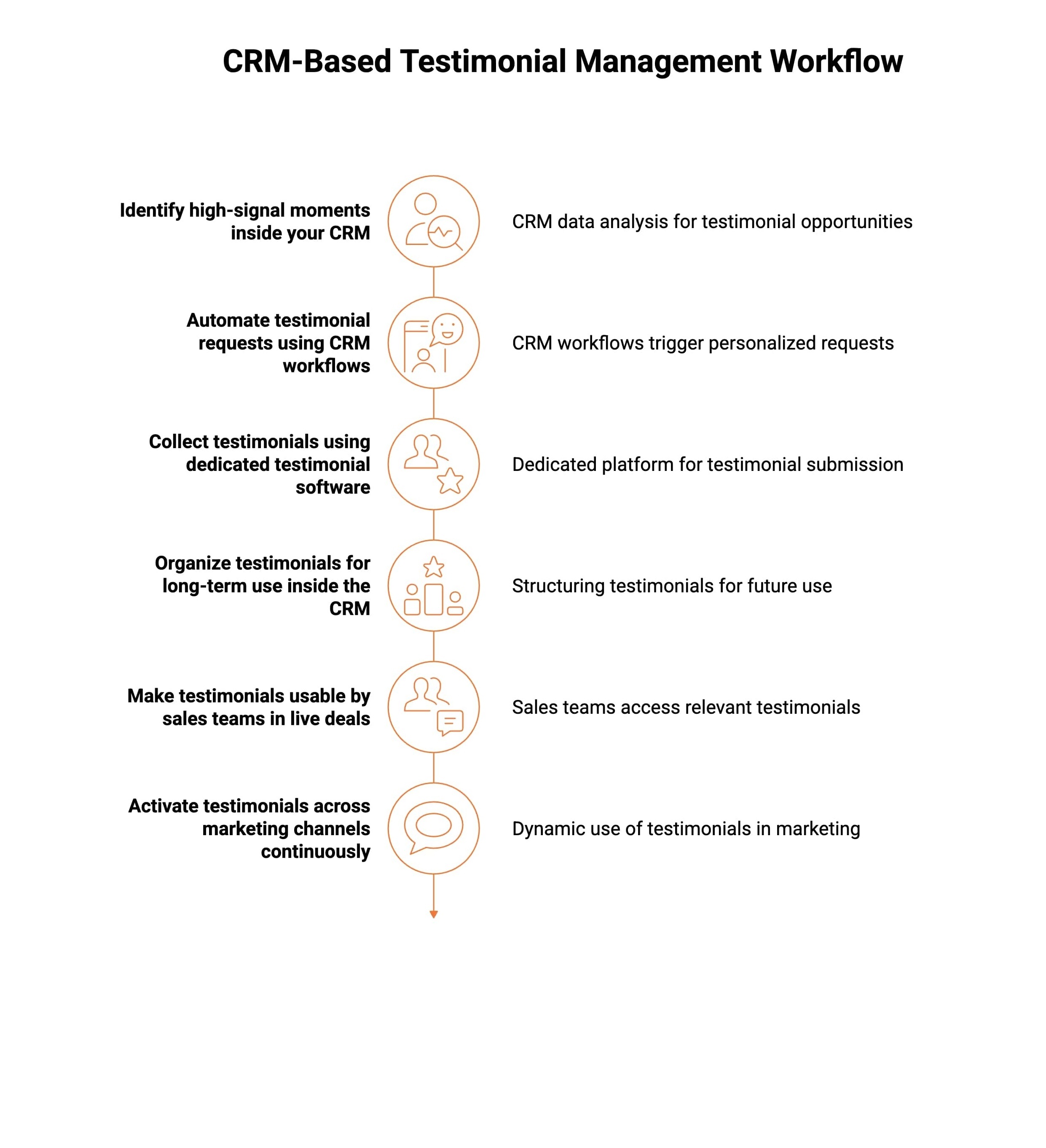
Most guides promise end-to-end testimonial workflows but stop at collection. In practice, testimonials only create value when they are structured for reuse, embedded into sales workflows, and activated continuously across marketing channels.
A CRM should act as the system of record that governs all three.
Here’s how CRM-based testimonial management works in reality.
Step 1: Identify the Right Testimonial Moments Inside Your CRM
Not every customer should be asked, and not every positive interaction is worth capturing.
A CRM helps teams identify high-signal moments, such as:
-
A deal marked Closed Won
-
Successful onboarding or feature activation
-
Renewal or account expansion
-
Resolved support tickets with strong satisfaction signals
-
High NPS or CSAT scores
Because these events already exist inside the CRM, testimonial requests are triggered by verified customer outcomes, not assumptions.
Step 2: Automate Testimonial Requests Using CRM Workflows
Once the right moments are defined, workflows remove manual coordination.
CRMs like HubSpot allow teams to:
-
Automatically send testimonial requests after the value is delivered
-
Personalize outreach using deal, product, or lifecycle data
-
Delay requests to avoid premature asks
-
Trigger reminders without manual follow-ups
At this stage, the CRM controls who is asked, when, and why.
Step 3: Collect Testimonials Using Dedicated Testimonial Software
CRMs are orchestration tools, not collection or presentation systems.
Dedicated tools like ProofFlow handle:
-
Branded testimonial submission pages
-
Text and video testimonials
-
Moderation, approvals, and quality control
-
Consistent formatting and metadata capture
In a mature setup:
-
The CRM handles logic and timing
-
The testimonial platform handles collection and readiness
This separation prevents testimonials from becoming messy, inconsistent, or unusable later.
Step 4: Organize Testimonials for Long-Term Use Inside the CRM
This is the step most teams skip, and where long-term value is created.
Approved testimonials should be synced back into the CRM with a clear structure:
-
Customer persona or segment
-
Industry or company size
-
Product, feature, or use case referenced
-
Funnel stage relevance
-
Sales vs marketing applicability
Instead of scattered quotes across tools, testimonials become searchable CRM assets that stay useful months or years later.
Step 5: Make Testimonials Usable by Sales Teams in Live Deals
Sales teams don’t need more testimonials; they need the right one at the right time.
When testimonials are structured in the CRM, sales can:
-
Surface relevant proof directly from the deal records
-
Match testimonials to objections, industries, or use cases
-
Insert testimonials into sales emails, proposals, and decks
-
Share social proof automatically at key deal stages
Testimonials stop being static website content and become deal-support assets.
Step 6: Activate Testimonials Across Marketing Channels Continuously
Marketing activation should not rely on one-off campaigns or manual updates.
With testimonials structured and approved:
-
Website pages pull relevant proof dynamically
-
Landing pages show testimonials tied to specific use cases
-
Email campaigns rotate fresh social proof automatically
-
Ads and retargeting use validated testimonials
-
Case study pipelines stay continuously filled
Marketing doesn’t chase testimonials; it deploys what the system already produces.
How Do I Automate the Process of Gathering Testimonials With My CRM?
Automating testimonial collection with your CRM works best when it follows a simple, repeatable workflow. Once set up, the system runs in the background and removes the need for manual chasing or one-off requests.
Here’s what that workflow looks like step by step.
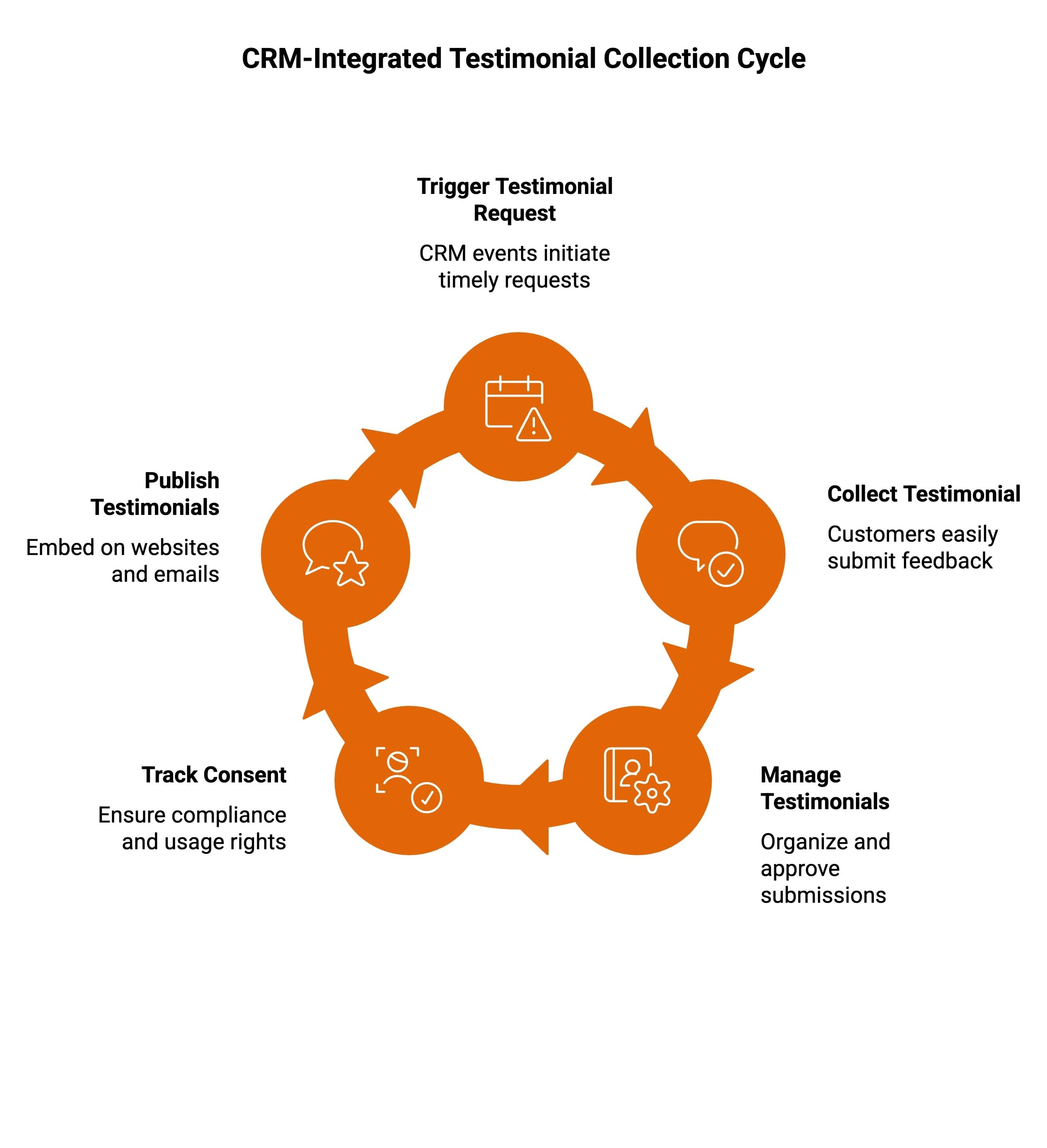
1. CRM Event Occurs
A key customer event happens inside the CRM, such as a deal closing or onboarding completing. This signals that the customer has reached a meaningful point and may be ready to share feedback.
2. Workflow Triggers Automatically
Based on that event, the CRM workflow sends a testimonial request email after a defined delay. This ensures requests are timed correctly and feel intentional rather than rushed.
3. Customer Submits the Testimonial
The customer submits a text or video testimonial through ProofFlow using a simple, guided experience. No replying to email threads or complicated steps is required.
4. Testimonial is Reviewed and Approved
Marketing or sales teams review submissions in a centralized dashboard. This step ensures accuracy, consent, and brand alignment before testimonials are published.
5. Testimonial is Deployed Across Channels
Approved testimonials are published automatically on website pages, sales emails, landing pages, and campaign assets, keeping social proof visible and up to date.
Once configured, this workflow runs continuously, generating fresh testimonials without ongoing manual effort from your team.
How Do HubSpot and ProofFlow Work Together for Testimonial Collection?
HubSpot is one of the most effective CRMs for automating testimonial workflows, and ProofFlow is designed to plug directly into that system. Together, they create a clean, end-to-end process where HubSpot handles timing and logic, and ProofFlow handles collection and presentation.
Here’s how HubSpot supports testimonial collection when paired with ProofFlow.
1. Trigger Testimonial Requests From Deal Stages
HubSpot workflows automatically trigger testimonial requests when deals move to stages like “Closed Won” or after onboarding milestones. ProofFlow receives these triggers and presents customers with a simple, branded testimonial submission experience.
2. Personalize Testimonial Requests Using CRM Properties
HubSpot passes CRM data, such as the customer’s name, company, or product used, into ProofFlow. This keeps testimonial requests personal and relevant, even when sent automatically.
3. Segment Customers and Route Testimonials Correctly
Using HubSpot segmentation by lifecycle stage, persona, or industry, ProofFlow can collect and tag testimonials accurately. This makes testimonials easy to reuse across marketing and sales campaigns.
4. Track Testimonial Engagement and Status
HubSpot tracks email engagement, while ProofFlow manages submission status, approvals, and consent. Together, they give teams full visibility into what has been requested, collected, and published.
By combining HubSpot’s automation with ProofFlow’s dedicated testimonial tools, businesses get a complete testimonial collection system instead of disconnected manual steps.
What Makes the Best CRM Testimonials Effective?
Not all testimonials create the same impact. The strongest CRM testimonials are designed to feel relevant, trustworthy, and easy to activate across marketing and sales. When collected through CRM systems, these qualities become repeatable instead of accidental.
1. Collected At The Moment of Real Success
High-performing CRM testimonials are requested right after customers experience clear value, such as onboarding completion or a measurable win. This timing captures genuine emotion, improves response quality, and avoids vague feedback that comes from asking too early.
2. Matched to a Clear Use Case or Audience
Effective CRM testimonials speak to a specific industry, persona, or outcome. By using CRM data, testimonials stay aligned with the reader’s situation, making social proof feel relevant, credible, and far more persuasive during evaluation and decision-making.
3. Structured for Reuse Across Teams
The best CRM testimonials are tagged, organized, and stored properly. This structure allows marketing and sales teams to reuse the same testimonials across emails, landing pages, decks, and campaigns without constantly recollecting feedback.
4. Honest, Human, and Often Video-Based
Strong testimonials sound natural, not scripted. Short, direct feedback, especially in video form, builds trust faster by showing real people and real experiences, helping prospects connect emotionally instead of reading polished marketing copy.
When CRM systems support testimonial collection, these qualities scale naturally and consistently across the entire funnel.
What Features Should I Look for in Testimonial Collection Software for CRM Integration?
When evaluating testimonial collection software, CRM integration should be a core requirement, not an afterthought. The right tool should fit naturally into your existing CRM workflows and make testimonial collection scalable, reliable, and easy to manage.
Here are the must-have features to look for.
1. CRM-Triggered Testimonial Requests
The software should work seamlessly with CRM workflows, triggering testimonial requests based on real lifecycle events like deal closure, onboarding completion, or renewals. This ensures requests are timely, relevant, and fully automated.
2. Video Testimonial Support
Video testimonials consistently outperform text when it comes to trust and engagement. A strong tool should make it easy for customers to record videos without downloads, logins, or technical setup.
3. Centralized Testimonial Management
All testimonials should live in one centralized place where teams can review, approve, tag, and organize them. This prevents feedback from being scattered across inboxes or documents.
4. Consent and Usage Tracking
Tracking consent and usage rights is critical, especially for video testimonials used in paid campaigns. The software should clearly record permissions to protect compliance and brand trust.
5. Easy Publishing and Embedding
Testimonials should be easy to publish across websites, landing pages, and emails. Simple embedding options ensure social proof stays visible and up to date without extra manual work.
ProofFlow is built specifically around these requirements, making it easy to connect CRM workflows with professional testimonial collection and presentation.
What Are the Common Mistakes in CRM Testimonial Collection?
Even with CRM automation in place, testimonial collection can fail if it is handled carelessly. These common mistakes often limit response quality, reduce impact, and waste valuable customer feedback.
1. Asking Too Early
Triggering testimonial requests before customers experience real value leads to weak or unhelpful responses. CRM workflows should wait for clear success moments, not just early interactions.
2. Using Generic Messaging
One of the biggest advantages of CRM-based testimonials is personalization. Ignoring CRM data and sending generic requests makes outreach feel impersonal and lowers response rates.
3. Not Using Testimonials After Collection
Collecting testimonials without deploying them across websites, emails, or campaigns wastes their value. Testimonials should be activated, not archived.
4. Treating Testimonials as Marketing-Only Assets
Testimonials are just as valuable for sales teams. Keeping CRM-linked testimonials accessible to sales improves credibility during conversations and helps move deals forward.
Avoiding these mistakes ensures CRM testimonial collection remains effective, scalable, and aligned with both marketing and sales goals.
How Does CRM-Based Testimonial Collection Improve Conversion Rates?
Testimonials are most effective when they feel relevant to the person reading them. CRM-based testimonial collection makes this possible by matching the right proof to the right audience at the right time.
Instead of static testimonial pages, CRM integration enables contextual delivery across the funnel.
1. Industry-Specific Testimonials on Landing Pages
CRM data allows landing pages to display testimonials from similar industries or company types. This relevance builds instant trust and helps visitors see themselves in the success stories, improving engagement and conversion rates.
2. Persona-Matched Testimonials in Sales Emails
Sales emails become more persuasive when testimonials reflect the buyer’s role, goals, or challenges. CRM-linked testimonials help reinforce credibility during active conversations and reduce hesitation during evaluation.
3. Lifecycle-Aligned Testimonials in Nurture Campaigns
CRM workflows insert testimonials that match where prospects are in the buyer journey. Early-stage proof builds trust, while late-stage testimonials reinforce confidence, significantly improving conversion performance compared to static placement.
By delivering testimonials contextually, CRM-based collection turns social proof into a conversion driver rather than passive content.
Why ProofFlow Is Built for CRM and Testimonial Collection?
ProofFlow is built for teams that want testimonials to work seamlessly with their CRM, not sit disconnected in spreadsheets or inboxes. It helps you collect structured text and video testimonials, manage approvals, and deploy social proof directly into HubSpot-driven workflows.
Instead of chasing reviews, you get a scalable system that turns real customer feedback into reusable trust assets across marketing and sales.
See how ProofFlow fits into your CRM testimonial workflow today!
Conclusion
CRM and testimonial collection are no longer separate initiatives. When combined, they create a powerful, automated system for capturing and activating customer trust at scale.
By using your CRM to trigger requests and a dedicated tool to collect and manage testimonials, you can automate the entire process without losing authenticity.
For modern B2B teams, CRM-driven testimonial collection isn’t just efficient. It’s essential.
Frequently Asked Questions
Can CRMs automate collecting and displaying testimonials effectively?
Yes, CRMs can automate collecting and displaying testimonials using testimonial request forms, workflows, analytics, and widgets. They trigger requests at the right time, capture positive feedback, support marketing campaigns, blogs, and SEO, and provide an easy way for teams.
How do I categorize and tag testimonials for marketing within my CRM?
You can categorize and tag testimonials in your CRM by industry, persona, product, sentiment, and funnel stage. This improves ease of use, helps the support team find proof fast, and ensures the best part appears in campaigns consistently.
What are the main benefits of using CRM testimonial automation over manual processes?
CRM testimonial automation saves time, reduces errors, and increases response rates compared to manual processes. It captures more positive feedback, improves analytics, supports SEO, aligns sales and marketing campaigns, and gives teams an easy way to scale reliably.
How do I track which customers have already been asked for, or have given, testimonials in my CRM?
CRMs track testimonial status using contact properties, timelines, and automation logs. You can see who received testimonial request forms, who responded, and who shared positive feedback, preventing duplicate requests and confusion for sales support and marketing teams easily.
What are the best ways to organize and store customer testimonials within my CRM?
The best way is to store testimonials as records linked to contacts, deals, or accounts inside your CRM. Use tags, folders, widgets, and notes so teams can access approved proof easily across marketing campaigns and blog content without friction or delays.
How can I measure the impact of testimonials on sales?
You can measure testimonial impact by tracking conversions, deal velocity, and assisted revenue inside your CRM. Analytics reveal which testimonials influence sales stages, emails, and pages, helping teams optimize marketing campaigns with data and confidence over time.
How can I tag or categorize testimonials in my CRM for easy retrieval?
Tag testimonials by industry, objection, persona, product feature, or channel within your CRM. This improves ease of use, speeds retrieval, supports widgets, blogs, and emails, and ensures the best part appears at the right moment in campaigns consistently.
What software is used to collect testimonials?
Testimonial software includes dedicated apps designed to collect written, video, and audio customer feedback. These tools offer testimonial request forms, AI assistance, analytics, widgets, pricing options, and CRM integrations for easy use across teams, marketing, and sales workflows.
What’s the best CRM for managing customers and sales?
The best CRM for managing customers and sales balances ease of use, automation, integrations, and analytics. It should support your support team, marketing campaigns, pricing visibility, apps, and scalable workflows without complexity as businesses grow and mature steadily.
What is the format of a testimonial?
A testimonial typically includes a customer’s name, role, company, challenge, experience, and outcome. Formats range from short quotes to video reviews, often displayed using widgets on websites, blogs, and sales pages to support SEO, trust, and conversions effectively.
Ready to automate your testimonial collection?
Get full access to ProofFlow at no cost during our free beta. The complete testimonial automation platform for HubSpot.
Get Started Free