What Is The Importance of CRM Automation in 2026?
Key Highlights
-
CRM automation is essential in 2026 as manual follow-ups, data updates, and coordination no longer scale with growing lead volumes
-
Automated CRM workflows help sales and marketing teams respond faster, personalize outreach, and maintain consistency without increasing headcount
-
Workflow automation in CRM systems uses triggers, conditions, and actions to move work forward without human reminders
-
CRM automation improves lead response times, nurturing consistency, data accuracy, and alignment between sales and marketing teams
-
Advanced use cases like testimonial video automation turn customer advocacy into a repeatable, revenue-supporting system
-
Real-world CRM automation replaces manual coordination with structured workflows that reduce errors and operational friction
-
Modern platforms like ProofFlow extend CRM automation beyond efficiency to accelerate trust, reduce objections, and support growth
Managing customer relationships manually no longer scales. As businesses grow, sales and marketing teams face increasing pressure to respond faster, personalize communication, and follow up consistently, without adding more headcount. This is where CRM automation becomes essential. Companies using CRM tools experience a 29% increase in revenue and a 34% boost in productivity after integrating CRM into workflows, highlighting the real business impact of CRM automation and unified customer management.
CRM automation helps businesses automate repetitive tasks, streamline workflows, and create better customer experiences across marketing and sales. From lead nurturing to testimonial video follow-ups, automation inside a CRM ensures that no opportunity is missed.
In this guide, we’ll explain what CRM automation is, how automation in CRM systems like HubSpot works, provide real-world examples, and explain how teams use CRM automation tools to drive growth.
What Is CRM Automation?
CRM automation refers to the use of software to automatically manage, execute, and optimize tasks within a customer relationship management system. Instead of relying on manual updates, reminders, and follow-ups, automated CRM systems trigger actions based on predefined rules or customer behavior.
At its core, automation in CRM helps teams:
-
Automatically capture and update customer data.
-
Trigger emails, tasks, or notifications.
-
Move leads through pipelines without manual effort.
-
Maintain consistent communication across channels.
An automated CRM reduces human error, saves time, and ensures every lead and customer receives timely attention.
Curious how automation turns feedback into influence? Learn how marketing automation platforms manage customer testimonials to boost credibility, improve engagement, and support buyer decisions across the funnel.
How Does CRM Workflow Automation Work in Practice?
CRM workflow automation uses triggers, conditions, and actions to automatically execute tasks when specific events occur in the customer journey. Instead of relying on manual follow-ups, teams define rules that tell the CRM what to do next based on customer behavior or lifecycle changes.
In practice, a CRM automation workflow includes:
-
Trigger such as a form submission, email click, demo video view, or deal stage update
-
Condition like job title, lead status, engagement level, or deal value
-
Action including sending emails, assigning sales tasks, updating properties, or triggering onboarding steps
For example:
-
A lead fills out a form, and the CRM creates a contact, assigns it to sales, and sends a follow-up email automatically.
-
A prospect watches a demo video, and the CRM triggers a personalized nurture sequence.
-
A deal moves to “Closed Won,” and onboarding, customer success, and internal tasks are launched.
Platforms like HubSpot rely on visual workflow builders that allow teams to design and manage these automations without code.
By using CRM workflow automation software, businesses can automate multi-step processes across marketing, sales, customer success, and operations. This structured approach is the foundation of scalable CRM automation and consistent customer experiences.
What Are the Benefits of CRM Automation for Growing Businesses?
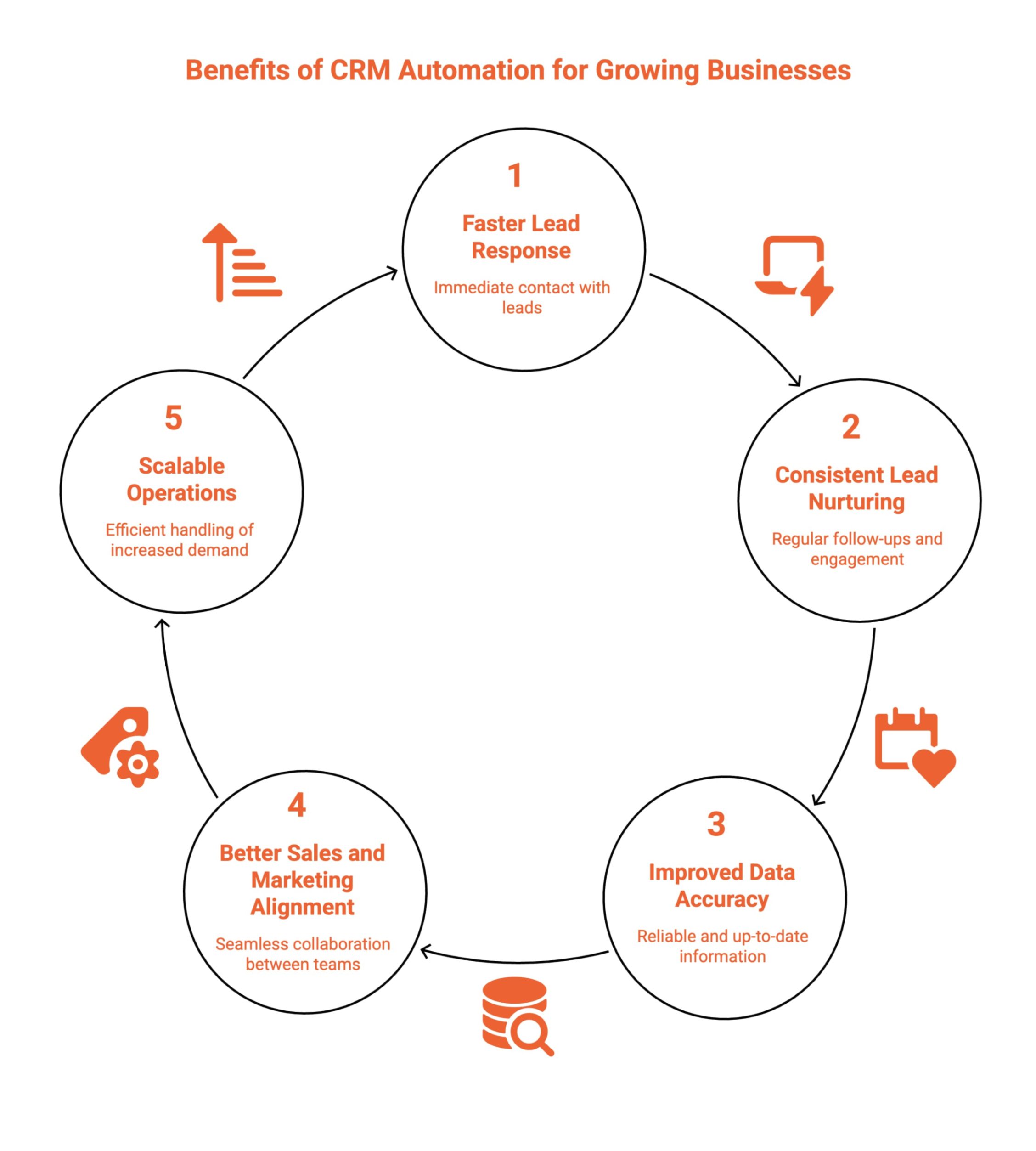
CRM automation benefits growing businesses by improving speed, consistency, data accuracy, and cross-team alignment. By automating repetitive processes, teams respond faster, nurture leads reliably, and scale operations without adding complexity, enabling sustainable growth while maintaining strong customer experiences across sales and marketing functions.
These benefits impact multiple areas of daily operations.
1. Faster Lead Response Times
CRM automation ensures leads are contacted immediately after engagement through automated emails, task creation, or alerts. Faster responses improve conversion rates by reaching prospects while interest is high, reducing drop-off caused by delays and helping sales teams capitalize on time-sensitive opportunities more effectively.
2. Consistent Lead Nurturing
Automated CRM workflows deliver consistent follow-ups through scheduled emails, reminders, and content sequences. This removes reliance on manual reminders, ensures no lead is forgotten, and maintains steady engagement over time, especially during longer sales cycles requiring repeated touchpoints and education.
3. Improved Data Accuracy
CRM automation reduces manual data entry by automatically updating contact properties, activity logs, and lifecycle stages. This minimizes errors, keeps records current, and provides teams with reliable data for reporting, segmentation, and decision-making across marketing, sales, and customer success functions.
4. Better Sales and Marketing Alignment
Shared CRM workflows connect marketing activities directly to sales actions, creating visibility across teams. Automation ensures lead status, engagement history, and ownership updates flow seamlessly, helping sales and marketing collaborate more effectively around pipeline goals and revenue outcomes.
5. Scalable Operations
CRM automation allows businesses to handle higher lead volumes and customer interactions without increasing operational overhead. Standardized workflows support growth by maintaining consistency, reducing manual effort, and enabling teams to scale processes efficiently as demand increases.
By implementing CRM automation early, growing businesses build a scalable foundation that supports efficiency, alignment, and sustainable revenue growth.
Testimonial Video Automation in HubSpot
One powerful but often overlooked CRM automation use case is testimonial video automation.
Here’s how it works in HubSpot:
-
A customer reaches a specific lifecycle stage (e.g., “Customer – 60 Days”).
-
A workflow automatically sends a personalized email requesting a testimonial.
-
The email includes a video prompt or recording link.
-
Once the video is submitted, the testimonial is stored as structured CRM data connected to the contact, company, and deal record inside HubSpot.
-
Sales and marketing teams are notified automatically.
This ensures testimonials are not external assets stored in separate dashboards. They become CRM-native records that support segmentation, reporting, lifecycle automation, and revenue attribution directly inside HubSpot.
Wonder why testimonials matter so much in HubSpot? Discover how HubSpot customer testimonials influence buyer decisions, build trust faster, and help sales teams shorten deal cycles.
What CRM Automation Tool Features Matter Most?
You should evaluate CRM automation tools based on how easily teams build workflows, connect systems, and measure results. Strong platforms simplify automation for non-technical users while supporting advanced use cases across sales, marketing, and customer success without heavy setup or ongoing operational complexity requirements today.
-
Visual workflow builders allow teams to design, edit, and launch automation flows without coding or technical expertise.
-
Native CRM and marketing integrations unify customer data, enabling seamless automation across tools, channels, and internal workflows.
-
Behavior-based triggers activate actions automatically based on emails, forms, videos, or website interactions without manual intervention.
-
Email and content automation deliver consistent, timely messaging throughout lead nurturing and customer lifecycle stages.
-
Performance reporting and analytics show workflow effectiveness, helping teams optimize timing, engagement, and conversion outcomes across revenue operations.
The best marketing automation and CRM tools make automation powerful yet accessible for growing teams.
How Does CRM Integration Enable Lead Nurturing Automation?
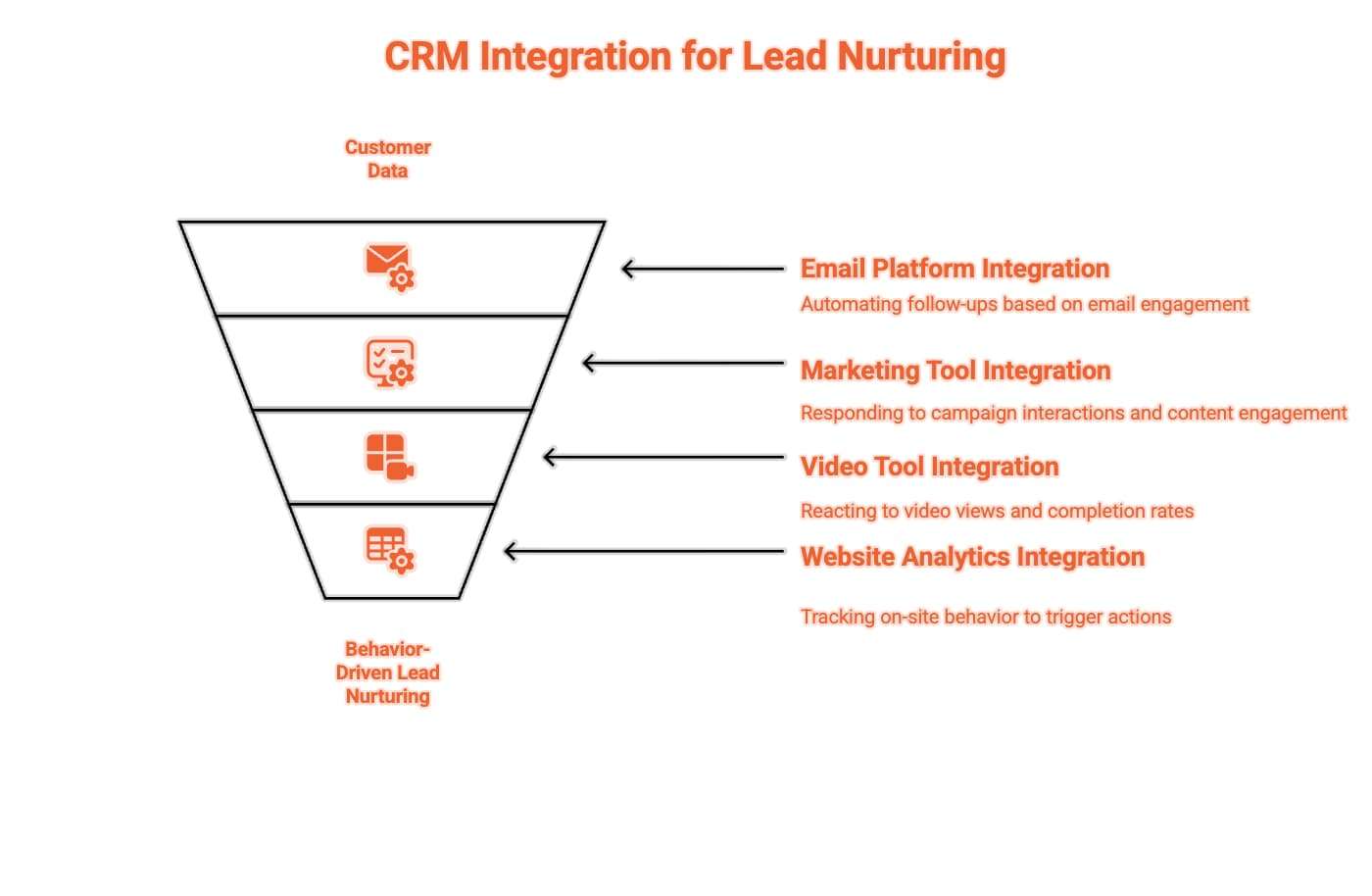
CRM integration enables lead nurturing automation by connecting customer data with engagement tools, allowing workflows to react to real behavior. This ensures leads receive timely, relevant follow-ups based on actions rather than assumptions, reducing manual work while improving personalization and conversion rates across marketing and sales teams. This automation is powered by several key integrations.
1. Email Platforms
Integrating email platforms with a CRM allows automation to trigger follow-ups based on opens, clicks, and replies. This ensures leads receive timely, relevant messages aligned with their engagement level, improving nurturing consistency while eliminating manual email scheduling or delayed responses from sales teams.
2. Marketing Tools
CRM integration with marketing tools enables workflows to respond to campaign interactions, form submissions, and content engagement. This allows leads to move automatically between nurturing stages, receive targeted messaging, and remain aligned with marketing strategies without manual list updates or workflow adjustments.
3. Video Tools
Connecting video tools to a CRM allows automation to react to video views, completion rates, and engagement depth. This helps teams prioritize interested leads, trigger follow-ups after key moments, and personalize outreach based on demonstrated interest rather than generic activity assumptions.
4. Website Analytics
CRM integration with website analytics tracks page visits, downloads, and on-site behavior. These signals trigger automated nurturing actions, helping teams deliver relevant content and follow-ups based on real intent, improving lead qualification and reducing reliance on manual lead scoring models.
By integrating CRM systems with engagement tools, lead nurturing becomes behavior-driven, automated, and scalable, delivering the right message at the right time without manual intervention.
What Are Real-World Examples of CRM Automation in Action?
Real-world CRM automation becomes clear when you follow how work actually moves through a team. The examples below show everyday situations teams face, what triggers automation, how the system responds step by step, which teams are involved automatically, and the operational or revenue result.
1. Lead Qualification Automation
A marketing team runs multiple campaigns, and inbound leads start piling up. Sales cannot manually review every form submission, so high-intent leads often wait too long.
When this happens, a lead submits a form and visits high-intent pages within the same session. The system then scores the lead automatically using engagement activity, company size, and job title.
Next, the CRM updates the lead status, assigns the contact to the correct sales rep, and creates a follow-up task with context already attached. Sales is notified instantly, while marketing continues nurturing lower-intent leads automatically.
This prevents slow response times, eliminates manual qualification, and increases conversion rates by ensuring sales only engages when intent is clear.
2. Sales Follow-Up Automation
A sales rep finishes a product demo and moves to the next call. Without automation, follow-ups depend on memory and often happen late.
When this happens, the rep marks the meeting as completed in the CRM.
The system then triggers a workflow that sends a personalized follow-up email, schedules a reminder task, and updates the deal stage.
Marketing assets are attached automatically, and sales leadership gains visibility without asking for updates.
This prevents dropped deals, inconsistent follow-ups, and stalled pipeline momentum while keeping sales focused on live conversations.
3. Customer Onboarding Automation
A deal closes, and the sales rep moves on. Without structure, onboarding handoffs become slow and inconsistent.
When this happens, the deal moves to “Closed Won.” The system then sends a welcome email, creates onboarding tasks for customer success, assigns an owner, and schedules check-ins automatically.
Product, support, and success teams receive context without internal emails or meetings.
This prevents missed handoffs, onboarding delays, and early churn while creating a predictable customer experience.
4. Testimonial and Review Automation
Customers reach success, but feedback is rarely captured because teams forget to ask.
When this happens, a customer completes onboarding or reaches a defined success milestone. The system then sends a testimonial request automatically, tracks responses, and stores approved testimonials centrally. Marketing gains reusable proof, sales accesses testimonials during deals, and customer success avoids manual chasing.
This prevents missed advocacy opportunities and turns customer feedback into a repeatable revenue asset.
These examples show how CRM automation replaces reminders, follow-ups, and internal coordination with structured workflows, allowing teams to move faster, stay aligned, and scale without adding operational overhead.
Want a smarter way to collect video testimonials? Explore the best automated approach to creating customer testimonial videos and see how automation simplifies collection while increasing response rates.
What Common Mistakes Should You Avoid With CRM Automation?
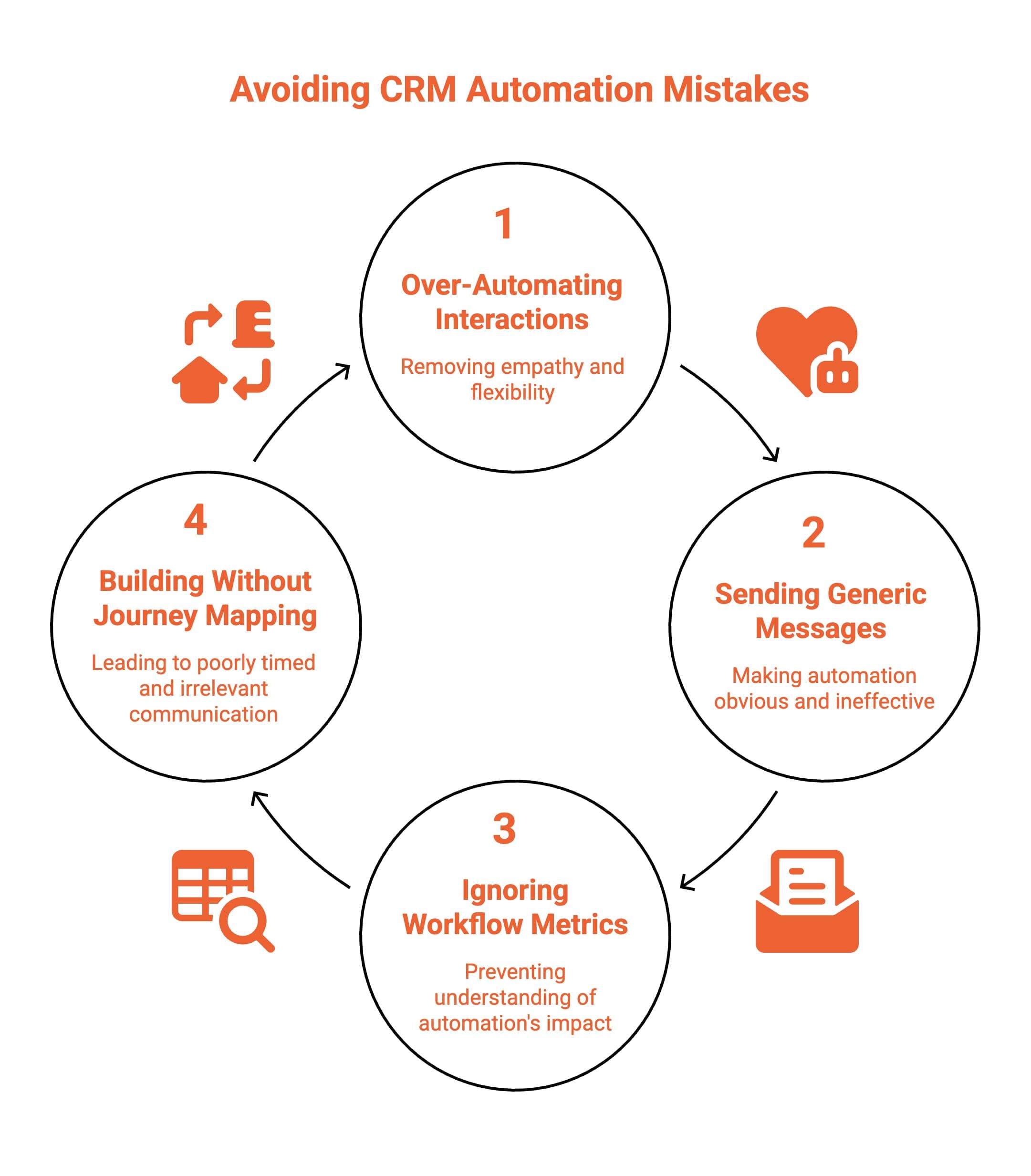
CRM automation delivers efficiency, but common mistakes can damage trust, engagement, and conversion rates. Overusing automation, ignoring data, or skipping strategy leads to impersonal experiences that frustrate customers instead of helping them. Avoiding these pitfalls ensures automation supports relationships rather than replacing thoughtful human interaction.
The most frequent issues appear in the following areas.
1. Over-Automating Every Interaction
Over-automating every interaction removes empathy and flexibility from customer communication. When every message feels automated, customers disengage and lose trust. CRM automation should handle repetitive tasks while leaving room for human judgment and real conversations at critical moments.
How to fix: Limit automation to repetitive, low-risk interactions. Reserve human outreach for high-intent actions, deal progression, objections, and customer success touchpoints where personal context matters most.
2. Sending Generic Messages Without Personalization
Sending generic messages without personalization makes automation obvious and ineffective. Prospects expect relevance based on behavior, role, and needs. Messages that ignore context feel mass-produced and disconnected from real customer situations.
How to fix: Use CRM data such as role, industry, engagement history, and lifecycle stage to dynamically personalize content, timing, and messaging within every automated workflow.
3. Ignoring Workflow Performance Metrics
Ignoring workflow performance metrics prevents teams from understanding what automation actually achieves. Without monitoring performance, ineffective workflows continue running unnoticed and create friction instead of value.
How to fix: Track open rates, click-throughs, conversions, delays, and drop-offs. Review workflows regularly, run controlled tests, and refine triggers, timing, and messaging based on real performance data.
4. Building Automation Without Mapping the Customer Journey
Building automation without mapping the customer journey leads to poorly timed and irrelevant communication. Messages trigger without context, making interactions feel intrusive or confusing to customers.
How to fix: Map the full customer journey before building workflows. Align automation triggers and actions with each stage so communication supports customer intent, expectations, and readiness.
Successful CRM automation strengthens relationships by removing friction and supporting teams with timely, relevant actions, never by replacing thoughtful, well-timed human engagement.
When Should a Business Invest in CRM Automation?
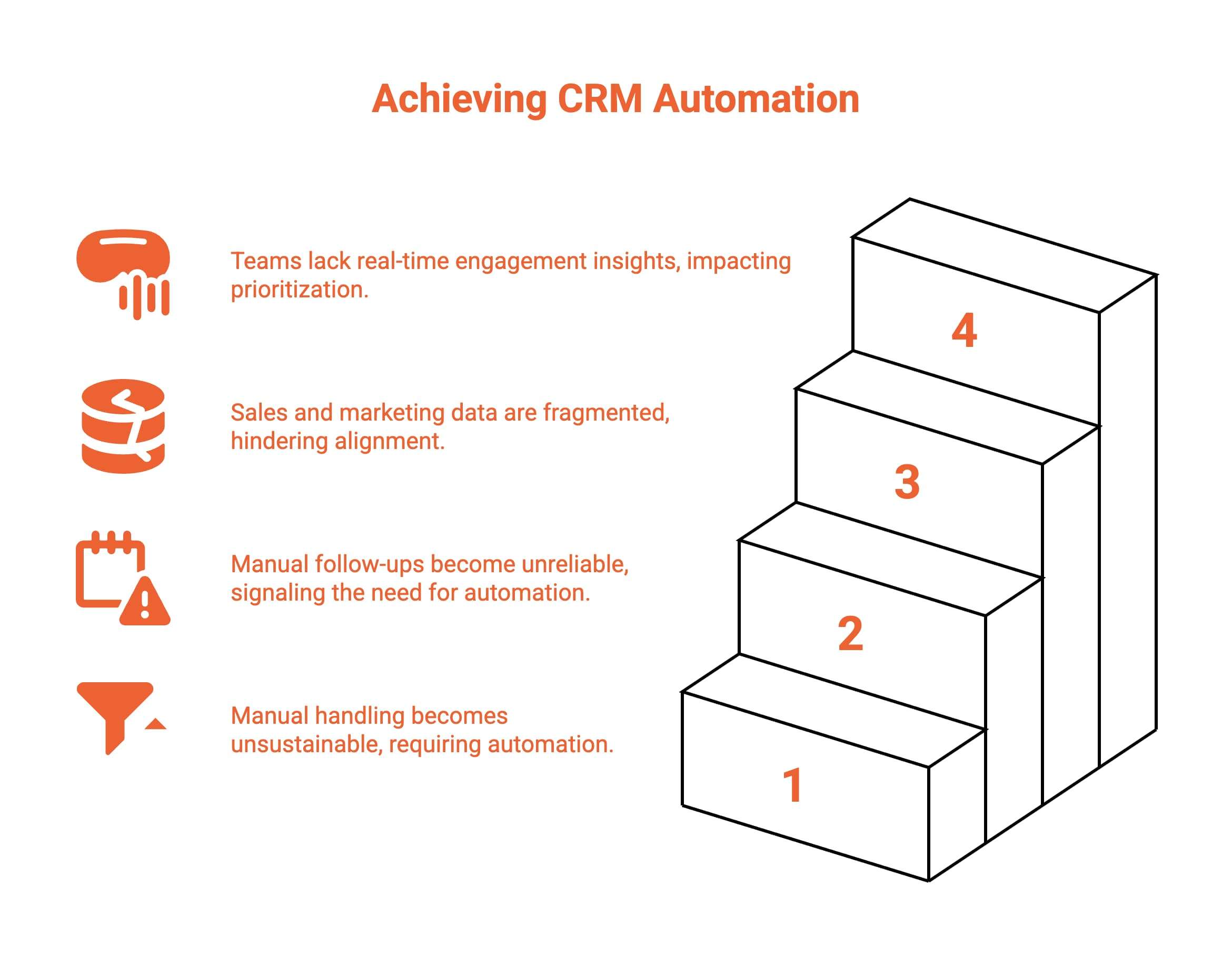
A business should invest in CRM automation when growth exposes inefficiencies in follow-ups, data visibility, and team alignment. As CRM marketing automation and automated CRM systems replace manual processes, organizations gain consistency, scalability, and clearer engagement insights across sales and marketing operations. Several clear signals indicate the right timing.
1. Lead Volume Increases
When lead volume increases, manual handling becomes unsustainable and response times slow. CRM automation ensures every lead is captured, routed, and nurtured automatically, preventing missed opportunities while maintaining consistent engagement quality as demand grows across inbound, outbound, and partnership-driven acquisition channels simultaneously.
2. Manual Follow-Ups Become Inconsistent
Inconsistent manual follow-ups signal readiness for CRM and marketing automation. Automated workflows ensure leads receive timely, structured communication regardless of team workload. This consistency improves trust, reduces drop-off, and allows sales teams to focus on high-value conversations instead of repetitive administrative tasks daily.
3. Sales and Marketing Data Feel Disconnected
Disconnected sales and marketing data creates blind spots across the funnel. Marketing automation and CRM tools unify engagement history, lead status, and performance metrics, giving teams shared visibility. This alignment improves handoffs, reporting accuracy, and coordinated decision-making across the revenue teams organization-wide.
4. Teams Need Better Visibility Into Engagement
When teams lack visibility into email activity, content interactions, or video engagement, prioritization suffers. CRM automation surfaces real-time engagement signals, enabling smarter follow-ups and targeted outreach based on behavior rather than assumptions, improving efficiency and outcomes across the customer journey stages.
When these challenges appear, investing in CRM workflow automation software becomes a practical step toward scalable, aligned, and data-driven growth.
How Does ProofFlow Complement Existing HubSpot Setup?
ProofFlow extends HubSpot’s CRM automation capabilities by adding native testimonial workflows that don’t exist in standard HubSpot. Built exclusively for HubSpot users, ProofFlow integrates directly with HubSpot CRM to automate testimonial collection, management, and activation.
Instead of forcing testimonial collection into manual workflows or disconnected tools, ProofFlow treats customer proof as first-class CRM data alongside your contacts, deals, and lifecycle stages.
ProofFlow provides:
-
Native HubSpot integration that triggers testimonial requests from HubSpot lifecycle stages and deal movements.
-
Testimonials as CRM records, stored directly in HubSpot, not in a separate siloed tool.
-
Automated video and text collection through frictionless browser-based recording.
-
CRM-powered personalization using HubSpot contact properties and engagement data.
-
Multi-portal support for HubSpot agencies managing multiple client accounts.
-
Sales enablement, giving teams instant access to relevant testimonials during deals.
Unlike traditional CRM automation tools that focus only on process efficiency, ProofFlow emphasizes buyer confidence, objection reduction, and revenue acceleration. Automation is used to move work forward automatically, without reminders, manual chasing, or internal coordination overhead.
For HubSpot teams that want to automate testimonial collection without managing separate tools or manual processes, ProofFlow provides the missing piece: customer proof as a native part of your CRM automation.
Final Thoughts
CRM automation transforms how businesses manage relationships, follow up with leads, and scale customer engagement. By automating workflows inside a CRM, teams save time, improve consistency, and focus on higher-value work.
Platforms like HubSpot demonstrate how powerful CRM automation can be, especially when applied to use cases like testimonial video automation. Modern tools like ProofFlow extend HubSpot’s automation capabilities by embedding revenue-supporting workflows, such as testimonial automation, directly within CRM processes.
When implemented thoughtfully, CRM automation doesn’t just improve efficiency; it improves the entire customer experience.
Frequently Asked Questions
What is CRM automation in simple terms?
CRM automation uses software to handle repetitive tasks like data entry, follow-up emails, and contact updates automatically. Instead of doing these manually, the CRM triggers actions based on rules you define, so everyday operations run consistently without constant human input.
Is CRM automation only for large businesses?
No. Businesses of any size benefit from CRM automation. Startups and small teams use it to scale outreach, maintain consistent follow-ups, and improve customer service without needing to hire additional staff as they grow.
What is workflow automation in CRM?
Workflow automation in CRM lets you define rules that trigger actions automatically when specific events occur, such as a deal changing stage or a contact submitting a form. This keeps processes moving through the sales pipeline without manual intervention.
Can CRM automation help with lead nurturing?
Yes. CRM automation supports lead nurturing by sending timely follow-up emails, enrolling contacts in nurture sequences, and alerting sales reps when leads show buying intent, ensuring prospects receive consistent communication throughout the sales cycle.
Which CRM automation tools are considered the best in 2026?
The leading platforms in 2026 combine workflow automation, native integrations, and strong reporting. When evaluating tools, focus on ease of use, scalability, integration depth with your existing stack, and quality of customer support.
How to use CRM integration for lead nurturing automation?
Connect your lead sources to your CRM, segment contacts by behavior and engagement, then build workflows that trigger personalized follow-ups automatically. Align sales alerts with key actions and track engagement metrics to refine your nurturing over time.
Can you explain the difference between CRM automation and marketing automation?
CRM automation focuses on managing relationships, sales activities, and post-conversion workflows, while marketing automation handles campaigns, audience segmentation, and engagement at scale. Together, they support different stages of the customer lifecycle but serve distinct operational goals.
Ready to automate your testimonial collection?
Get full access to ProofFlow at no cost during our free beta. The complete testimonial automation platform for HubSpot.
Get Started Free