What Are CRM Automation Benefits?
Key Highlights
-
CRM automation turns traditional CRMs from static databases into dynamic growth systems that reduce manual work and improve execution speed.
-
Automated workflows help sales, marketing, and customer experience teams stay aligned without relying on constant manual updates.
-
Businesses gain better visibility, consistency, and scalability as repetitive tasks are handled automatically across the customer lifecycle.
-
CRM automation improves data reliability, enabling smarter forecasting, reporting, and decision-making at every stage of growth.
-
When extended beyond operations, CRM automation supports trust-building activities like testimonial marketing and sales enablement.
-
Tools like ProofFlow bridge the gap between CRM automation and social proof, turning customer success into a repeatable growth channel.
Modern CRM systems are no longer just contact databases. When automation is applied correctly, CRMs become growth engines that reduce manual work, improve decision-making, and increase revenue velocity.
Understanding CRM automation benefits helps businesses unlock more value from their customer data while aligning sales, marketing, and customer experience.
This guide breaks down the benefits of CRM automation with real examples and shows how tools extend CRM automation into high-impact testimonial marketing.
What Is CRM Automation?
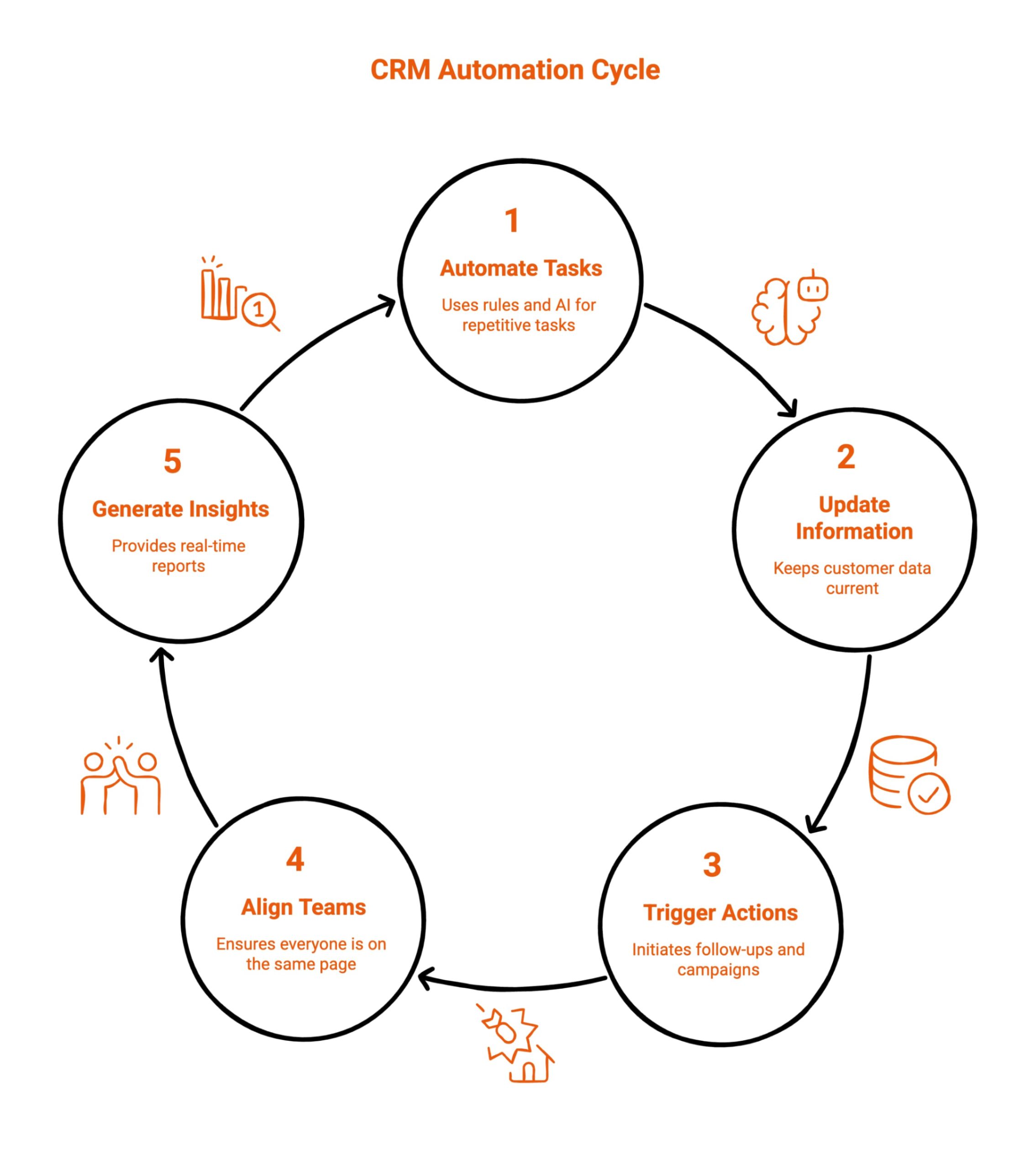
CRM automation refers to the use of rules, workflows, and AI to automatically manage repetitive customer-related tasks. Instead of manual data entry and follow-ups, automation keeps customer information updated, actions triggered, and teams aligned, helping businesses operate more efficiently and focus on outcomes.
CRM automation typically covers the following core activities.
-
Lead Routing and Follow-Ups: Automatically assigns leads and triggers follow-ups so no opportunity is delayed or overlooked.
-
Pipeline Stage Updates: Updates deal stages automatically based on actions, keeping pipelines accurate and up to date.
-
Customer Lifecycle Tracking: Tracks customer movement across lifecycle stages without manual intervention or data duplication.
-
Marketing Campaign Triggers: Launches emails, workflows, or campaigns automatically based on customer behavior or status changes.
-
Reporting and Insights: Generates real-time reports and insights without manual data compilation or spreadsheet maintenance.
The core benefit of CRM automation is simple: teams spend less time managing systems and more time driving measurable business outcomes.
How do marketing automation platforms turn testimonials into trust signals? Learn how automated testimonial workflows help businesses manage feedback, increase credibility, and keep prospects engaged across the buyer journey.
What Are the Benefits of Using CRM Automation Software for Modern Businesses?
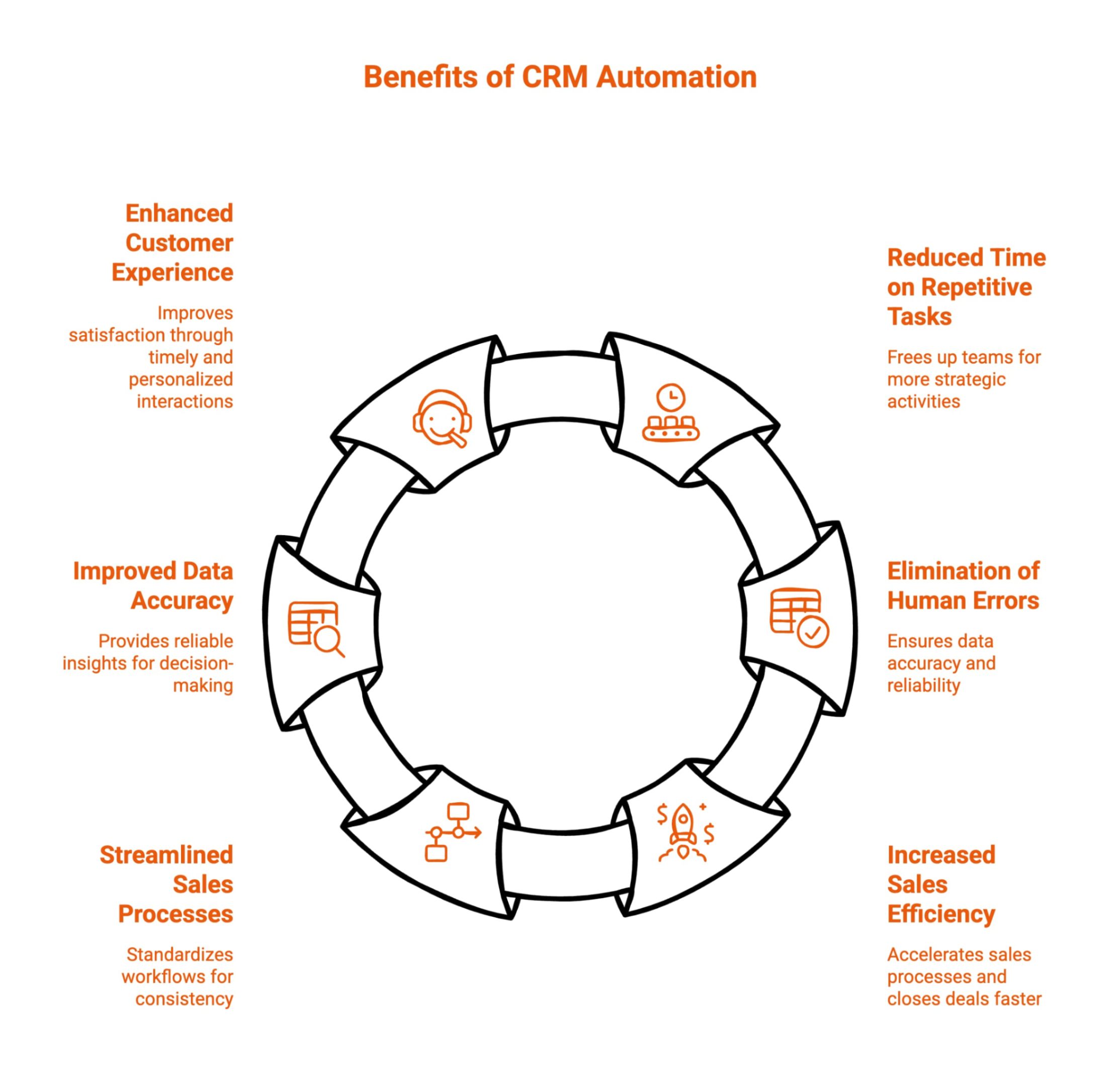
As organizations scale, managing data, people, and processes manually becomes increasingly inefficient. CRM automation software helps teams organize interactions, standardize workflows, and maintain consistency across departments without adding operational strain.
Below are the most impactful benefits explained with detailed examples.
1. Reduced Time Spent on Repetitive Tasks
Manual tasks such as updating records, assigning ownership, and logging activities consume valuable time that teams could otherwise spend engaging prospects. CRM automation removes this burden by executing predefined actions automatically and consistently.
By reducing administrative workload, teams can shift their focus toward building stronger customer relationships, improving responsiveness, and delivering value-driven interactions.
Over time, this balance between automation and human effort leads to higher productivity without increasing burnout or headcount.
Example:
Consider a sales team handling inbound inquiries from multiple channels. With automation in place, every new inquiry is automatically captured, assigned, and logged without manual effort.
Follow-up tasks are created instantly, reminders are scheduled, and timelines are updated in the background.
This allows sales representatives to move directly into meaningful conversations instead of spending time organizing information, resulting in faster engagement and improved daily efficiency.
2. Elimination of Human Errors in Data Handling
Human error is unavoidable when data entry and updates depend entirely on manual input. Missed fields, duplicate records, and inconsistent formatting can weaken reporting accuracy and decision-making.
CRM automation enforces standardized rules and validations, ensuring information remains clean and reliable. This consistency helps teams trust their systems, collaborate more effectively, and reduce friction between departments that rely on shared data.
Example:
In a growing organization, multiple team members may interact with the same contact. Automation ensures updates happen in real time, prevents duplicate records, and enforces required fields.
When one user edits information, it syncs instantly across the system. As a result, reports remain accurate, forecasts improve, and leadership gains a clearer view of performance without correcting errors manually.
3. Increased Sales Efficiency and Focus
Sales efficiency depends on momentum, clarity, and timely action. CRM automation accelerates execution by removing delays caused by manual updates and fragmented workflows.
Automated transitions, reminders, and status updates ensure opportunities move forward smoothly while keeping teams aligned.
This structured approach allows sales professionals to manage more opportunities simultaneously without losing focus or accuracy within the sales pipeline.
Example:
After a discovery call, the system automatically updates the deal stage, logs the interaction, and schedules next steps. Notifications keep stakeholders informed without extra emails or meetings.
Sales reps immediately move on to the next opportunity while knowing the system is tracking progress accurately, enabling consistent follow-through and faster deal movement.
4. Streamlined and Standardized Sales Processes
Inconsistent processes often lead to missed steps, stalled deals, and unclear ownership. One of the key benefits of automating CRM processes is the ability to standardize workflows so every opportunity follows a defined, repeatable path. This reduces ambiguity, improves accountability, and ensures best practices are applied consistently across teams using the same CRM software environment.
Example:
When an opportunity advances, automated workflows trigger tasks, internal notifications, and approvals. Sales teams know exactly what action is required at each stage, while managers gain visibility without chasing updates. This structured execution improves consistency across teams and reduces dependency on individual habits or experience levels.
See how automating testimonials supports demand generation, strengthens brand trust, and drives measurable business growth.
5. Improved Data Accuracy and Actionable Insights
Accurate data is essential for forecasting, planning, and performance measurement. CRM automation improves data quality by reducing manual inputs and syncing information across systems. These capabilities are especially valuable when evaluating the benefits of AI-powered CRM automation for sales teams, where timely, reliable insights directly influence prioritization and performance.
Example:
Customer details automatically update from integrated tools, ensuring records remain current. Changes made in one system reflect everywhere, eliminating discrepancies. Teams can confidently analyze trends, predict outcomes, and optimize strategies without questioning data reliability or spending time reconciling reports.
6. Enhanced Customer Experience and Satisfaction
When internal operations are efficient, external interactions improve naturally. CRM automation ensures timely responses, consistent follow-ups, and better coordination across customer support functions. These outcomes highlight the benefits of automating CRM for software companies, where customer expectations around speed, personalization, and continuity are especially high.
Example:
When a customer submits an inquiry, automation creates a case, assigns ownership, and logs history instantly. Support agents respond with full context, reducing repetition and resolution time. Customers feel heard, supported, and valued throughout the interaction, strengthening trust and long-term retention.
By combining structured customer relationship management with intelligent workflows, businesses can turn raw CRM data into meaningful actions.
When tools unify lead scoring, email marketing, and social media engagement through scalable automation features, teams operate with clarity, improve customer satisfaction, and build systems that support sustainable growth rather than short-term efficiency.
What’s the most efficient way to create testimonial videos at scale? Explore how automation simplifies video testimonial collection while improving response rates and marketing impact.
Where Does Traditional CRM Automation Fall Short?
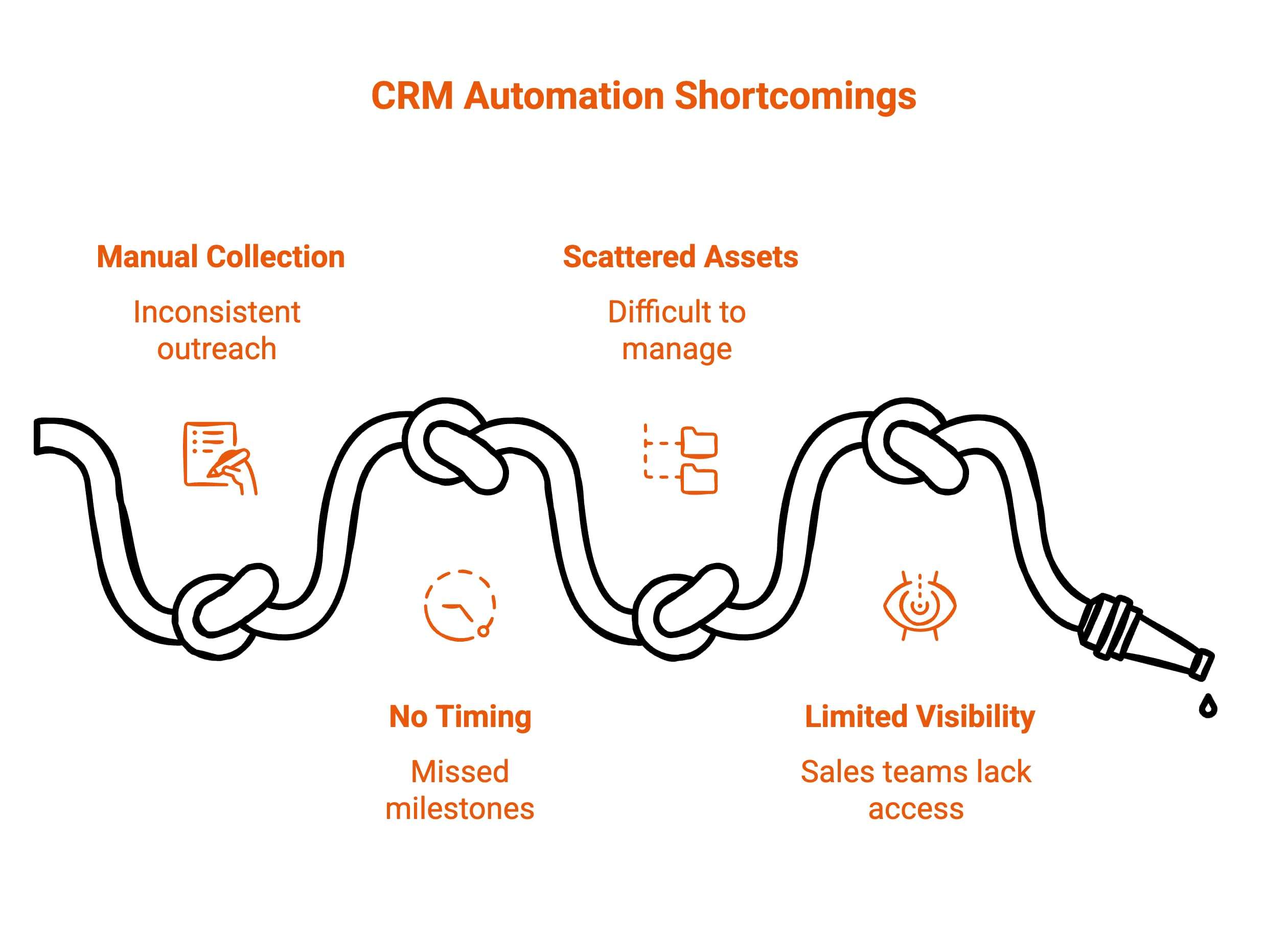
Even advanced CRM automation systems leave important growth opportunities untapped. One of the most common gaps is testimonial marketing, which is often treated as a manual, one-off activity rather than a scalable workflow integrated into the customer lifecycle.
Traditional CRM automation commonly falls short in the following areas.
-
Manual Testimonial Collection: Testimonials are requested manually, leading to inconsistent outreach and missed customer success moments.
-
No Timing Automation: CRM systems lack automated triggers to request testimonials at optimal customer milestones.
-
Scattered Video Assets: Video testimonials are stored across inboxes, drives, or tools, making them difficult to manage and reuse.
-
Limited Sales Visibility: Sales teams lack easy access to relevant testimonials that could support deals and objections.
This is where ProofFlow fits perfectly, by adding a dedicated automation layer for collecting, organizing, and activating customer testimonials at scale.
How Does ProofFlow Extend CRM Automation Into Testimonial Marketing?
ProofFlow acts as a specialized automation layer that complements traditional CRM systems by handling testimonial workflows that most CRMs are not designed for. While teams understand the benefit of automations in CRM, testimonial collection often remains manual, fragmented, and inconsistent, limiting its overall impact on growth.
When teams look at integrating CRM with marketing automation benefits, testimonial marketing is a critical but overlooked piece. Testimonials directly influence conversion rates, sales trust, and purchase confidence, yet most businesses lack a system to collect and activate them reliably.
This is where ProofFlow extends CRM automation into a complete growth workflow.
-
Automated Testimonial Requests: Triggers video testimonial collection at key CRM moments such as closed-won deals, renewals, or successful onboarding milestones.
-
Centralized Testimonial Management: Stores all customer testimonials in one organized, searchable library instead of scattered tools and folders.
-
Sales Enablement Through Social Proof: Gives sales teams instant access to relevant testimonials for emails, demos, and follow-ups.
-
Marketing Reuse at Scale: Allows testimonials to be repurposed across landing pages, ads, email campaigns, and product marketing assets.
-
Minimal Customer Friction: Enables one-click video recording experiences that significantly increase participation and completion rates.
By extending CRM automation into testimonial marketing, ProofFlow unlocks additional benefits of CRM automation that most teams never realize. Testimonials move from being a manual task to a repeatable, automated growth channel aligned with sales and marketing workflows.
Example CRM Automation + ProofFlow Workflow
-
A deal is marked closed-won inside the CRM system automatically.
-
ProofFlow sends a testimonial request without manual intervention or follow-up.
-
The customer records a short video testimonial within minutes.
-
The testimonial is stored, tagged, and categorized automatically.
-
Sales and marketing teams reuse the testimonial instantly across channels.
This workflow shows how testimonial marketing becomes a natural extension of CRM-driven automation, reinforcing trust while maximizing the overall impact of CRM investments.
Conclusion
The true value of CRM automation isn’t just speed; it’s consistency, insight, and scalability.
When combined with tools like ProofFlow, CRM automation extends beyond operations into revenue-driving trust signals like testimonials.
If you’re already using CRM automation but still collecting testimonials manually, ProofFlow fills the gap, turning customer success into automated proof that drives growth.
Frequently Asked Questions
Are there specific use cases where CRM automation delivers the most value?
CRM automation delivers the most value in lead generation, lead management, and follow-ups at the right time, helping sales reps reduce delays, act on signals faster, and convert potential customers while aligning daily activities with the overall sales process.
What are the best practices for implementing CRM automation?
Start by mapping core business processes, selecting the right CRM, and defining goals clearly. Roll out workflow automation gradually, train every team member, and review performance regularly to ensure automation supports real outcomes, not disconnected tasks.
What CRM features create a single view of the customer?
A single view comes from unified contact information, shared customer insights, synced interactions, and centralized records. An automated CRM connects touchpoints across teams, ensuring everyone works from consistent, up-to-date data without fragmented systems or guesswork.
What are the differences between CRM automation and marketing automation?
CRM automation focuses on sales process execution and customer retention, while marketing automation software supports campaigns, scoring, and lead nurturing. Together, they align marketing efforts with revenue teams but serve distinct stages of the customer lifecycle.
What common business challenges does CRM automation solve?
CRM automation helps streamline processes, reduce routine tasks, and improve visibility. It addresses slow follow-ups, data silos, and missed opportunities by connecting teams through shared systems and actionable workflows that support consistent, scalable execution.
What are the 7 C’s of CRM?
The 7 C’s are: customer, consistency, communication, customization, coordination, control, and continuity, guide effective CRM usage. Automation platforms support these principles by structuring engagement, improving data flow, and enabling reliable execution across teams.
Can CRM automation help increase ROI, and if so, how?
Yes. CRM automation improves ROI by prioritizing high-intent leads, optimizing lead management, and applying artificial intelligence for smarter decisions. Faster response times and better targeting help teams close more deals with fewer resources.
Does CRM automation reduce manual work for sales teams?
Absolutely. CRM automation reduces manual work for sales reps by handling updates, reminders, and task routing. This frees time for relationship-building and selling instead of administrative work that slows productivity.
What is the primary benefit of automation in customer service?
The primary benefit is faster, more consistent support. Automation tools help service reps resolve customer issues efficiently, route requests correctly, and maintain service quality while supporting growing volumes without increasing headcount.
In what ways does CRM automation enhance customer service?
CRM automation supports customer service teams by centralizing history, triggering responses, and coordinating workflows. It improves customer retention by ensuring timely follow-ups, consistent experiences, and smoother collaboration across departments using modern automation systems.
Ready to automate your testimonial collection?
Get full access to ProofFlow at no cost during our free beta. The complete testimonial automation platform for HubSpot.
Get Started Free