Is HubSpot CRM Data Secure? Best Practices Explained
Key Highlights
-
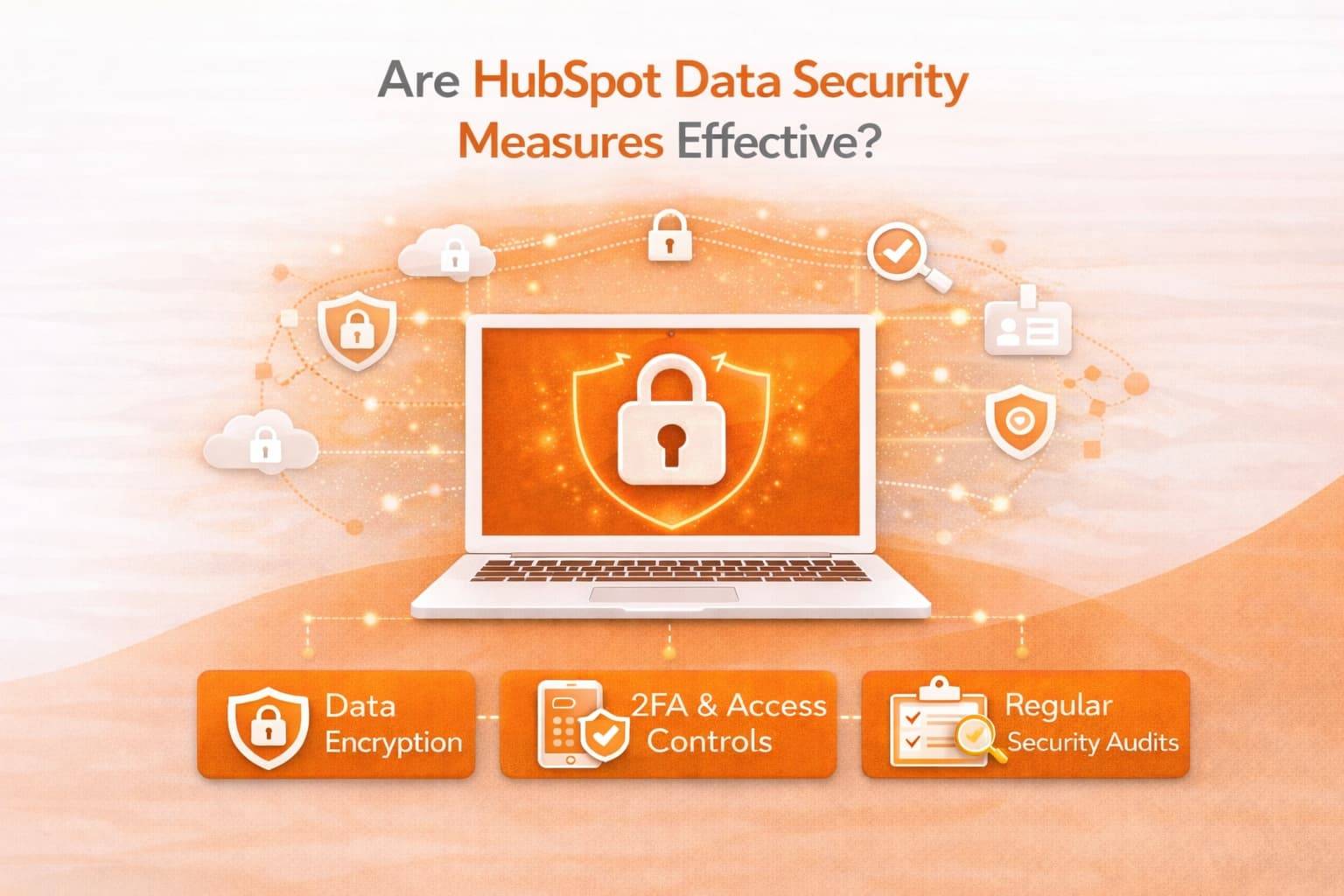
HubSpot CRM uses encryption at rest and in transit, role-based access controls, monitoring, and audit logging to protect customer data.
-
Security follows a shared responsibility model: HubSpot secures the platform, and businesses must manage access, governance, and internal controls.
-
Best practices include two-factor authentication, least-privilege permissions, audit log reviews, secure integrations, and strong password policies.
-
Secure CRM data migration requires encrypted transfer, restricted access, backups, validation testing, and regulatory alignment.
-
Regulated industries can configure HubSpot to support GDPR and HIPAA-aligned workflows with proper governance.
-
Strong security depends on disciplined configuration, continuous monitoring, and documented compliance processes.
When choosing a CRM (Customer Relationship Management) platform, one of the biggest concerns for businesses is data security. You’re trusting a software provider with sensitive customer information, sales records, communications history, and other proprietary data, and you need to know it’s safe.
If you’re considering HubSpot CRM, you’re likely asking: Is HubSpot CRM data secure?
In this guide, we’ll explain how HubSpot protects your CRM data, what built-in security measures are in place, best practices for securing your data, and what you should know about secure CRM data migration during HubSpot implementations.
Is HubSpot CRM Data Secure?
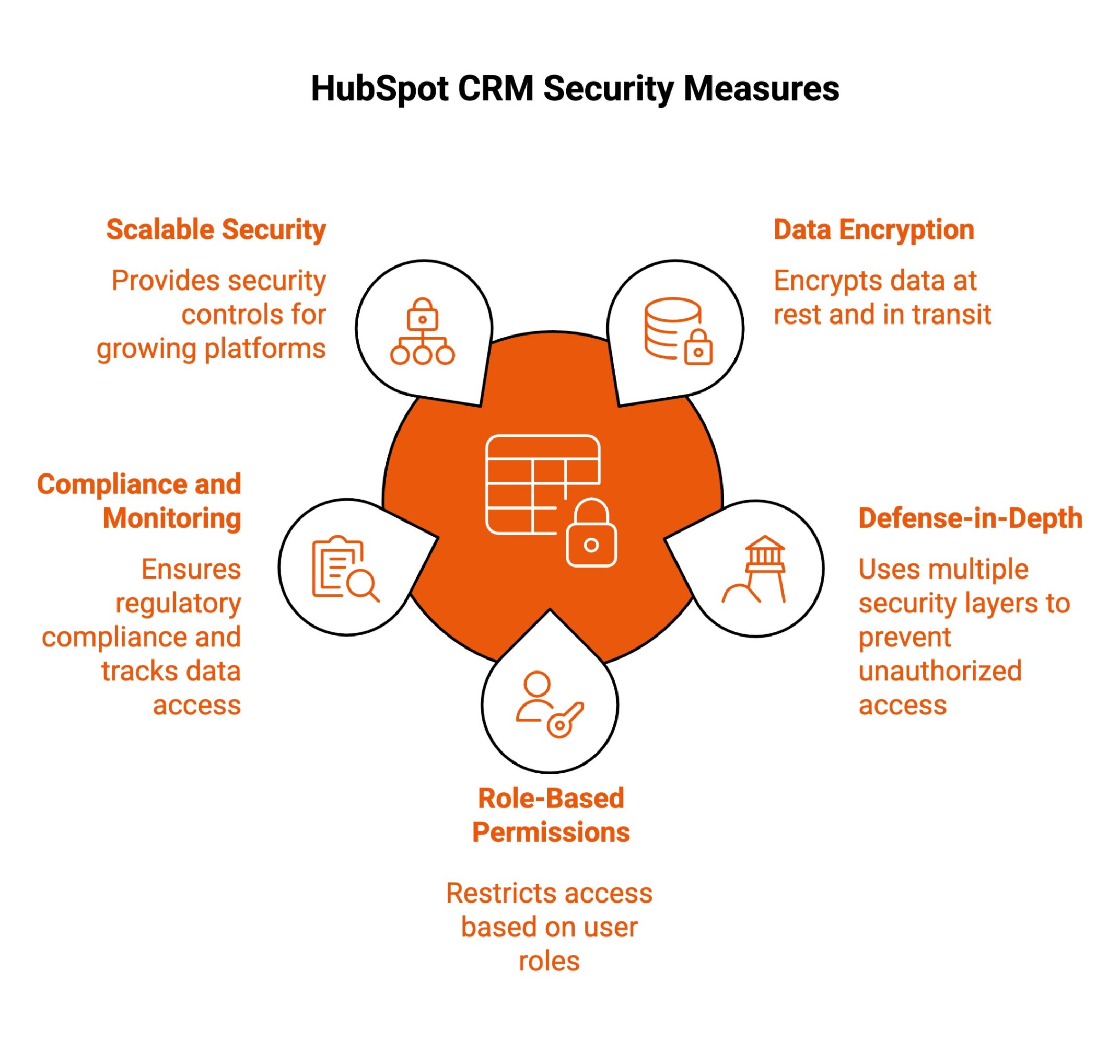
HubSpot CRM is used by startups, scaling teams, and enterprise organizations. When all your customer data lives in one system, security becomes a business priority, not just an IT concern.
Here’s a simple breakdown of how HubSpot protects your CRM, and how it affects your daily operations.
1. Data Encryption at Rest and In Transit
HubSpot encrypts data both when it is stored and when it is being transferred between devices and servers.
In practice, this means:
-
If someone intercepts internet traffic, they cannot read your data.
-
If storage systems are accessed without authorization, the data is not stored in plain text.
Your contact records, deals, emails, and customer information are automatically protected without requiring manual setup.
This matters when:
-
Employees log in remotely.
-
Teams work across different networks.
-
Data syncs between integrations.
-
Records are stored long-term.
Encryption is always on. You do not need to configure it.
2. Defense-in-Depth Protection Against Unauthorized Access
HubSpot uses multiple layers of security instead of relying on a single safeguard.
These layers include:
-
Firewalls.
-
Continuous system monitoring.
-
Intrusion detection.
-
Threat response mechanisms.
If one layer fails, others are still active.
For your organization, this reduces the likelihood of large-scale breaches and improves early detection of suspicious behavior.
You are not depending solely on passwords. The infrastructure is designed to block, monitor, and respond to threats continuously.
3. Role-Based Permissions and Access Management
HubSpot allows administrators to control exactly who can view, edit, export, or delete data.
You can:
-
Limit sales reps to their own pipelines
-
Restrict marketing from accessing billing settings
-
Prevent most users from exporting large data sets
-
Reserve admin rights for a small group
This reduces internal risk.
If someone makes a mistake, it is contained. If someone changes roles, permissions can be adjusted. If someone leaves, access can be removed immediately.
Security becomes part of daily account management, not an afterthought.
4. Compliance, Logging, and Ongoing Monitoring
HubSpot logs activity across your account.
You can review:
-
Login history
-
Permission changes
-
Data exports
-
Record updates
If something unusual happens, you have visibility into it.
This supports:
-
Internal investigations
-
Audit preparation
-
Regulatory reporting
-
Accountability across teams
For organizations operating under frameworks like the general data protection regulation, detailed audit trails help demonstrate responsible handling of personal data.
This is especially important when managing sensitive data, health data, or other specific data subject to strict regulatory requirements.
HubSpot’s logging capabilities help teams align with industry standards by giving security teams visibility into account activity and changes.
5. Scalable Platform Security and Privacy Controls
As your organization grows, your CRM becomes more complex.
You add:
-
More users.
-
More integrations.
-
More workflows.
-
More customer data.
HubSpot is designed to scale securely alongside that growth.
You can:
-
Add new teams without granting excessive permissions.
-
Connect tools while maintaining oversight.
-
Manage consent and privacy settings.
-
Handle data deletion requests properly.
This is especially important for organizations operating across multiple regions or regulated industries.
Security controls expand with usage rather than breaking under it. HubSpot’s security measures affect how confidently you can operate.
With encryption, layered infrastructure protection, controlled access, detailed logging, and scalable privacy tools, you can centralize customer data without sacrificing governance. Security is not just about preventing attacks. It is about maintaining operational control as your organization grows.
What Are the Best Practices for Securing HubSpot CRM Data?
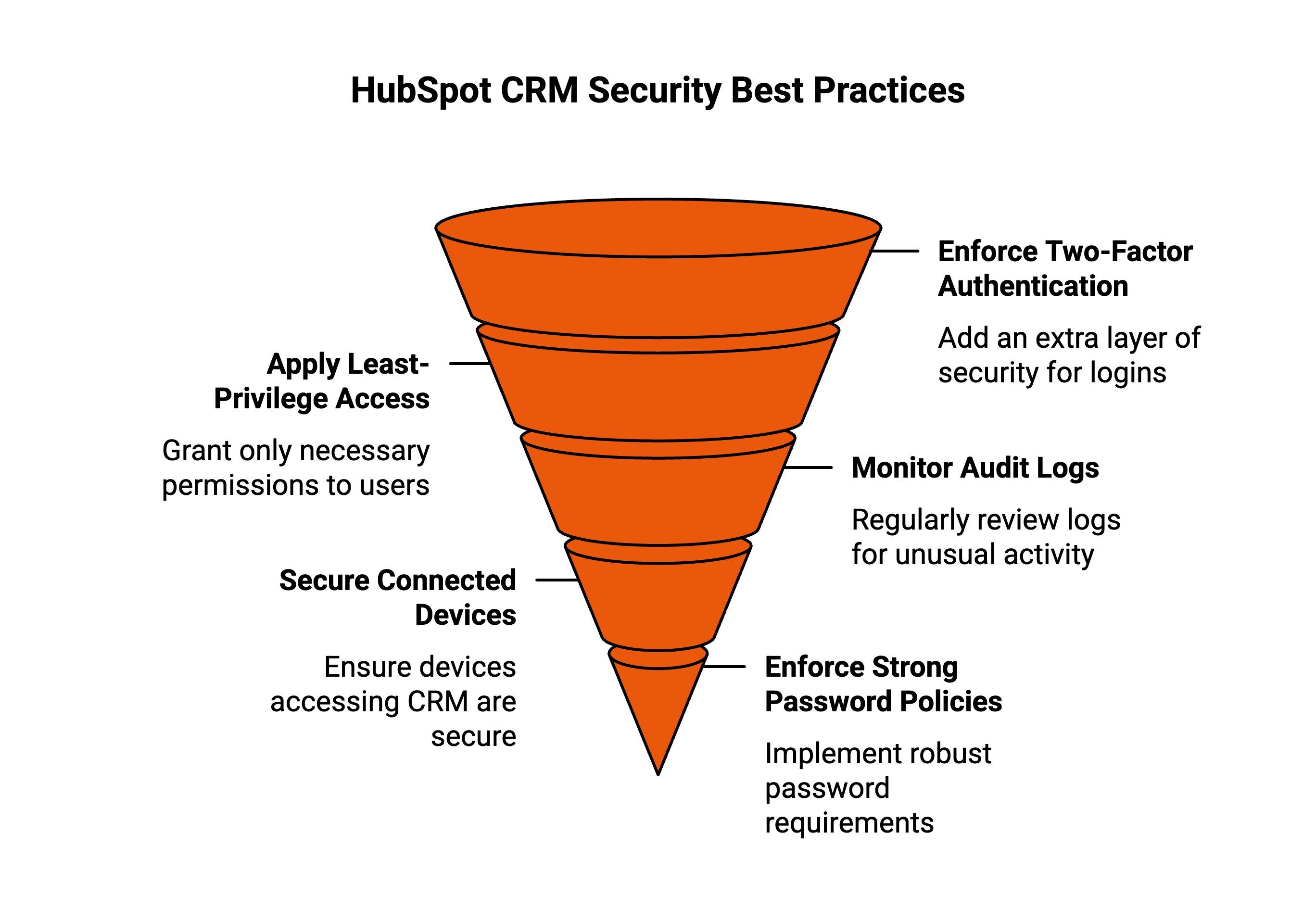
Even though HubSpot includes strong built-in protections, long-term security depends on how your team sets it up and manages access day to day. Security does not maintain itself.
If you want to protect customer data, meet compliance standards, and avoid preventable mistakes as your team grows, you need clear internal rules and consistent oversight.
Here are practical steps every organization should follow.
1. Enforce Two-Factor Authentication
Do not rely on passwords alone.
Turn on two-factor authentication (2FA) for every user in your HubSpot account, without exception.
Even if someone’s password is compromised, 2FA prevents attackers from logging in without a second verification step.
Make this mandatory for:
-
Admins
-
Marketing managers
-
Sales leaders
-
Anyone with access to customer data
Do not allow shared logins. Do not allow “temporary” bypasses.
If someone needs access, give them their own account and require verification.
This single step significantly reduces unauthorized access risk.
2. Apply Least-Privilege Access Controls
Do not give everyone admin access.
Only give users the permissions they absolutely need to do their job.
For example:
-
Sales reps do not need account-level admin controls.
-
Content writers do not need access to billing settings.
-
External contractors should never have full system permissions.
Review permissions before onboarding new users. Review them again when someone changes roles.
If someone leaves the company, immediately remove their access.
The goal is simple: limit exposure.
The fewer people who can change critical settings or access sensitive records, the lower your internal risk.
3. Monitor Audit Logs Consistently
Do not wait for something to go wrong before checking activity logs.
Set a routine to review HubSpot audit logs regularly, weekly or monthly, depending on account size.
Look for:
-
Unusual login locations.
-
Permission changes.
-
Bulk data exports.
-
Integration modifications.
-
New admin assignments.
If you onboard a third-party agency or a new internal team member, monitor activity more closely during the first few weeks.
Early detection prevents small issues from turning into larger incidents.
Security visibility is not optional; it is a habit.
4. Secure Connected Devices and Integrations
Do not assume HubSpot security covers insecure devices.
Any laptop, mobile device, or integration connected to your account becomes part of your security environment.
Make sure:
-
Devices are encrypted
-
Software is updated regularly
-
Antivirus and endpoint protection are active
-
Public Wi-Fi usage is restricted or secured via VPN
Review third-party integrations before connecting them.
Ask:
-
What data will this tool access?
-
Does it require full permissions?
-
Is the vendor reputable?
Remove unused integrations. Disconnect tools that no longer serve a purpose.
Every integration expands your attack surface. Keep it controlled.
5. Enforce Strong Password Policies
Do not allow weak passwords.
Require:
-
Minimum length standards
-
Mixed characters (upper/lowercase, numbers, symbols)
-
Unique passwords per account
Educate your team about password reuse. Many breaches happen because employees reuse passwords from other platforms.
Encourage the use of password managers. Do not allow credentials to be stored in shared documents or sent via email.
If your organization handles regulated data, increase password rotation frequency and audit compliance.
Strong passwords are basic, but they remain one of the most important defenses.
When you combine HubSpot’s built-in protections with disciplined internal practices, you create a security framework that supports trust, compliance, and long-term resilience, not just short-term protection.
Secure CRM Data Migration: What You Need to Know?
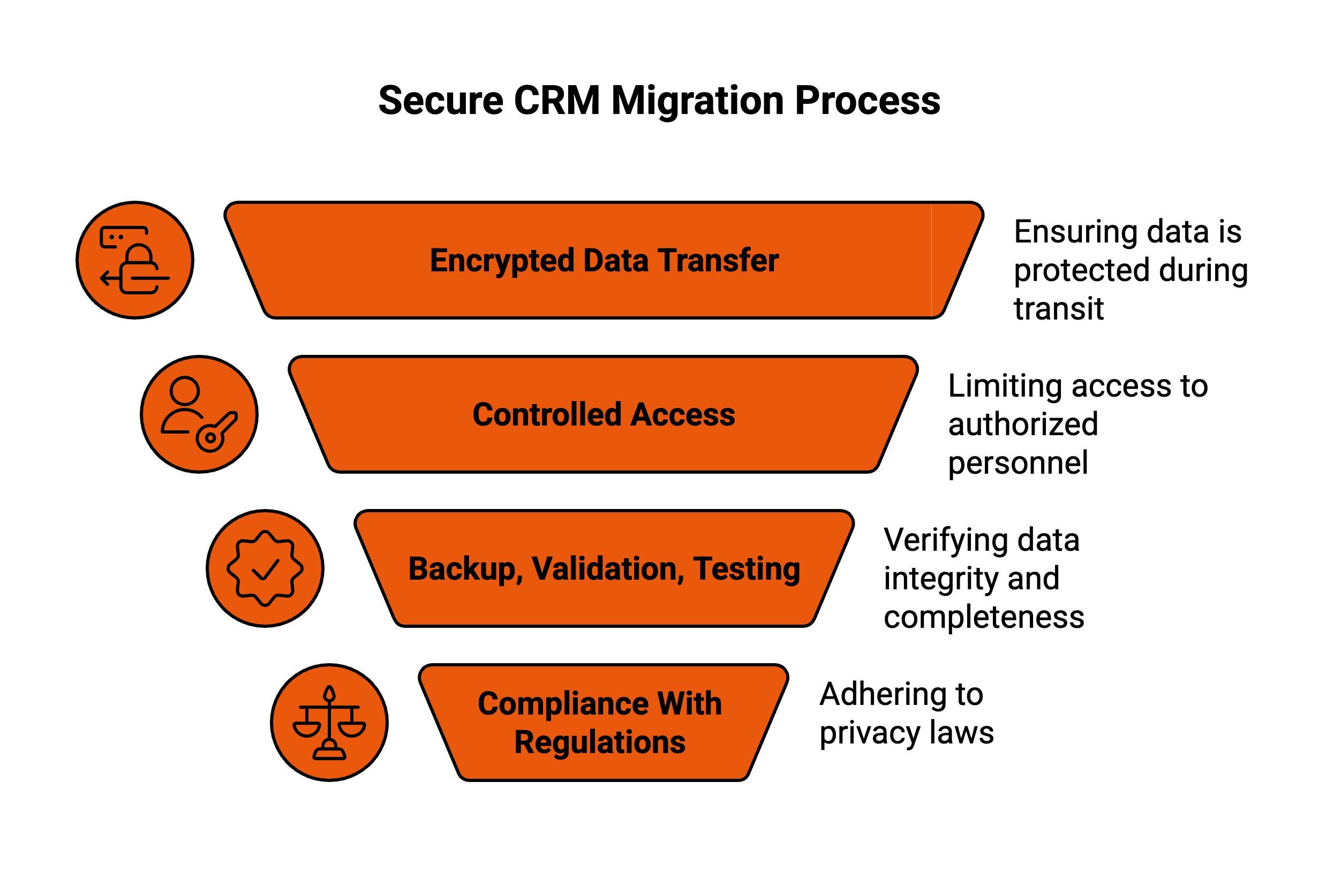
Migrating CRM data is a critical step when moving to HubSpot, especially when customer records, history, and workflows are involved. A secure migration protects business continuity, prevents data loss, and ensures sensitive records remain confidential while systems, teams, and processes transition to a new platform.
Below are the core elements that define a secure CRM migration.
1. Encrypted Data Transfer
During migration, data should always be encrypted while moving between systems. Encryption ensures intercepted files remain unreadable and protected from unauthorized access.
This safeguard is essential when transferring large datasets, historical records, and customer communications, reducing exposure risks and maintaining confidentiality throughout the entire migration window.
2. Controlled Access and Permissions
Only approved personnel should access systems, credentials, and files during migration. Temporary roles, limited permissions, and secure credential handling prevent accidental exposure.
Restricting access reduces human error, supports accountability, and ensures migration activities are performed only by those directly responsible for execution and oversight.
3. Backup, Validation, and Testing
Comprehensive backups before migration protect against unexpected failures. Post-migration validation ensures that records are transferred accurately and completely. Testing confirms data integrity, field mapping, and usability.
These steps prevent silent data loss, reduce downtime, and allow teams to correct issues before the new CRM goes live.
4. Compliance With Privacy Regulations
Secure migrations must align with privacy laws such as GDPR and HIPAA when applicable. This includes lawful handling, minimal data exposure, and documented safeguards.
Whether managed internally or through a HubSpot partner, compliance-focused migration practices protect organizations from legal risk and preserve customer confidence.
A secure CRM migration is not just a technical execution; it is a governance process that protects data, trust, and long-term operational stability when aligned with HubSpot CRM data security best practices.
How Does HubSpot Ensure Data Security in Regulated Industries Like Healthcare and Finance?
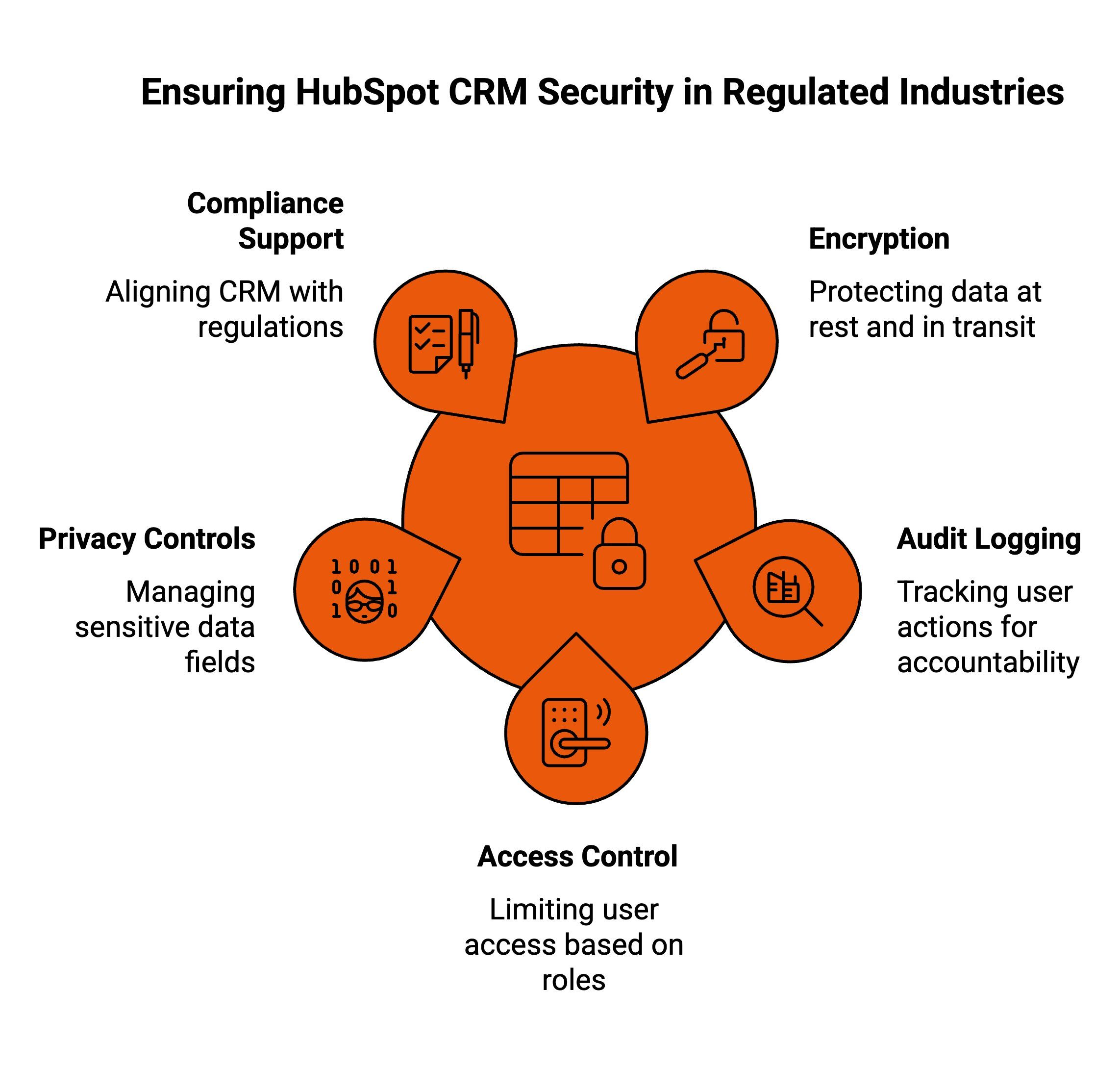
Organizations in highly regulated industries face stricter expectations around privacy, auditing, and governance. CRM platforms must support compliance without limiting usability. The HubSpot platform can be configured to meet these needs when teams understand how its controls align with regulatory requirements and internal risk management policies.
Here is how regulated organizations can use HubSpot responsibly.
1. Enterprise-Grade Encryption and Data Protection
HubSpot applies enterprise-grade encryption to protect HubSpot data at rest and in transit. This protects personal information, client data, and other sensitive information from unauthorized access.
Encryption acts as a foundational layer of security, helping reduce the risk of data breaches across devices, integrations, and connected systems. For industries handling health information or financial records, this protection supports data privacy expectations without interrupting daily operations.
When properly implemented, encryption helps organizations maintain customer trust while centralizing operations inside a secure data hub.
2. Audit Logging and Access Control
Detailed audit logs track logins, changes, exports, and permission updates. Role-based permissions limit who can view or modify records.
This combination of security features allows security teams to monitor activity, investigate incidents, and enforce internal access policies. If something unusual occurs, there is a clear activity trail.
For regulated environments, this visibility supports oversight, accountability, and compliance reporting, especially when managing sensitive workflows tied to customer service operations.
3. Sensitive Data and Privacy Controls
HubSpot provides tools to manage and restrict sensitive fields, helping teams control how sensitive data is stored and accessed.
For organizations handling health data or other protected records, this reduces unnecessary exposure and supports stronger data privacy practices.
Proper configuration ensures that only authorized users interact with protected records, limiting risk across departments and workflows.
4. Support for GDPR and HIPAA-Aligned Workflows
HubSpot includes compliance tooling that helps organizations align CRM usage with GDPR and HIPAA expectations. These tools support consent management, documentation, and data rights handling.
HubSpot’s security program operates as a structured security program with documented processes, monitoring, and ongoing reviews. While internal governance remains essential, these controls help organizations align operations with industry standards.
With disciplined configuration and oversight, regulated teams can use the HubSpot platform to protect personal information while maintaining an efficient and reliable customer experience.
Why Keep Managing Testimonials Outside HubSpot When You Can Automate Them Natively with ProofFlow?
If your team is exporting lists, sending manual emails, or copying embed codes from disconnected tools, you’re adding friction to something that should run automatically. ProofFlow solves that by living inside HubSpot, not beside it. Your HubSpot CRM already knows who your happiest customers are, based on NPS, deal stage, lifecycle data, and engagement.
ProofFlow reads that data, triggers personalized testimonial requests through HubSpot workflows, collects video or text responses directly in-browser, and syncs everything back into contact records with status, timestamps, and transcripts.
You no longer need CSV exports, Zapier chains, or separate dashboards to manage proof. Testimonials become searchable, reportable CRM data that stays up to date and feeds your website widgets without manual work.
Streamline testimonial collection, automate follow-ups, and publish updated social proof without leaving HubSpot.
Get started with ProofFlow — set up in under two minutes and automate your testimonial workflow today!
Conclusion
HubSpot CRM is built with strong security fundamentals and enterprise-level protections, including encryption at rest and in transit, role-based access controls, continuous monitoring, and compliance tools.
However, security is a shared responsibility: HubSpot protects the platform, while businesses must secure access and governance settings, ensure migrations follow secure processes, and conduct regular audits and access reviews.
When these measures work together, HubSpot CRM helps keep customer data private, controlled, and compliant, enabling organizations to operate securely and confidently.
Frequently Asked Questions
Is HubSpot safe for sensitive customer data?
Yes, HubSpot protects sensitive customer data through encryption, role-based access controls, and audit logs, helping organizations secure personally identifiable information, limit unauthorized access, support compliance requirements, and maintain visibility into data usage across marketing, sales, and service teams.
Does HubSpot use security certifications?
HubSpot follows recognized security standards and completes third-party audits such as SOC 2 Type II, providing documentation that helps businesses assess controls, validate compliance readiness, and confidently use the platform within regulated or security-conscious operating environments today.
How secure is using HubSpot CRM with the Outlook add-in?
Using HubSpot CRM with the Outlook add-in is secure because data syncs through authenticated connections, respects user permissions, and follows HubSpot’s encryption and access controls, ensuring emails, contacts, and activity data are protected during integration and everyday use.
Does HubSpot sell your data?
No. HubSpot does not sell customer data. Data is processed only to provide contracted services, following strict privacy policies, security controls, and compliance standards that protect customer ownership, confidentiality, and responsible data usage.
What is a secure CRM data migration during a HubSpot implementation?
A secure crm data migration HubSpot implementation protects sensitive customer information during transitions, ensuring data accuracy, regulatory compliance, controlled access, and continuity of marketing and sales operations, while reducing risk, downtime, and long-term governance issues for growing organizations.
Ready to automate your testimonial collection?
Get full access to ProofFlow at no cost during our free beta. The complete testimonial automation platform for HubSpot.
Get Started Free