How to Grow Your Business with Testimonial Automation?

Key Highlights
- Embrace testimonial automation to streamline how you gather customer feedback and build powerful social proof.
- Automated tools can send out requests and collect text and video testimonials with minimal effort.
- You can easily showcase positive reviews on your website using customizable widgets and “Wall of Fame” pages.
- Integrating with platforms like social media allows you to import positive comments and mentions directly.
- This process saves time, strengthens your brand’s credibility, and helps turn happy customers into advocates.
Ever realize you should’ve asked for a testimonial, after the moment has already passed? A deal closes, onboarding finishes, or a customer sends a positive note, and the intent is there. Then the inbox fills up, priorities shift, and the ask never goes out. When someone finally remembers days or weeks later, the context is gone, and the response is weak or nonexistent.
This is why manual testimonial outreach rarely delivers consistent results. The issue isn’t effort, it’s timing and follow-through. Automation turns testimonial collection into a system rather than a reminder, capturing text and video testimonials at moments of peak satisfaction, before enthusiasm fades.
In this guide, you’ll learn how testimonial automation works, how to automate video testimonials, how HubSpot fits into the process, and how ProofFlow helps businesses collect and showcase authentic customer testimonials effortlessly.
What Is Testimonial Automation?
Testimonial automation is a way to operationalize customer proof at scale, not simply collect quotes faster. As teams grow, manual outreach creates gaps in timing, consistency, and quality that are difficult to manage reliably.
Instead of relying on ad-hoc requests, automated systems trigger testimonial outreach at defined customer milestones, such as after a purchase, project completion, or positive interaction. This preserves context and intent, making feedback more relevant and easier to activate across marketing and sales.
With automated client testimonial workflows, businesses can expect:
- Higher response rates because requests align with real success moments.
- Better testimonials that are clearer, more specific, and more persuasive.
- Steady social proof without last-minute scrambling or missing gaps.
- Less manual effort for marketing and customer success teams.
The result is a shift from reactive testimonial collection to a structured, repeatable trust system that supports conversion and growth, without constant oversight.
What Steps are Involved in Automating the Testimonial Collection Process?
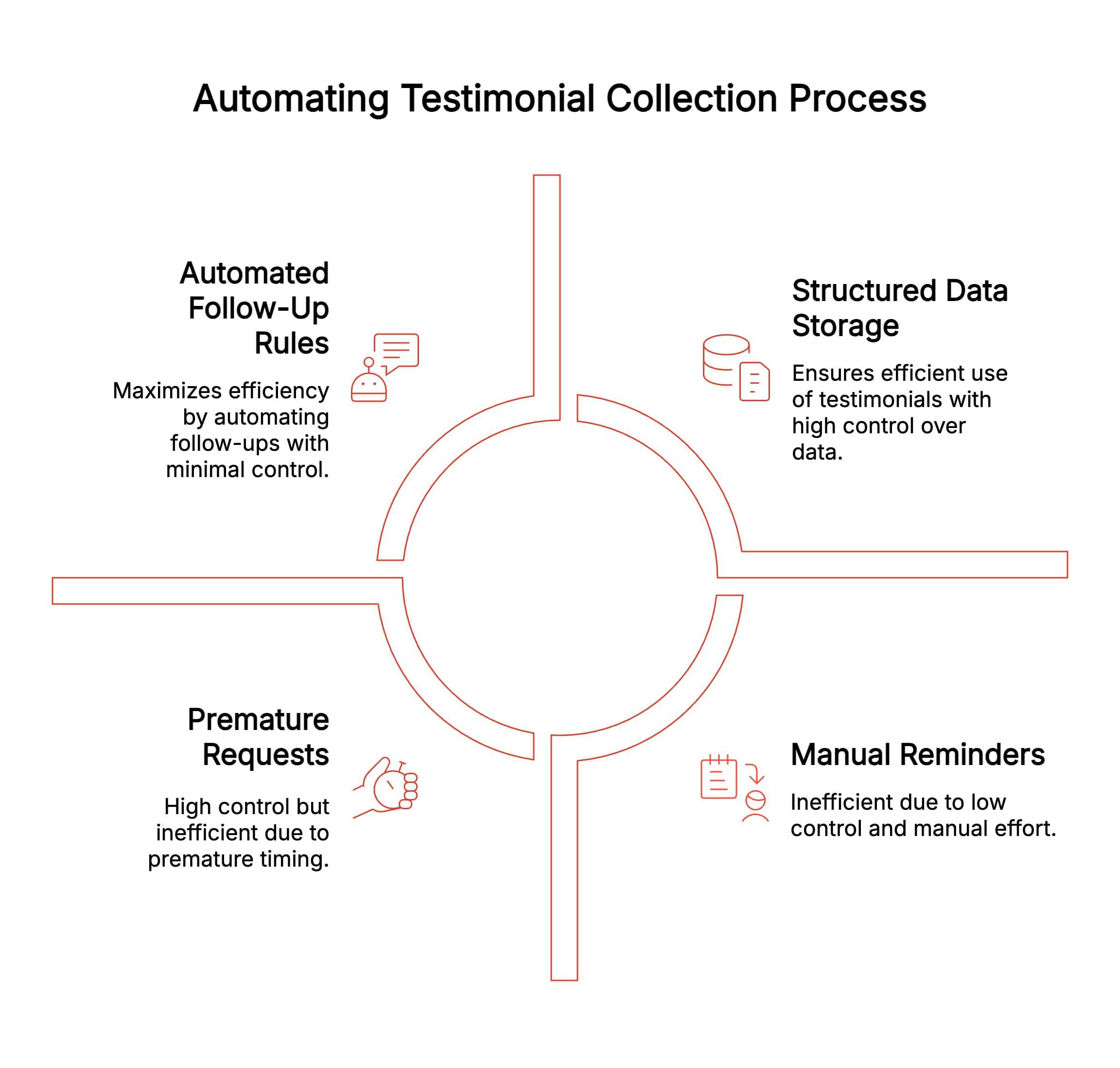
Automated testimonial emails fail most often not because the tools are complex, but because teams automate without first deciding what should trigger a request and what should stop it. The goal isn’t volume, it’s accuracy.
A good setup ensures requests are timely, controlled, and operationally invisible once live.
Step 1: Define the Exact Trigger in Your CRM
Before touching automation, decide which customer moments genuinely signal success. Triggers like Closed Won, completed onboarding, renewal confirmation, or a high NPS score work because they represent value already delivered.
Defining this upfront prevents premature requests. Adding a simple control field, such as a testimonial requested flag, ensures customers aren’t contacted twice and protects long-term trust as automation scales.
Step 2: Connect the Trigger to a Testimonial Collection Action
Once the trigger is clear, the next decision is where the customer lands. Linking the email to a single testimonial collection page removes ambiguity and reduces friction.
Referencing the exact milestone in the message explains why the request exists now, which increases completion rates and avoids the “random automated email” effect that customers often ignore.
Step 3: Set Follow-Up Rules Instead of Manual Reminders
Follow-ups are where manual systems break down. Instead of reminders, automation should include simple logic that waits, checks for a response, and sends one polite follow-up if needed.
This prevents over-messaging while ensuring no opportunity is lost. Automatically exiting responders from the workflow keeps outreach respectful and operationally clean.
Step 4: Store Testimonials as Structured, Reusable Data
Collection alone doesn’t create value; structure does. Storing testimonials as records tied to contacts or accounts, with consent and status captured automatically, prevents common issues like lost approvals or unused feedback. This structure is what allows testimonials to move effortlessly into emails, pages, and sales workflows later.
Manually asking for testimonials may work at a small scale, but it becomes difficult to manage as a business grows. Between customer support requests, managing social channels, and daily operations, testimonial outreach is often delayed or missed. Start collecting testimonials automatically with ProofFlow
What Does Fully Automated Testimonial Collection Look Like in Practice with HubSpot and ProofFlow?
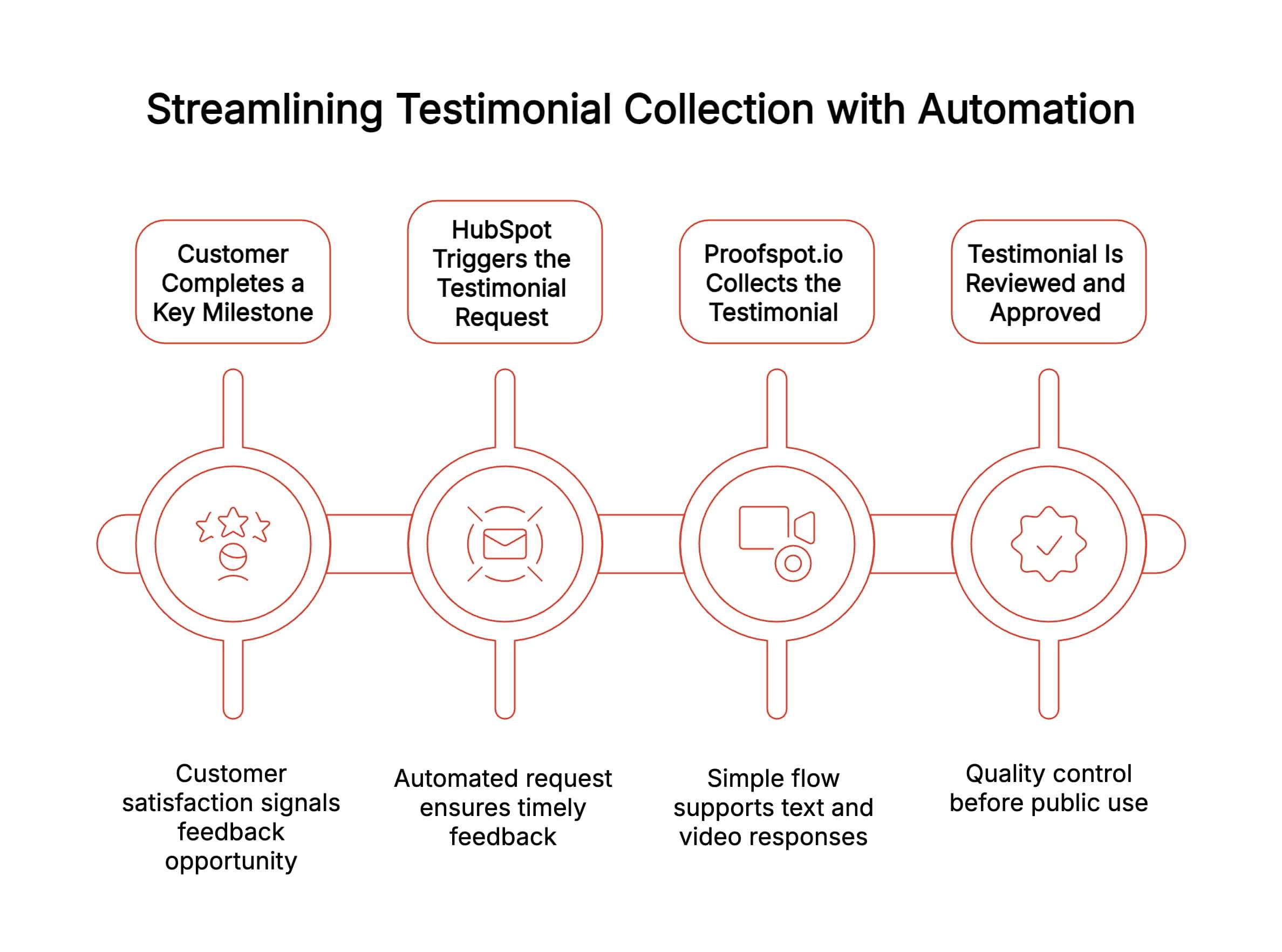
A fully automated testimonial system connects customer actions, HubSpot workflows, and ProofFlow into one seamless process. Instead of chasing feedback manually, testimonials are collected, reviewed, and published automatically at the right moments.
Here’s how the system works step by step in real-world use.
1. Customer Completes a Key Milestone
The process starts when a customer reaches a meaningful milestone, such as onboarding completion, project delivery, renewal, or a clearly achieved outcome. These moments signal satisfaction and willingness to share feedback, making them ideal for triggering testimonial requests without forcing outreach too early or adding unnecessary pressure.
2. HubSpot Triggers the Testimonial Request
Once the milestone is recorded, HubSpot workflows automatically trigger a testimonial request. This ensures consistent timing and relevant messaging, removing reliance on reminders and freeing sales and customer success teams from manually chasing feedback as pipelines grow.
3. ProofFlow Collects the Testimonial
ProofFlow.app captures the response through a simple, guided flow that supports both text and video. This creates an automated way to create customer testimonial videos, allowing customers to respond from a single link without logins or downloads, which significantly reduces friction.
4. Testimonial Is Reviewed and Approved
Once submitted, testimonials move into a review stage where they can be approved, categorized, and prepared for use across campaigns, landing pages, and sales workflows. This final step ensures quality, consent, and consistency before testimonials are activated as scalable social proof.
When HubSpot is integrated with ProofFlow, testimonial requests and submissions become part of a seamless, automated workflow rather than a disconnected manual process.
Why Should You Automate Video Testimonials?
Video testimonials feel more real and trustworthy because buyers can see faces, hear voices, and sense genuine emotion. This makes them more engaging and persuasive than text alone.
As buyers increasingly expect authentic proof, businesses need a scalable way to collect video feedback without friction. Automating video testimonials helps you:
- Build stronger trust with real customer stories.
- Increase engagement across landing pages and campaigns.
- Improve conversion rates with authentic social proof.
- Reduce the effort required to collect video feedback.
In short, video testimonial automation makes it easier to capture powerful customer stories and use them consistently across your marketing.
What Are the Benefits of Automating Video Testimonials with ProofFlow?
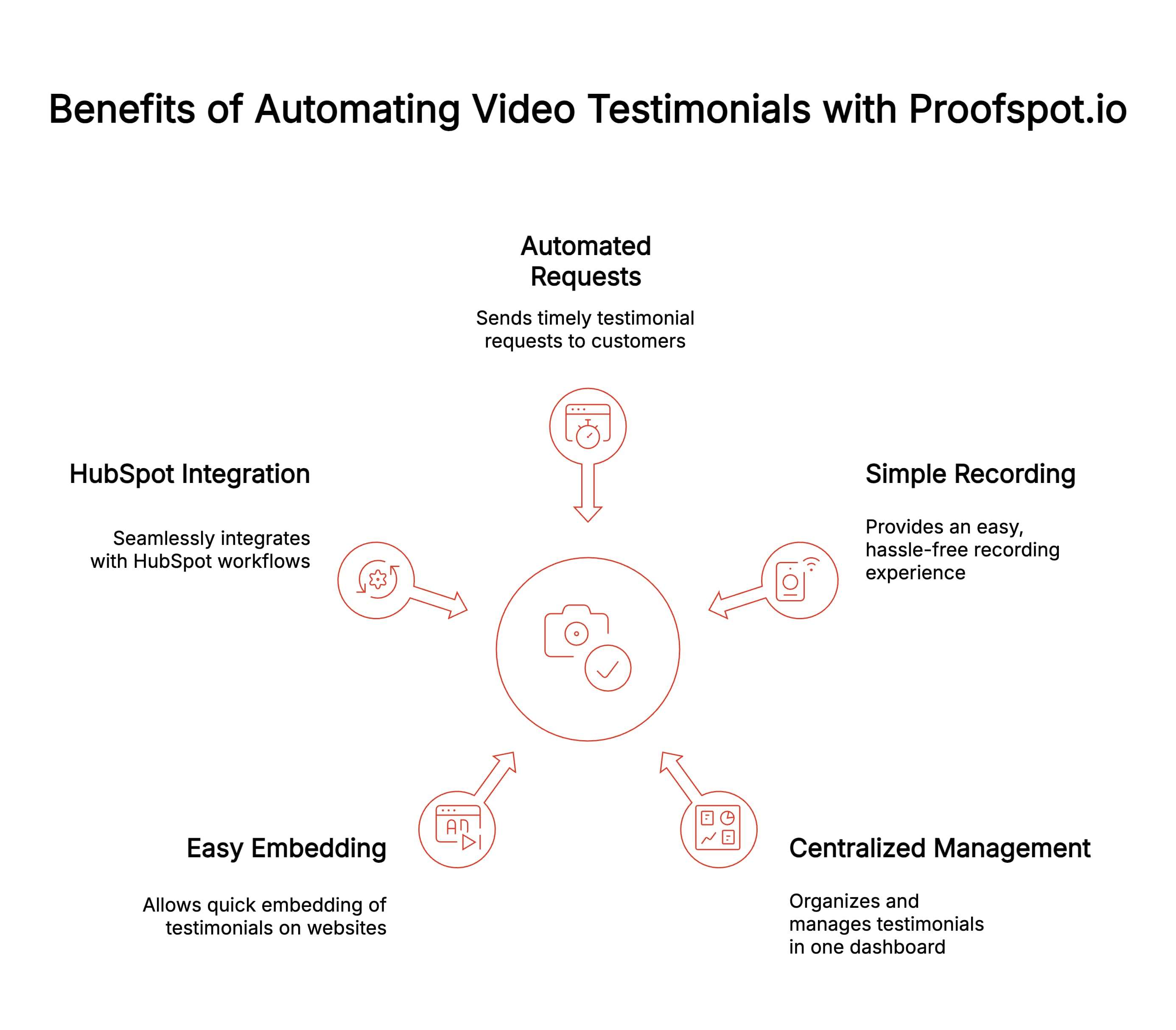
ProofFlow helps businesses scale video testimonial collection while keeping the experience simple for customers and teams. Each benefit supports consistent, high-quality social proof without manual effort.
1. Automated Testimonial Requests
ProofFlow automatically sends video testimonial requests at the right moments in the customer journey. This ensures feedback is collected when satisfaction is highest, improving response rates while removing the need for manual reminders or follow-ups from busy marketing teams.
2. Simple Video Recording Experience
Customers can record video testimonials directly from a single link, with no downloads, logins, or technical setup required. This low-friction experience makes it easier for customers to participate and increases the likelihood of receiving authentic, usable video feedback.
3. Centralized Review and Approval
All video testimonials are stored in one centralized dashboard, where teams can review, approve, tag, and organize content. This keeps testimonials consistent, compliant, and easy to manage across different campaigns, pages, and sales enablement materials.
4. Easy Website and Landing Page Embedding
Approved video testimonials can be embedded quickly on websites and landing pages. This allows businesses to keep social proof fresh, relevant, and visible without developer support or repeated manual updates across multiple marketing assets.
5. Seamless HubSpot Integration
ProofFlow integrates smoothly with HubSpot workflows, enabling fully automated video testimonial collection tied to real customer actions. This creates a connected system that scales effortlessly while maintaining authenticity, control, and alignment with existing marketing automation processes.
What Mistakes Should You Avoid When Automating Testimonials?
Testimonial automation works best when it feels thoughtful and genuine. Small missteps can reduce trust and limit the value of the feedback you collect.
Being aware of these common mistakes helps keep your testimonials authentic and effective.
1. Overloading Customers With Long or Confusing Requests
Automated testimonial requests often fail when they ask too much or are unclear. Long prompts increase friction and drop-offs. When requests aren’t simple and fast to complete, customers disengage, lowering response rates and weakening the overall quality of feedback collected.
2. Treating Video Testimonials as Optional
Many teams rely heavily on written testimonials because they feel easier to automate. This limits impact. Short, informal videos convey tone, confidence, and authenticity that text alone cannot, especially when buyers are close to making a decision.
3. Collecting Testimonials Without Measuring Performance
Automation often stops at collection. Teams rarely track which testimonials influence engagement or conversions. Without performance data, weak placements and formats persist, preventing optimization and limiting the real business value of testimonial automation.
4. Sending Requests Too Early
Asking before a customer has experienced real value often leads to weak or no responses. Automation should wait for clear success moments, not rush the request.
5. Using Generic Templates
Overly generic messages feel impersonal and are easy to ignore. Even automated requests should reference the customer’s experience to feel human and relevant.
6. Ignoring Consent and Permissions
Testimonials should always be collected with clear consent for use. Skipping this step can create legal issues and damage customer trust.
7. Collecting Testimonials Without a Usage Plan
Gathering testimonials without knowing where or how they will be used leads to wasted effort. Every testimonial should have a clear purpose across pages or campaigns.
When done correctly, automation strengthens authenticity by supporting better timing, clearer intent, and more meaningful customer stories.
How Does Testimonial Automation Support Long-Term Growth?
Testimonial automation creates a steady stream of trust that strengthens performance over time. Each benefit compounds as more customer stories are collected and reused across the funnel.
1. Improves Conversion Rates
Consistently updated testimonials reduce buyer hesitation by showing real customer outcomes. When prospects see relevant proof at decision points, they feel more confident, leading to higher conversion rates across landing pages, product pages, and key steps in the sales funnel.
2. Speeds Up Sales Velocity
Strong testimonials answer common questions and objections before sales conversations begin. This shortens decision cycles, reduces back-and-forth, and helps prospects move faster from interest to commitment with fewer follow-ups from sales and customer success teams.
3. Builds Lasting Brand Credibility
A continuous flow of authentic testimonials signals reliability and long-term value. Over time, this consistent social proof strengthens brand credibility, positioning the business as trusted, proven, and dependable in increasingly competitive markets.
4. Encourages Customer Advocacy
Automated testimonial requests make it easy for satisfied customers to share their experience. This turns positive outcomes into visible advocacy, helping businesses amplify word-of-mouth while reinforcing loyalty and long-term customer relationships.
As competition grows, businesses that automate testimonials gain a compounding advantage by continuously reinforcing trust at scale.
Conclusion
Testimonial automation is no longer optional for growing businesses. As the customer base expands, manual processes struggle to capture timely positive feedback, leaving gaps across online reviews and other trust signals that prospects rely on.
By combining HubSpot workflows with dedicated testimonial tools, teams can automate email requests and video outreach, ensuring testimonials are captured immediately after a positive experience. This keeps proof flowing consistently into review platforms, review sites, and Google reviews without relying on memory or manual follow-ups.
The result is fresher social proof, stronger credibility, and scalable trust, exactly what modern teams need as volume and expectations grow.
Frequently Asked Questions
Are automated testimonial platforms suitable for small businesses?
Yes, automated testimonial platforms suit small businesses by reducing manual effort, capturing feedback consistently, and building trust affordably. They scale with growth, require minimal setup, integrate with existing tools, and help small teams compete using credible social proof effectively.
How do automated testimonial tools handle video testimonials?
Automated testimonial tools handle video testimonials by triggering requests, guiding customers through simple recording steps, managing permissions, and storing files centrally. They streamline approvals, optimize formats, and distribute videos across websites, email, and social channels without technical friction.
Can I automate both collecting and sharing testimonials on my site?
Yes, you can automate both collecting and sharing testimonials by using workflows that request feedback, approve submissions, and publish them dynamically. Automation ensures testimonials appear on relevant pages instantly, stay updated, and align with buyer intent signals clearly.
What are the best software tools for automating testimonial requests?
The best software tools for automating testimonial requests offer timed triggers, reminders, personalization, and integrations. Purpose-built platforms outperform generic tools by capturing feedback reliably, supporting video testimonials, managing approvals, and scaling social proof workflows efficiently for businesses.
Can I embed automated testimonials directly into my site?
Yes, automated testimonials can be embedded directly into your site using widgets, scripts, or CMS integrations. This allows real-time updates, consistent branding, faster publishing, and placement across landing pages, product pages, and conversion-focused sections sitewide easily.
Is there a way to automate both collecting and sharing testimonials?
There is a way to automate both collecting and sharing testimonials through end-to-end testimonial platforms. These systems handle requests, approvals, storage, and distribution automatically, ensuring testimonials are always current, relevant, and strategically placed across marketing channels.
How can I use testimonials in my marketing and sales efforts?
Use testimonials in marketing and sales by addressing objections, validating claims, and reinforcing trust. Place them in emails, ads, proposals, landing pages, and sales conversations to shorten cycles, improve confidence, and increase conversions consistently for modern buying journeys.
What features and benefits should customer feedback tools have?
Customer feedback tools should offer automation, easy collection, video support, integrations, analytics, and compliance. Benefits include higher response rates, organized insights, scalable workflows, improved customer satisfaction, and actionable social proof that drives decisions across teams, channels, and campaigns.
How can I set up automated email requests for customer testimonials?
Set a CRM trigger after a success milestone, connect it to an automated email linking a testimonial form, personalize with context, add one follow-up rule, and store responses with consent so testimonials are captured without chasing.
Ready to automate your testimonial collection?
Get full access to ProofFlow at no cost during our free beta. The complete testimonial automation platform for HubSpot.
Get Started Free