How ProofFlow Automates Testimonials in HubSpot

Key Highlights
-
ProofFlow automates testimonial collection, review, approval, and reuse directly inside HubSpot, eliminating manual emails, spreadsheets, and disconnected tools.
-
HubSpot-triggered workflows ensure testimonial requests are sent at the right stage of the customer journey, improving timing, response rates, and consistency.
-
Centralized testimonial records keep feedback tied to contacts, companies, and deals, preserving full CRM context and visibility.
-
Built-in review, approval, and version control help teams scale testimonials without risking outdated or unapproved content.
-
Approved testimonials can be reused across HubSpot pages, campaigns, and sales workflows without duplication or manual updates.
-
Native publishing and reuse turn testimonials into structured HubSpot assets rather than one-off marketing content.
-
ProofFlow supports marketing, sales, and RevOps teams by creating a repeatable, scalable testimonial system inside HubSpot.
Customer testimonials are powerful, but managing them inside HubSpot often feels fragmented and manual. Teams rely on scattered emails, shared documents, and inconsistent follow ups, which makes it difficult to turn customer feedback into structured, reusable proof that supports deals and campaigns.
According to industry data compiled by Famewall, 92% of consumers read online reviews and testimonials before making a purchase decision. Despite this, many teams still treat testimonials as one off marketing assets instead of CRM level infrastructure. As companies grow, context gets lost, approvals slow down, and valuable proof never reaches landing pages, sales sequences, or automated workflows at the right time.
This blog explains how ProofFlow addresses these gaps by automating testimonial collection, approval, publishing, and reuse directly inside HubSpot, helping teams transform social proof into a scalable and reliable part of their CRM workflows.
Why Testimonial Automation Breaks Inside Most HubSpot Setups?
Most HubSpot teams rely on manual emails, static forms, or external tools to collect testimonials. These approaches disconnect testimonials from CRM logic, approvals, and reuse, causing automation to break as volume grows.
Here are the main reasons testimonial automation fails:
-
Lack of Lifecycle-Based Triggers: Testimonial requests are sent manually instead of being triggered by deal stages or lifecycle changes, leading to missed timing and inconsistent outreach.
-
Feedback Stored Outside HubSpot: Testimonials collected through external tools lose contact, company, and campaign context, making them harder to track and reuse.
-
No Structured Review or Version Control: Without approvals and version history, teams risk publishing outdated, unapproved, or inconsistent testimonials.
-
Limited Reuse Across Teams and Pages: Testimonials remain one-off assets that cannot be easily reused across HubSpot pages, campaigns, or sales workflows.
When testimonials are not managed natively in HubSpot, automation breaks down and proof becomes difficult to scale.
What Is ProofFlow and How Does It Work Natively Inside HubSpot?
ProofFlow is designed to automate how teams collect, review, approve, and reuse customer testimonials within their CRM workflows. Unlike embed based testimonial tools that generate standalone widgets for websites, ProofFlow treats testimonials as structured CRM assets tied directly to revenue activity.
Instead of managing proof through emails or external dashboards, ProofFlow connects testimonials to contacts, companies, and deals, preserving full business context. Requests are triggered at the right moments using HubSpot workflow logic, ensuring testimonials are collected when customer sentiment is strongest, not weeks later through manual follow up.
Here are the key ways ProofFlow operates within HubSpot workflows:
-
CRM Object Integration: Testimonials are stored alongside contact, company, and deal records, keeping proof connected to lifecycle data and ownership.
-
Workflow Triggered Requests: Testimonial requests are automatically sent based on deal stages, lifecycle changes, or custom workflow rules, eliminating ad hoc outreach.
-
Structured Review and Approval: Feedback, revisions, and approvals follow defined ownership and visibility rules, reducing ambiguity and version confusion.
-
Reusable Across Revenue Assets: Approved testimonials can be activated across landing pages, email sequences, and sales workflows without copying, pasting, or managing external embeds.
By positioning testimonials as CRM infrastructure rather than website widgets, ProofFlow helps teams operationalize social proof across marketing, sales, and RevOps in a scalable way.
What Core Features Does ProofFlow Provide to Automate Collecting Testimonials in HubSpot?
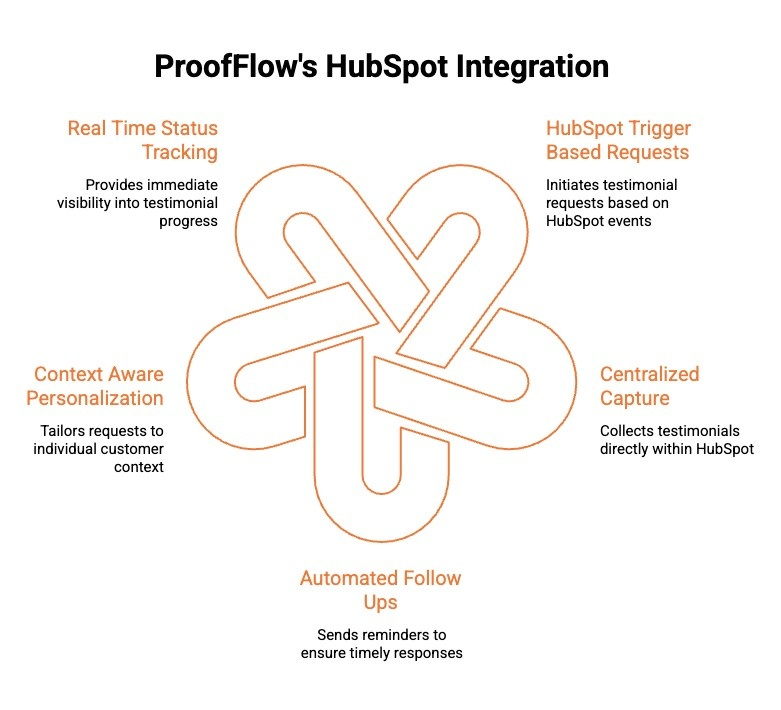
Collecting testimonials manually often leads to missed follow ups, inconsistent timing, and lost context. ProofFlow solves this by automating testimonial collection directly inside HubSpot workflows.
Here are the core features that enable structured, scalable testimonial collection:
1) HubSpot Trigger Based Testimonial Requests
ProofFlow uses lifecycle stages, deal updates, and workflow logic inside HubSpot to automatically trigger testimonial requests. This ensures customers are contacted at the right moment, without relying on manual outreach, and supports consistent collection across the entire customer lifecycle.
2) Centralized Testimonial Capture Inside HubSpot
All testimonials are captured directly within HubSpot, eliminating external tools or inbox tracking. This centralization gives marketing teams and sales reps full visibility into responses, ownership, and status, while preserving contact, company, and deal context for every testimonial collected.
3) Automated Follow Ups and Reminder Logic
ProofFlow automatically sends follow ups when testimonials are pending, reducing delays caused by manual chasing. Reminder logic ensures requests stay active until completion, helping teams maintain steady momentum even as testimonial volume increases.
4) Context Aware Request Personalization
Testimonial requests can be personalized using CRM data such as lifecycle stage, deal type, or customer segment. This context driven approach improves response quality while ensuring messages remain relevant and aligned with the stage of the customer journey.
5) Real Time Status Tracking and Visibility
Teams can track testimonial progress in real time, including requests sent, responses received, and items awaiting review. This visibility helps teams identify bottlenecks early and keep testimonial collection running smoothly at scale.
With five tightly integrated features, ProofFlow turns testimonial collection into a reliable, automated HubSpot workflow instead of a manual task.
How Does ProofFlow Help Automate the Process of Requesting Customer Testimonials in HubSpot?
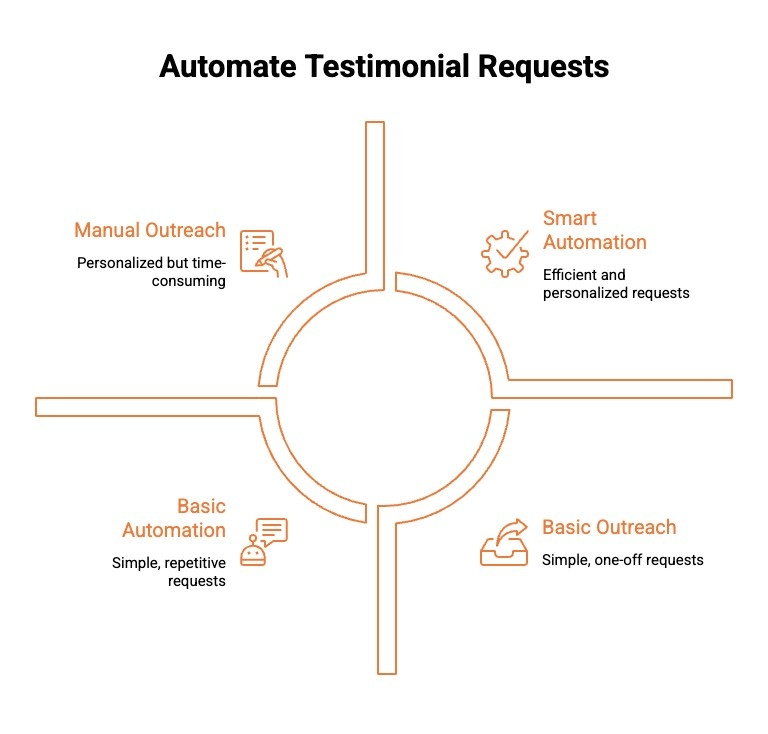
ProofFlow removes manual outreach by automating testimonial requests directly inside HubSpot. Instead of relying on ad hoc emails, teams use CRM data and workflow logic to request testimonials at the right time.
Here are the key ways ProofFlow automates testimonial requests:
-
Lifecycle and Deal-Based Triggers: Testimonial requests are automatically triggered when a contact reaches specific lifecycle stages or deal milestones, ensuring timely outreach.
-
Workflow-Driven Request Automation: HubSpot workflows control when and how testimonial requests are sent, eliminating manual tracking and follow-ups.
-
Context-Aware Request Templates: Requests are personalized using CRM data, making messages relevant to each customer and improving response rates.
-
Automated Follow-Ups and Status Tracking: ProofFlow tracks responses and sends reminders automatically, giving teams real-time visibility into request progress.
By automating requests inside HubSpot, ProofFlow ensures testimonial collection stays timely, consistent, and scalable without manual effort.
How ProofFlow Handles Testimonial Review and Approval at Scale?
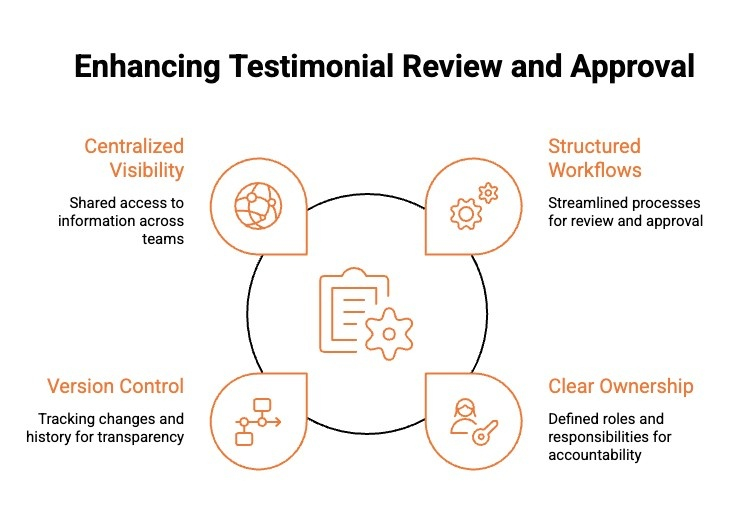
ProofFlow keeps testimonial reviews structured by managing approvals directly inside HubSpot. Instead of scattered feedback and unclear ownership, teams get a repeatable approval flow that scales as testimonial volume grows.
Here are the key ways ProofFlow manages review and approval:
-
Structured Approval Workflows: Testimonials move through defined review stages, ensuring the right stakeholders approve content before it is used.
-
Clear Ownership and Accountability: Each testimonial has assigned reviewers, removing confusion and preventing approval bottlenecks.
-
Version Control and Change History: Every edit and revision is tracked, reducing the risk of outdated or unapproved testimonials being published.
-
Centralized Visibility Across Teams: Marketing, sales, and RevOps teams can see approval status in real time inside HubSpot.
By standardizing review and approval inside HubSpot, ProofFlow enables teams to scale testimonials without losing control or quality.
Can ProofFlow Automatically Publish Collected Testimonials to My HubSpot Website?
Yes. ProofFlow can automatically publish approved testimonials directly to your HubSpot website without relying on manual copy-paste or third-party embeds.
Once a testimonial completes the review and approval process, it becomes a reusable HubSpot asset that can be placed across CMS pages, landing pages, and campaigns from a single source.
Because testimonials live natively inside HubSpot, they remain connected to the original contact, company, and lifecycle context, helping maintain accuracy and consistency.
Any updates or edits made to an approved testimonial are reflected wherever it is published, allowing teams to keep customer proof current as their website and campaigns scale.
Also read: Want to see how customer testimonials fit into HubSpot workflows beyond automation? Learn how HubSpot customer testimonials can be collected, managed, and reused across pages, campaigns, and teams to strengthen trust at every stage of the funnel.
How ProofFlow Enables Reuse of Testimonials Across the Funnel?
Testimonials often get locked into single pages or campaigns, limiting their long-term value. ProofFlow keeps testimonials structured inside HubSpot so they can support marketing, sales, and retention at every stage.
Here are the key ways ProofFlow enables reuse across the funnel:
-
Centralized Testimonial Records Inside HubSpot: ProofFlow stores testimonials as structured records connected to contacts, companies, and deals inside HubSpot. This allows teams to search, filter, and reuse the same approved testimonial across multiple funnel stages without recreating content or losing context.
-
Flexible Use Across Marketing and Sales Touchpoints: The same testimonial can support landing pages, email campaigns, sales enablement, and customer communications. ProofFlow ensures testimonials remain consistent while adapting to different funnel needs, reducing duplication and keeping messaging aligned across teams.
-
Controlled Reuse With Ongoing Governance: Because testimonials stay tied to approval status and version history, teams can confidently reuse proof knowing it is current, approved, and compliant. Updates automatically carry through wherever the testimonial appears.
By enabling controlled reuse inside HubSpot, ProofFlow turns testimonials into durable assets that drive trust across the entire funnel.
How ProofFlow Improves Cross-Team Collaboration Inside HubSpot?
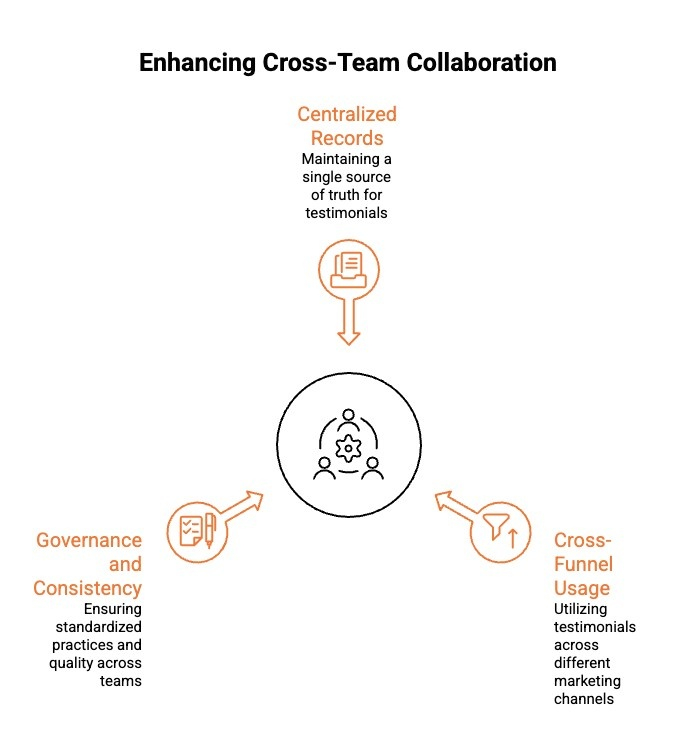
Testimonials often create internal friction long before they reach a landing page. Marketing collects the quote, sales wants to use it in an active deal, and RevOps needs to ensure it is approved and compliant. Without clear ownership and shared visibility, teams duplicate effort, send conflicting versions, or hesitate to use proof at all. For example, a sales rep may paste an old testimonial into a proposal while marketing is still waiting on final approval, creating confusion and risk.
ProofFlow removes that cross team tension by structuring testimonials inside HubSpot with defined ownership, visibility, and status tracking. Marketing knows when a testimonial is approved, sales knows what is safe to use, and RevOps maintains governance without chasing updates across tools.
Here are the core ways ProofFlow enables structured reuse across the funnel:
1) Centralized Testimonial Records
ProofFlow stores testimonials as structured records linked to contacts, companies, and deals. Teams can filter by industry, persona, or lifecycle stage, ensuring everyone pulls from the same approved source instead of saving personal copies.
2) Cross Funnel Activation Without Misalignment
An approved testimonial can support a landing page, a sales sequence, and a renewal conversation without creating separate versions. Because it remains connected to its approval status, teams avoid conflicting edits or unauthorized changes.
3) Governance and Role Clarity at Scale
Approval status, version history, and ownership are clearly defined inside HubSpot. Marketing controls messaging, sales activates proof confidently, and RevOps maintains oversight without manual tracking.
By aligning marketing, sales, and RevOps around a single structured system, ProofFlow turns testimonials from scattered campaign assets into coordinated revenue support tools.
Why HubSpot-Triggered Automation Matters for Scaling Testimonials?
As testimonial volume grows, manual requests and follow-ups quickly become inconsistent and hard to manage. HubSpot-triggered automation ensures testimonial collection runs as a repeatable process, not a one-time task.
Here are the key reasons automation matters for scale:
-
Timely Requests Based on Customer Events: Testimonial requests are triggered by lifecycle changes or deal milestones, reaching customers when engagement is highest.
-
Consistent Execution Without Manual Effort: Automation ensures every eligible customer receives a request, removing reliance on individual team follow-through.
-
Reduced Operational Overhead: Automated workflows eliminate manual chasing, saving time as testimonial volume increases.
-
Scalable Governance and Visibility: Teams maintain clear oversight of testimonial status and approvals as programs grow.
HubSpot-triggered automation turns testimonials into a scalable, reliable system instead of an ad hoc effort.
How Does ProofFlow Compare to Manual or External Testimonial Tools?
Testimonials are often collected using manual emails or third party tools that operate outside HubSpot, creating disconnected workflows between marketing, sales, and RevOps. This may work when testimonial volume is low, but as requests increase, approvals multiply, and more teams rely on proof, external tools introduce delays, version confusion, and unclear ownership. What starts as a simple collection process turns into cross team friction and lost visibility.
Here are the key differences between ProofFlow and manual or external testimonial tools:
| Comparison Area | ProofFlow (HubSpot-Native) | Manual or External Testimonial Tools |
|---|---|---|
| Workflow Integration | Operates natively inside HubSpot using lifecycle stages, deals, and workflows to trigger testimonial collection automatically. | Relies on manual emails or external platforms that sit outside HubSpot and require extra coordination. |
| Automation and Efficiency | Automates testimonial requests, follow-ups, reviews, and approvals as part of existing HubSpot workflows. | Requires manual follow-ups, task tracking, or partial automation that breaks at scale. |
| CRM Context | Keeps testimonials tied to contacts, companies, deals, and campaigns, preserving full customer context. | Testimonials are often detached from CRM records, losing attribution and relevance. |
| Review and Governance | Provides built-in approval stages, version control, and clear ownership inside HubSpot. | Limited or no native approval tracking, increasing the risk of outdated or unapproved testimonials. |
| Reuse and Scalability | Testimonials become reusable HubSpot assets that can support marketing and sales across the funnel. | Testimonials are usually copied between tools or pages, leading to duplication and inconsistency. |
By staying native to HubSpot, ProofFlow offers a more scalable, controlled, and efficient alternative to manual or external testimonial tools.
Also read: Exploring other options before committing? See how today’s top testimonial management tools compare, what features matter most, and how teams choose the right platform for collecting, approving, and reusing testimonials at scale.
How Can You Turn Testimonials Into a Scalable HubSpot Asset With ProofFlow?
Testimonials often start as one-off wins but quickly become hard to manage as volume increases. ProofFlow turns testimonials into structured CRM assets by keeping them native to HubSpot workflows.
Here are the core ways ProofFlow makes testimonials scalable inside HubSpot:
1) Structuring Testimonials as CRM Records
ProofFlow stores testimonials directly within HubSpot, linking them to contacts, companies, deals, and lifecycle stages. This structure allows testimonials to behave like CRM data rather than static content. Teams can filter, manage, and reuse testimonials reliably while maintaining full customer and campaign context.
2) Automating Collection, Review, and Governance
By using HubSpot-triggered workflows, ProofFlow standardizes how testimonials are requested, reviewed, and approved. Automation removes dependency on manual follow-ups and individual ownership. Clear approval stages, version control, and visibility ensure testimonials remain accurate, approved, and ready for reuse as programs scale.
3) Enabling Reuse Across Teams and Channels
Once approved, testimonials become reusable HubSpot assets that can support marketing pages, campaigns, and sales workflows. Updates are managed centrally, preventing duplication and inconsistency. This allows teams to scale customer proof without adding tools or creating fragmented processes.
With ProofFlow, testimonials evolve from isolated content into scalable HubSpot assets that grow with your business.
Conclusion
ProofFlow changes how teams manage testimonials by embedding the entire process directly inside HubSpot. Instead of treating testimonials as isolated content, ProofFlow turns them into structured CRM assets that can be collected, reviewed, approved, and reused at scale. HubSpot-triggered automation ensures requests are timely, approvals stay controlled, and published testimonials remain consistent across channels.
As teams grow, this native approach reduces manual effort, prevents context loss, and supports long-term governance. By aligning testimonial workflows with existing HubSpot logic, ProofFlow helps marketing, sales, and RevOps teams build trust continuously without adding complexity or new tools.
Frequently Asked Questions
What kind of reporting or analytics does ProofFlow provide for testimonial collection in HubSpot?
ProofFlow provides visibility into testimonial requests, responses, approval status, and reuse performance inside HubSpot. These metrics help marketing teams track progress, identify bottlenecks, and gain actionable insights tied to business outcomes and conversion rates.
Does ProofFlow allow you to customize testimonial request emails sent through HubSpot?
Yes. ProofFlow allows full customization of testimonial request emails using HubSpot tools, enabling personalization by stage of the customer journey. Marketers can tailor messaging, timing, and tone to improve user experience while reaching the right people across the entire customer lifecycle.
How does ProofFlow manage and organize collected testimonials within HubSpot?
ProofFlow organizes testimonials as structured CRM records linked to contacts, deals, and pipeline stages. This makes testimonials searchable, reusable, and easy to manage for marketing teams and sales reps, while maintaining clear context across the customer journey and content hub.
Is it possible to display collected testimonials on a HubSpot website using ProofFlow?
Yes. ProofFlow allows approved testimonials to be displayed on HubSpot websites, landing pages, and campaigns. Because testimonials live inside HubSpot, updates stay consistent, supporting better user experience, SEO performance, and higher conversion rates without manual duplication.
Which of the following Sales Hub tiers have access to workflows (HubSpot’s automation platform)?
HubSpot workflows are available on paid Sales Hub tiers, not the free CRM. Access enables salespeople and marketers to automate processes like testimonial requests, lead scoring, and pipeline movement, aligning automation with the stage of the customer journey.
Do automated processes eliminate the need for human editors?
No. Automation streamlines tasks, but human intervention remains essential. ProofFlow uses automation to assist marketing teams, not replace them. Human editors ensure accuracy, context, and brand alignment, especially where artificial intelligence alone cannot guarantee quality or trust.
Does ProofFlow Support Video Testimonial Collection in HubSpot Workflows?
Yes. ProofFlow supports collecting video testimonials as part of HubSpot-triggered workflows. Video submissions stay linked to contacts and deals inside HubSpot, allowing teams to review, approve, and reuse video testimonials with the same visibility, governance, and automation as written feedback.
Ready to automate your testimonial collection?
Get full access to ProofFlow at no cost during our free beta. The complete testimonial automation platform for HubSpot.
Get Started Free