Best Ways to Trigger Testimonial Requests in HubSpot Workflows
Key Highlights
-
HubSpot workflows can automatically trigger testimonial requests using closed-won deals, NPS or CSAT survey completion, onboarding milestones, support resolution, and lifecycle stage changes.
-
Setting up automation requires selecting the right workflow type, defining precise enrollment triggers, adding strategic delays, configuring suppression rules, and building personalized email actions.
-
Conditional branching ensures only satisfied customers receive testimonial requests, protecting relationships and improving response quality.
-
Avoid over-asking by adding cooldown periods and exclusion filters to prevent sending multiple requests to the same contact or targeting churn risk accounts.
-
Automated follow-ups with exit criteria significantly increase submission rates while reducing manual effort for sales and marketing teams.
-
Workflow analytics and CRM syncing allow teams to measure response rates, track ROI, and connect testimonials to revenue impact.
-
Testimonials can be repurposed across SEO pages, sales enablement materials, social media, and case studies to strengthen the revenue flywheel.
-
ProofFlow enhances HubSpot automation by handling triggers, follow-ups, approvals, CRM synchronization, and publishing in one scalable system.
Collecting testimonials inside HubSpot often feels inconsistent and reactive. Sales and marketing teams rely on manual reminders, scattered emails, or one-off outreach, which means valuable customer advocacy is missed or captured too late.
That gap has real revenue impact. Research from the Spiegel Research Center found that displaying customer reviews can increase conversion rates by up to 270%. When testimonials are not systematically triggered, synced, and stored inside your CRM, proof remains fragmented and underutilized.
This guide explains how to trigger testimonial requests automatically in HubSpot workflows using native automation, clean CRM syncing, guardrails, and scalable processes so customer proof becomes structured, reusable, and revenue aligned.
Why Should You Automate Testimonial Requests in HubSpot?
Automating testimonial requests ensures you capture advocacy at peak satisfaction without relying on manual follow-ups.
Why automation matters:
-
Capture testimonials at the right moment, such as Closed Won, renewal, or high NPS.
-
Eliminate inconsistent outreach and forgotten follow-ups.
-
Tie testimonials directly to CRM records, deals, and lifecycle stages.
-
Create measurable attribution between feedback and revenue.
-
Turn social proof into a scalable, repeatable growth system.
When structured properly, testimonial workflows become part of your revenue engine, not an occasional marketing task.
What Goes Wrong Without Guardrails?
Without suppression logic and workflow discipline, automation can backfire:
-
Asking too early before customers see real value
-
Asking about churn risk or refund accounts
-
Asking the same person multiple times
-
No consent tracking or approval workflow
-
Testimonials not tagged or stored properly, making reuse difficult
Guardrails ensure testimonial automation strengthens relationships instead of damaging trust, setting the foundation for scalable advocacy and tools like ProofFlow that systemize the entire process.
Want to see how leading marketing automation platforms manage testimonial collection at scale? Read our detailed guide on how marketing automation platforms handle customer testimonials to understand triggers, follow-ups, approvals, and CRM syncing in depth.
What Are the Best Ways to Trigger Testimonial Requests Automatically in HubSpot Workflows?
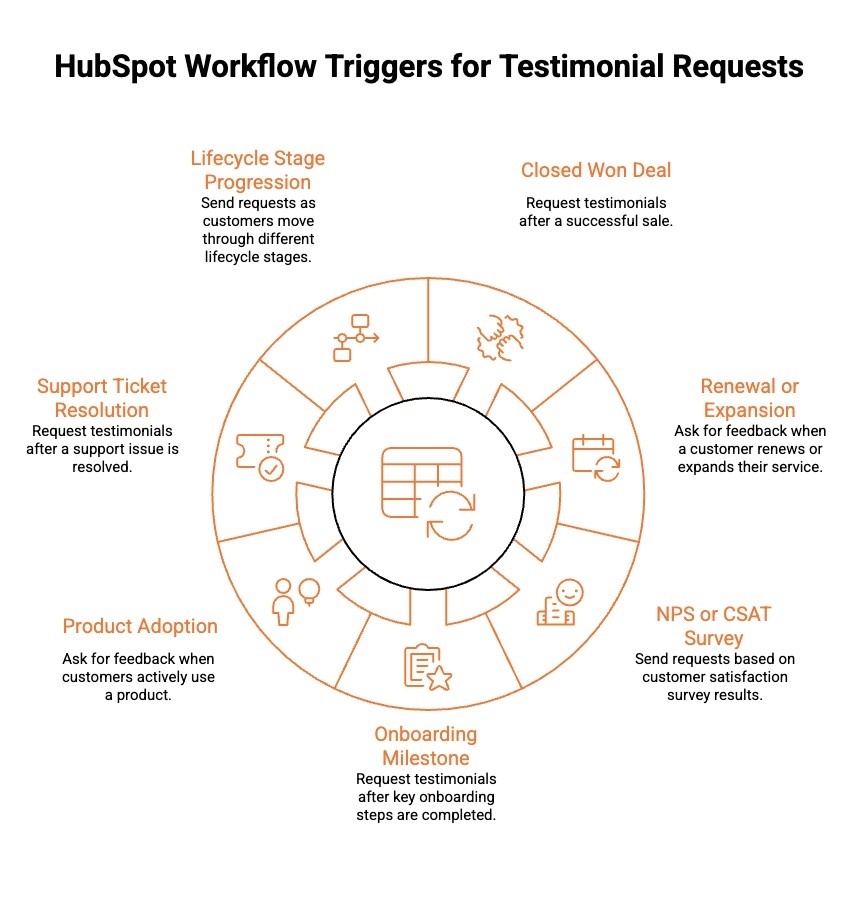
Timing is everything when requesting testimonials. In HubSpot, the most effective automation strategies rely on triggering requests at moments of peak customer satisfaction, using CRM data and behavioral signals.
Here are the best ways to trigger testimonial requests automatically in HubSpot workflows:
1) Closed Won Deal Trigger
Trigger testimonial requests when a deal moves to Closed Won. Add a delay of seven to fourteen days to allow results to materialize. Personalize the request using deal properties such as product purchased, contract value, or industry segment to improve relevance and response rates.
2) Renewal or Expansion Trigger
For subscription businesses, trigger testimonial requests after a renewal, upsell, or expansion deal closes. Customers who renew or increase spending demonstrate clear satisfaction and ROI, making this a powerful moment to capture high-credibility testimonials.
3) NPS or CSAT Survey Trigger
Use survey completion as a qualification filter. Enroll contacts when their NPS score is nine or ten or when CSAT feedback is positive. Apply conditional branching so only promoters receive testimonial requests, while detractors are routed to support follow-up.
4) Onboarding Milestone Trigger
Automate outreach after onboarding is marked complete or when a customer reaches a defined success milestone. Use property updates or workflow events to identify activation success and ensure testimonials reflect real outcomes.
5) Product Adoption Trigger
If you track product usage events, trigger testimonial requests after key feature adoption, usage thresholds, or activation milestones. This ensures feedback is based on proven value, not just onboarding completion.
6) Support Ticket Resolution Trigger
Leverage Service Hub data by triggering requests after a support ticket is successfully resolved and paired with a positive CSAT score. This works especially well for service-driven businesses.
7) Lifecycle Stage Progression Trigger
Trigger testimonial requests when a contact moves into advanced lifecycle stages such as Customer, Advocate, or Evangelist. Segment by revenue tier or account size to prioritize strategic accounts.
When implemented strategically, these triggers turn testimonial collection from manual outreach into a predictable, scalable advocacy system embedded directly within your HubSpot workflows.
Looking for a complete breakdown of how testimonials work inside HubSpot? Explore our in-depth guide on HubSpot customer testimonials and automation strategies to see how triggers, approvals, syncing, and publishing work together.
What Are the Steps to Automatically Trigger Testimonial Requests in HubSpot Workflows?
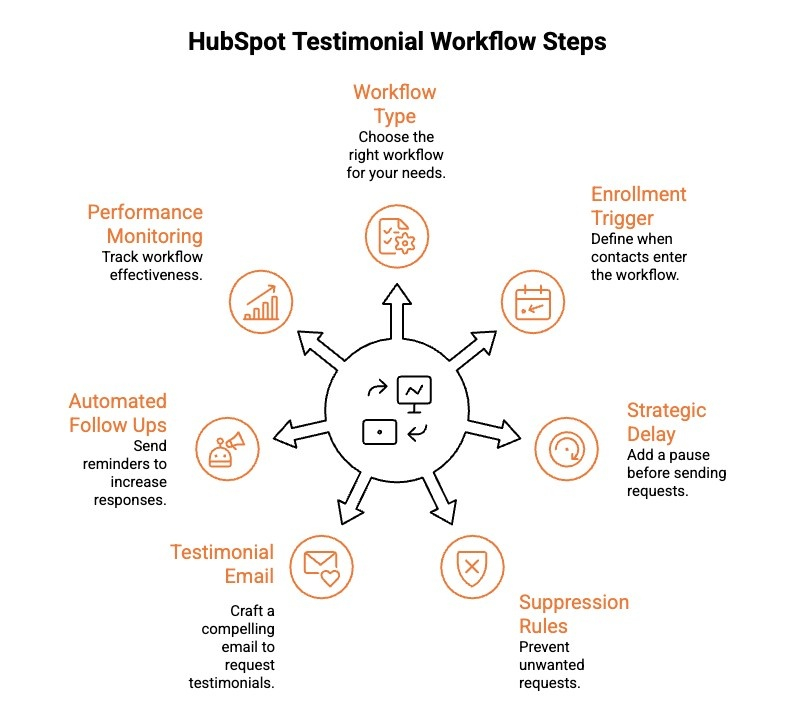
Automating testimonial requests in HubSpot ensures consistent outreach without relying on manual reminders from sales or success teams. When configured correctly, workflows capture customer advocacy at the right moment and route requests automatically.
Below are the exact steps to trigger testimonial requests in HubSpot workflows:
1) Create the Appropriate Workflow Type
Select the correct workflow object inside HubSpot. Choose a deal-based workflow if your trigger depends on deal stage changes such as Closed Won. Use a contact-based workflow for survey scores, lifecycle updates, or onboarding completion. Proper alignment prevents enrollment errors.
2) Define the Enrollment Trigger Clearly
Set precise enrollment conditions such as Deal Stage equals Closed Won, NPS score greater than or equal to nine, or Lifecycle Stage updated to Customer. Add filters to exclude inactive or disqualified records to maintain data accuracy.
3) Insert a Strategic Delay
Add a delay of seven to fourteen days after the trigger event. This gives customers time to experience measurable value before being asked for feedback. Test different delay windows to optimize response rates.
4) Add Suppression Rules and Cooldowns
Before sending the email, define exclusion logic to protect customer relationships. Suppress contacts who are churned, refunded, or have open support tickets. Add cooldown rules to prevent multiple testimonial requests within a defined timeframe. This ensures requests feel timely, not automated or repetitive.
5) Add the Testimonial Request Email
Create a concise, personalized email using HubSpot tokens such as first name, company name, product purchased, or account manager. Include a clear call to action linked to a short testimonial form to reduce friction and increase completions.
6) Configure Automated Follow-Ups
Build one or two reminder emails that trigger only if the testimonial form is not submitted. Add exit criteria so contacts automatically unenroll after submission. This prevents over-messaging while maximizing response coverage.
7) Monitor Workflow Performance
Track open rates, click-through rates, and testimonial submission conversions using HubSpot analytics. Identify drop-off points and refine timing, subject lines, or segmentation logic to continuously improve performance.
When executed properly, these steps transform testimonial collection into a structured advocacy engine embedded directly inside your HubSpot ecosystem.
Want to connect testimonial collection directly to your CRM data and revenue reporting? Learn how CRM and testimonial collection work together to create measurable advocacy systems that sync feedback to contacts, companies, and deals automatically.
How Can You Set Up a Workflow in HubSpot to Send Testimonial Requests After a Deal Closes?
Instead of long configuration steps, here is a practical example workflow blueprint you can implement inside HubSpot:
Example Workflow Blueprint:
| Component | Configuration |
|---|---|
| Object | Deal |
| Trigger | Deal Stage equals Closed Won |
| Enrollment Filters | Exclude refunds, churned accounts, and deals with open support tickets. |
| Delay | 10 days after stage change |
| Primary Action | Send a personalized testimonial request email. |
| Branch Logic | If testimonial status is not submitted |
| Follow Up 1 | Send a reminder on Day 3 after the initial email. |
| Follow Up 2 | Send a final reminder on Day 7 if there is still no submission. |
| Exit Criteria | Automatically unenroll when testimonial status equals Submitted |
This structure ensures testimonial requests are triggered at peak satisfaction, filtered for quality, and supported with automated follow-ups without over-messaging.
When implemented consistently, every Closed Won deal becomes a predictable opportunity to generate scalable social proof inside HubSpot.
Is It Possible to Send Automatic Testimonial Requests in HubSpot Based on Survey Completion?
Yes, it is possible to send automatic testimonial requests in HubSpot based on survey completion by using workflow triggers tied to survey properties.
When a customer submits an NPS or CSAT survey, HubSpot stores their score as a contact property. You can create a workflow that enrolls contacts automatically when their score meets a defined threshold, such as an NPS of 9 or 10.
Using conditional branching, promoters can receive a testimonial request email, while neutral or negative respondents can be routed to support follow-up instead. This approach ensures you request testimonials only from satisfied customers, increasing response quality and protecting customer relationships.
What Advanced HubSpot Workflow Strategies Improve Testimonial Collection?
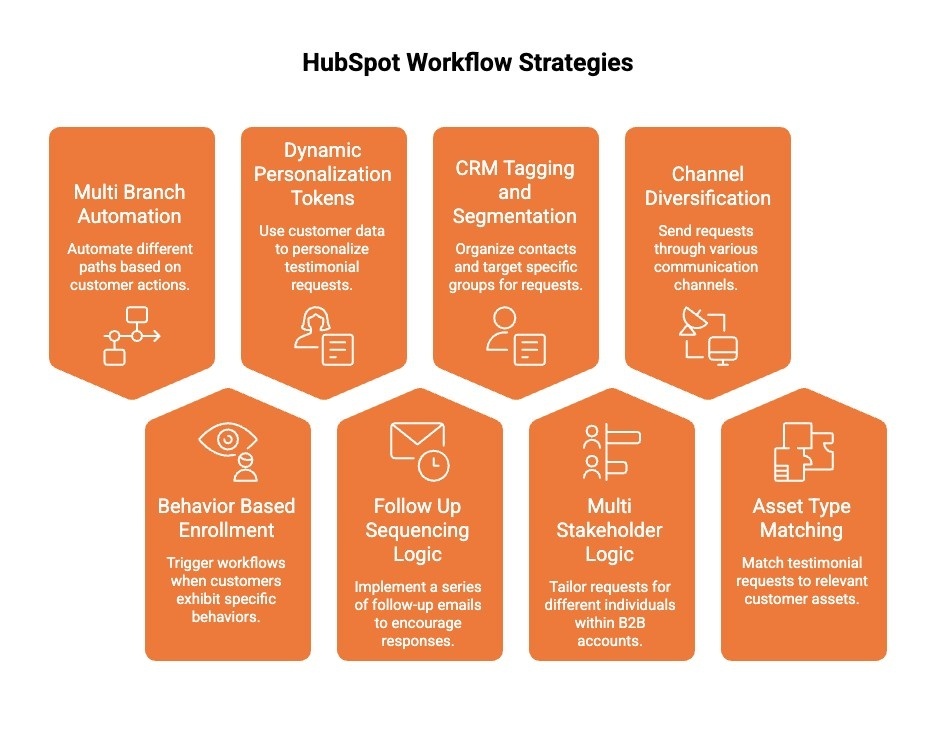
Advanced HubSpot workflow strategies help you move beyond basic email triggers and build a structured testimonial engine tied to real customer behavior. Instead of one-size-fits-all outreach, you can use smarter automation to improve timing, targeting, and response quality.
Below are advanced strategies that improve testimonial collection efficiency and impact:
-
Multi-branch automation: Use conditional logic to send testimonial requests only to high-satisfaction segments, while routing neutral or negative feedback to retention or support workflows.
-
Behavior-based enrollment: Trigger requests after onboarding completion, feature adoption, renewal, or milestone usage events to capture outcome-driven stories.
-
Dynamic personalization tokens: Insert deal value, product purchased, industry, use case, or account manager details to increase relevance and authenticity.
-
Follow up sequencing logic: Automate one or two reminders with exit rules once a testimonial is submitted to prevent over-messaging.
-
CRM tagging and segmentation: Automatically tag promoters, store testimonial status in contact and company records, and segment by revenue tier or account type.
-
Multi-stakeholder logic for B2B accounts: Ask the champion first. If submitted, trigger a secondary workflow to request an executive-level quote from the decision maker. This increases credibility and authority in enterprise deals.
-
Channel diversification: If a customer agrees but does not submit, trigger an internal Slack alert or create a CRM task for the CSM to follow up personally. This bridges automation with human touch.
-
Asset type matching: Route high-value accounts to video testimonial workflows while sending simplified text forms to long-tail customers. Align testimonial format with account value and sales impact.
When implemented strategically, these advanced workflows transform testimonial collection into a structured advocacy engine that scales with revenue rather than relying on manual effort.
What Are the Best Practices for Increasing Testimonial Response Rates?
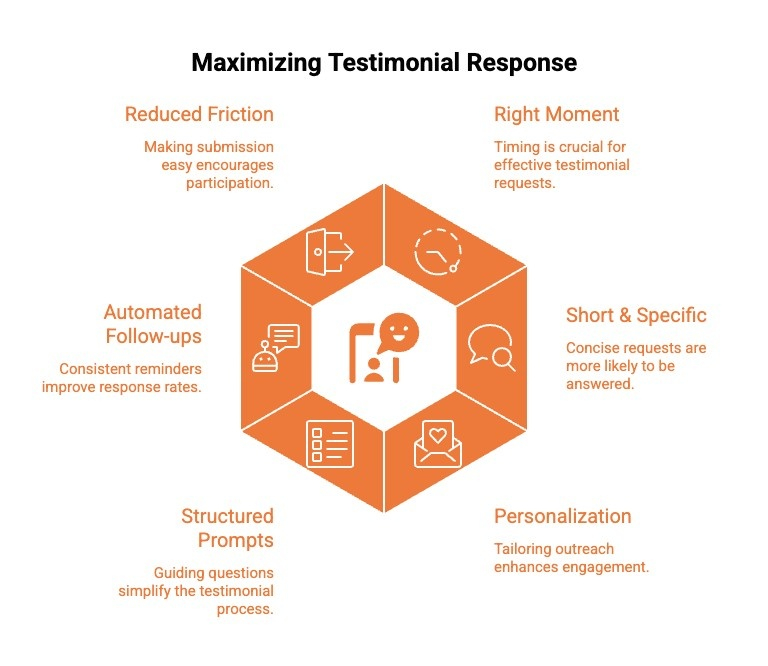
Strong testimonial response rates depend on timing, clarity, and simplicity. Even with automation in place, how and when you ask makes a measurable difference. The goal is to reduce friction, personalize the request, and reach customers at peak satisfaction moments.
Here are the best practices for increasing testimonial response rates:
-
Ask at the right moment: Send requests shortly after a closed-won deal, successful onboarding, or a high NPS score while enthusiasm is high.
-
Keep the request short and specific: Avoid long emails. Make the ask clear, direct, and easy to complete in minutes.
-
Personalize the outreach: Reference the product, use case, or results achieved to show context and authenticity.
-
Provide structured prompts: Offer guiding questions to reduce cognitive load and help customers respond faster.
-
Automate smart follow-ups: Send one or two reminders with clear exit criteria to avoid over-messaging.
-
Reduce submission friction: Use simple forms, minimal fields, and mobile-friendly layouts.
When you combine smart timing with low-friction execution, testimonial requests feel natural rather than transactional, significantly improving both response rates and quality.
How Does ProofFlow Automate Testimonial Triggers Inside HubSpot?
HubSpot workflows can trigger testimonial requests, but managing follow-ups, approvals, syncing, and publishing often requires manual coordination. ProofFlow simplifies this using a dedicated HubSpot workflow action that launches testimonial requests directly from your existing automation.
With two-way contact sync, every submission automatically updates the correct record and stores it in native HubSpot objects such as contacts, companies, and deals. Each request and submission is logged as timeline activity, giving sales and marketing full visibility without switching tools.
Automated reminders, built-in approvals, and one-click publishing complete the loop, turning testimonial collection into a structured, revenue-aligned system inside HubSpot.
Conclusion
Automating testimonial requests inside your HubSpot account turns social proof into a consistent growth engine instead of a one time marketing task. Using the workflow editor, you can trigger an automated email at key moments such as closed won deals or onboarding milestones, capturing authentic feedback when satisfaction is highest.
Structured delays and follow ups improve response rates while reducing manual effort for your sales team. When client testimonials sync to contact records and align with your pipeline, they strengthen enablement, SEO, and demand generation. With the right setup, testimonial collection becomes scalable, measurable, and tied directly to revenue impact.
Frequently Asked Questions
How can I automatically send testimonial request emails to customers after a deal is closed in HubSpot workflows?
Create a deal-based workflow triggered when the deal stage equals Closed Won. Add a short delay, then send a personalized email with a link to your testimonial form. Sync submissions back to the contact record for visibility across your team.
Can I use HubSpot pipeline automation to schedule testimonial requests at specific deal stages?
Yes. Set up a deal-based workflow that enrolls contacts when deals reach stages like Closed Won or Renewal. Add a delay and send a personalized request at the right moment, no manual follow-up needed.
Is it possible to send follow-up reminders for testimonials automatically in HubSpot?
Yes. Add reminder steps to your workflow that trigger if no testimonial form submission is detected. Include delays and exit criteria so contacts stop receiving reminders once they submit.
How do I measure the effectiveness of automated testimonial requests in HubSpot?
Track open rates, click-through rates, and form submission rates in your workflow analytics. Compare testimonial volume against pipeline activity to measure how advocacy contributes to revenue.
Can HubSpot workflows integrate with external testimonial collection tools?
Yes. HubSpot workflows can connect to external platforms through native integrations or APIs. Workflow actions trigger outbound requests, and submissions sync back to contact records automatically.
How can I leverage customer testimonials across marketing channels?
Feature testimonials on landing pages, in sales decks, on social media, and within case studies. Strong testimonials support pricing conversations, nurture prospects, and build trust throughout the buying journey.
What are some example HubSpot workflows for automating testimonial collection?
Common examples include closed-won deal triggers, NPS promoter segmentation, onboarding milestone workflows, and renewal stage automation. You can also trigger internal notifications when testimonials are submitted to keep your team informed.
Ready to automate your testimonial collection?
Get full access to ProofFlow at no cost during our free beta. The complete testimonial automation platform for HubSpot.
Get Started Free